What Is a Kanban Board Used for? a Practical Guide
A kanban board is used to show work as cards moving through stages, so you can see at a glance what is in progress, what is waiting and what is stuck. Toyota introduced the idea in 1954 as a supermarket method for parts, and the same left-to-right layout now runs job search pipelines and recruiting boards without changing shape.
So why does a board holding forty cards often tell you less than a board holding six?
Because a full board is easy to mistake for progress. People build one, move a few cards, and end up with a prettier to-do list that still can't answer the only question that matters on a Monday morning: what should I do next, and what has stopped moving? A board that answers those two questions is a flow-control system. A board that only records activity is decoration with columns.
What a Kanban Board Is Used For at a Glance
A kanban board turns a process into a picture you can read in about four seconds. Every card is one item, whether that's a chore, a job application, a candidate or a draft. Every column is a stage, and where the card sits tells you its state without opening anything. If you've been asking what is a kanban board used for, the practical answer is this: it's a flow map you update, not a list you complete.
Strip away the software and the same four settings keep appearing. The table below is the fastest way to see what stays the same and what changes.
| Use | One card represents | Typical columns | What the board reveals |
|---|---|---|---|
| Personal task management | One task or chore | To do, In progress, Done | Overloaded days and tasks that have stalled |
| Job-application pipeline | One job opening | Saved, Applied, Interview, Offer, Closed | Which applications need follow-up and where the search stalls |
| Recruiting pipeline | One candidate | Sourced, Screening, Interview, Offer, Hired | Stage congestion and candidates waiting on feedback |
| Project or content delivery | One work item | Backlog, Doing, Review, Done | Work blocked waiting for review |
One layout, four different jobs
Nothing in the layout changes between rows. A factory foreman, a recruiter and a job seeker all ask the same three questions: what's waiting, what's moving and what's stuck. The board answers by position instead of by memory, which is why a single method covers work as different as hiring and housework.
What changes is the card and what the board is expected to show. On a personal board, a stalled card is an errand you keep dodging. On an application board, a stalled card is a role you applied to eleven days ago and never chased. Same column, very different decision.
A two-question test for any board
You don't need a course to judge whether a board is working. Run this on the one in front of you right now.
The test: can you name the card that hasn't moved in two weeks, and can you say why it's stuck? If both answers come easily, the board is doing its job. If neither does, you have a decorated list.
Kanban Board vs. To-Do List vs. Spreadsheet
Choose by the shape of the work, not by habit. A kanban board fits work that moves through stages and waits between them. A to-do list fits tasks that finish in one step. A spreadsheet fits tracking where you need totals and comparisons across many rows.
The three overlap more than their fans admit. Here's the honest comparison.
| Method | Best for | Shows flow? | Weak point |
|---|---|---|---|
| To-do list | One-off tasks with no stages | Only done or not done | Stalled work looks the same as active work |
| Spreadsheet | Custom tracking and totals | Only if you build the view yourself | Rows go stale and nothing prompts follow-up |
| Kanban board | Work that moves through stages | Yes, by column position and card age | Columns alone mislead without limits and aging |
Where each method breaks
A to-do list carries one bit of information per item: done or not done. A task you've avoided for three weeks looks identical to one you started this morning, so the list never points you toward the item that needs attention.
A spreadsheet can show stages if you build the view yourself with columns for Applied, Reply, Interview and Outcome. What it won't do is prompt you. Rows go stale, and sorting by date tells you the oldest application but not whether it needs a phone call today.
A board makes stage and age visible through position. That's exactly the information job applications, candidate pipelines and content waiting on review all need.
The fit test
Ask one question: does an item pass through more than two stages and wait between them? If yes, a board earns its keep. If the items are independent and finish in a single step, a list is enough and a board just adds chores.
There's a limit worth naming. A board only helps when its columns change what you do next. Cards with no next action and columns with no entry rule create visual clutter and a false sense of control.
Keep a spreadsheet, or keep one alongside, when you need calculations such as conversion rates across many roles. If you're moving an existing tracker across, plan the spreadsheet import before you name your columns, because renaming a stage across a hundred rows is the kind of chore that ends tracking altogether.
How Pull Signals and WIP Limits Control Flow
In 1954, Toyota introduced a "supermarket method" in which downstream processes took only the parts they needed from upstream processes, and kanban cards carried the product name, part number and quantity so that actual consumption triggered replenishment rather than speculative production. Toyota's own history of its production system records the practice reaching every Toyota plant by 1963.
The diagram below shows the three moments that matter in that system.
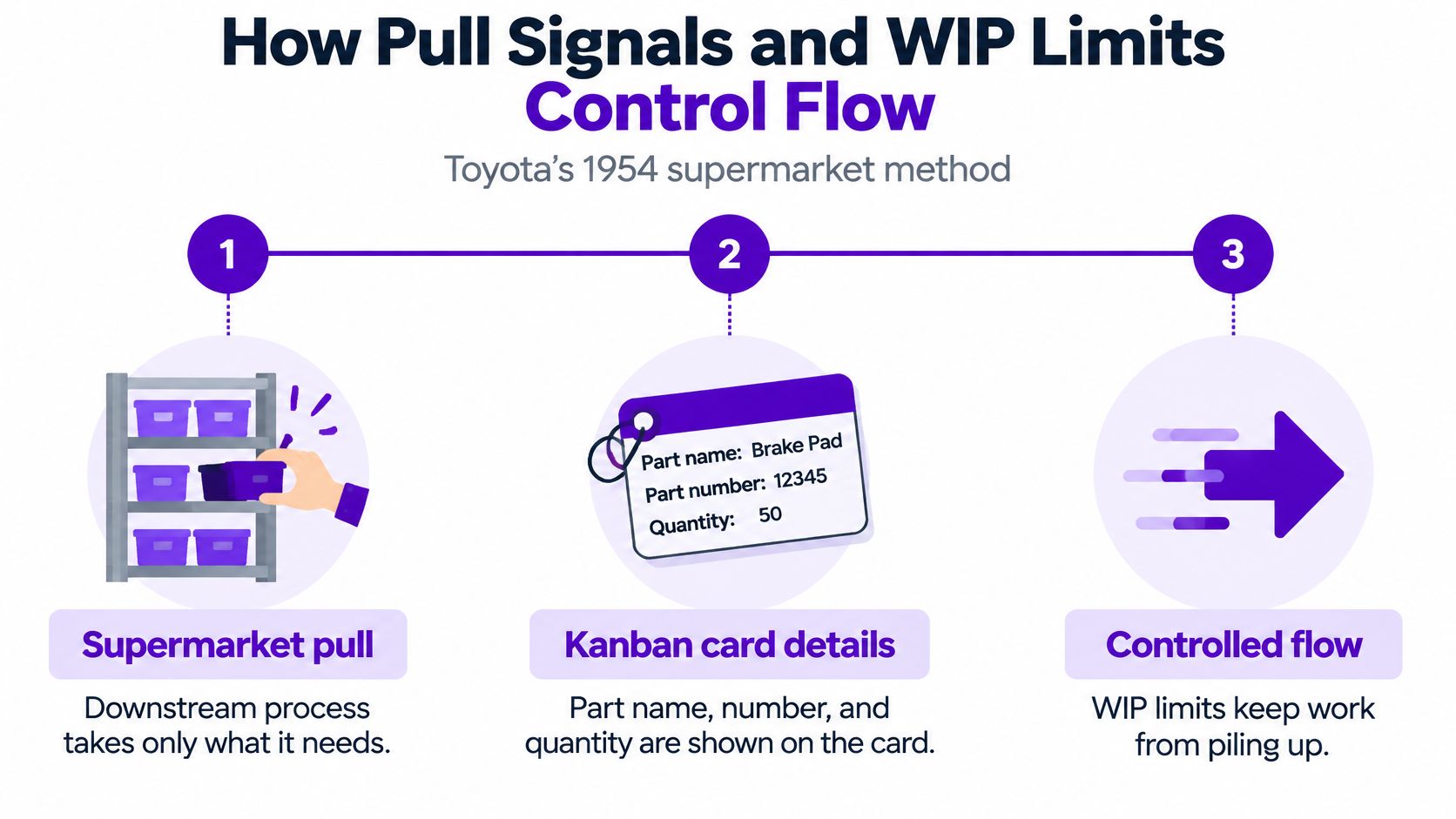
Translated to a board you'd use: a card is a request for work, and a column is the place where that request waits.
Card, column and limit
Three parts do the work, and many build only two of them.
- The column is a stage with a fixed meaning. A card sits in exactly one column, so "waiting for a reply" and "preparing for an interview" never blur into each other.
- The card is one request for work. It needs an owner, a date and a next action. Without those it's a bookmark, not a work item.
- The work-in-progress limit is the cap. It sets the maximum number of cards a column may hold at once, and it's the piece almost everyone skips.
Take a job search. Four applications sitting in Interview is manageable: you can prepare properly for each one. Twenty in the same column means none of them gets real preparation, and the board is showing you an overload you'd otherwise feel as vague anxiety.
The pull logic follows from the cap. When a column is full, you finish something instead of starting something. That's the whole trick, and it's why the limit has to bite.
Toyota's kanban system instructed processes to make and deliver parts only in the volumes needed, which removed excess inventory between stages, and Toyota's history of the kanban method describes how that same replenishment rule becomes a cap on active work. Flow studies summarized alongside it report that records covering more than 8,000 work items across five teams over four years found lower work in progress was associated with shorter lead times, although the relationship with productivity was not conclusive and the ideal limit was difficult to determine. Start with a limit you can defend, then adjust it.
Aging is the signal that flags a stall
Each card needs one more number: how many days it has been in its current column. A card that has sat in Applied for eleven days is telling you something a card moved yesterday isn't. Aging turns the board from a snapshot into a warning system.
If you'd rather see the mechanics in motion first, this short walkthrough covers the same flow logic.
Rule of thumb: if you can't say what a card is waiting for and who it's waiting on, it isn't moving. It's drifting.
The board controls flow only when limits and ages are visible. Everything else is bookkeeping.
Real Uses for Job Searches, Recruiting and Daily Work
Say someone saves thirty roles in a single week. The board has five columns: Saved, Applied, Interview, Offer and Closed. On its own that's just sorting. One rule changes it: any Applied card older than two weeks triggers a review, so the card either becomes a follow-up with a date or gets closed.
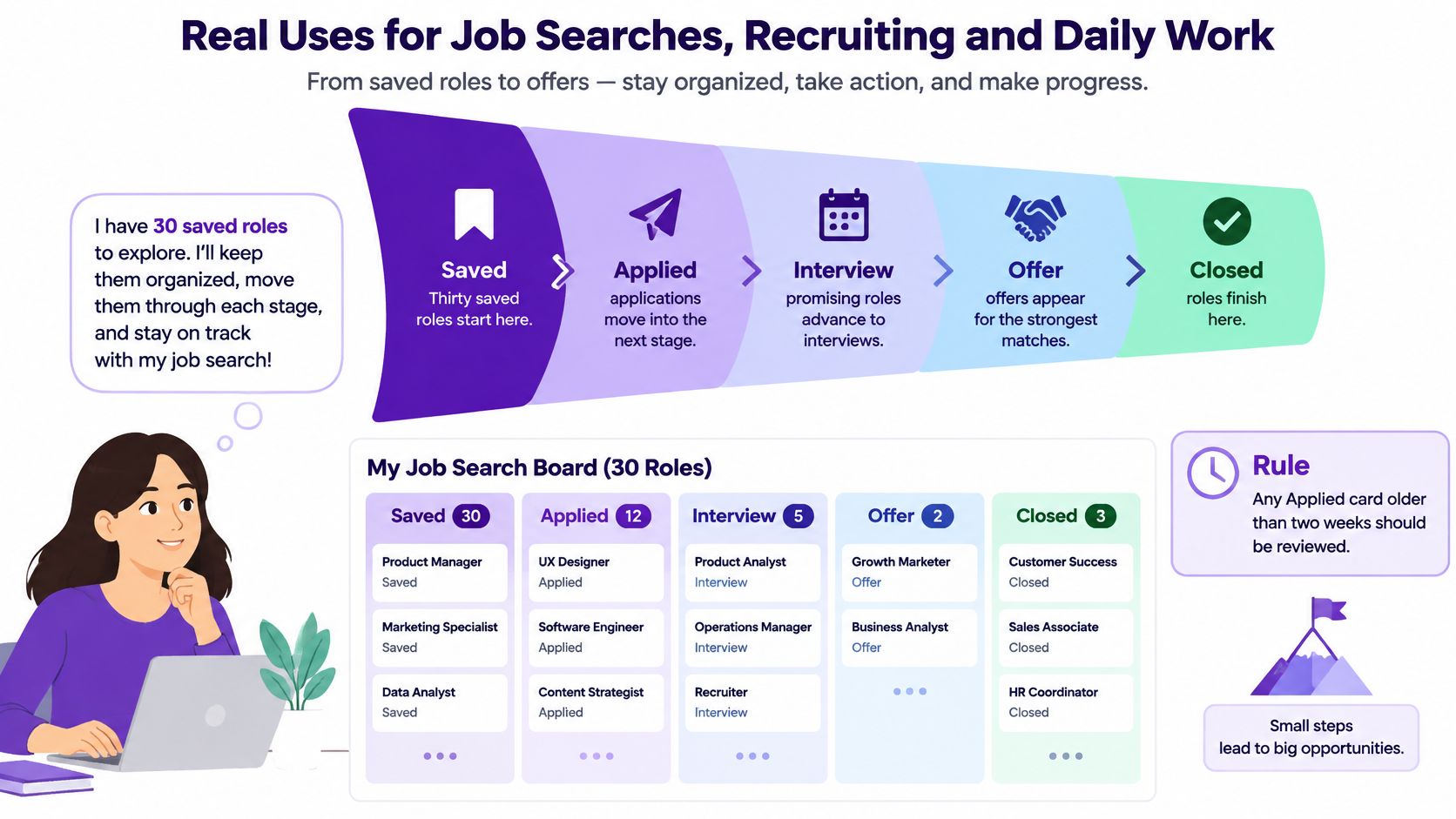
The same board for a hiring team
A talent team runs Sourced, Screening, Interview, Offer and Hired. The card is one candidate, and the rule is the mirror image: a candidate sitting in Interview for a week means feedback is late, and a late decision loses good people to faster employers. If you're comparing tools for that workflow, this roundup of pipeline management software comparisons covers how the stage logic differs between platforms.
The quiet version
Daily personal use is unglamorous and works just as well. A single column of household tasks becomes a visible queue, and the cap stops you from starting four repairs before finishing the leaking tap. The benefit isn't the app. It's that the queue is on a screen instead of in your head.
Why columns alone stopped being enough
The market context matters here. Greenhouse-based data reported an average of 244 applications per job posting in 2025, up from 115 in 2022, while the average job took 56.7 days to fill, 36.8% longer than in 2022, according to NovoResume's hiring statistics roundup.
High volume breaks the simple version of the board. When hundreds of people apply to the same role, "Applied" stops being informative and starts being a comfort blanket. A useful board needs application age, expected response windows, follow-up dates, rejection reasons and a clear separation between near-term actions and long-shot roles, so effort stays selective instead of spread across every card. If you want the mechanics of that setup, this guide to how to use a kanban board walks through the columns job seekers need.
When a Board Misleads Instead of Helps
A board can look busy and still be lying to you. The failure usually isn't the tool; it's the absence of rules about what may enter a column, what must leave it, and how long a card may sit.
Research on kanban in practice keeps returning the same problems: weak discipline around work-in-progress limits, cultural resistance, scope creep, and misinterpretation that comes from over-relying on the visual layer. A systematic review of kanban implementation lays those out, and notes that the evidence base itself is uneven, since negative results and implementation failures are underreported. A tidy case study proves less than it appears to.
The patterns you'll recognise
A large Applied column feels like progress while missed follow-ups pile up underneath it. Too many open cards means nothing finishes, even on a week when the board looks active. Columns treated as a status report rather than a control system keep bottlenecks invisible, because nothing in a status report has to be acted on.
Then come the structural slips. Cards drift between stages because nobody wrote entry and exit criteria, so no one can say when an item is done. People stop updating the board after a month, and it becomes fiction. New columns keep appearing, and the board grows until it explains nothing.
Three checks to run this week
- A card that moved but carries no next action. Moving without a decision is the most common form of fake progress.
- A column full of active cards where nothing has moved since your last review. That's congestion, and the cap should have flagged it.
- Rising card counts with flat replies or flat interviews. Volume is going up and outcomes aren't, which means the constraint sits somewhere else entirely.
A board earns its place when its columns change decisions. When they only describe activity, you've built a wall chart.
If your own pipeline has stalled, this breakdown of job search process steps helps you find which stage is leaking before you add another column.
How to Set Up and Check a Board Before Review
A board that never gets checked turns into decoration within a month. The routine below takes one sitting, and each step comes with the reason it matters and the mistake that usually undoes it.
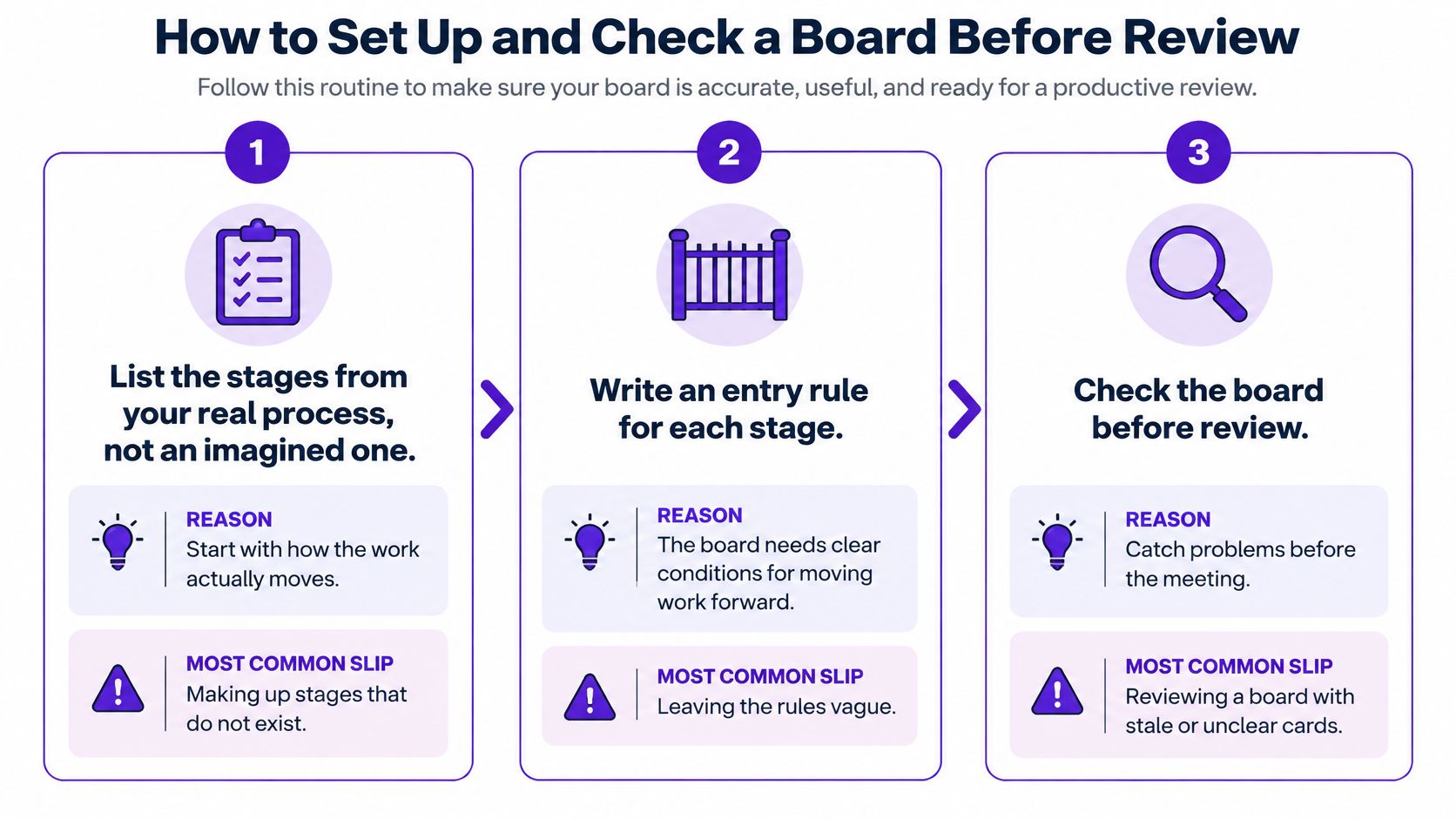
- List the stages your work passes through. Trace one real application or candidate from start to finish and write down where it went. The usual slip is inventing stages that sound professional and never get used.
- Write an entry rule for every column. An entry rule states what has to be true before a card may sit there, such as "application submitted and confirmation email received". The slip is leaving rules vague enough that every card qualifies.
- Write an exit rule as well. Exit rules say when a card leaves, such as "reply received or follow-up sent with a date". Without them, nothing is ever finished and the column just grows.
- Give every card three fields. A next action, a date and a contact. A card missing any of the three is a bookmark wearing a deadline.
- Set a WIP limit on each active column. Start lower than feels comfortable, because a cap you never hit isn't a cap. For one person job hunting, three cards in Interview is a working maximum.
- Set an aging alert. Pick a threshold you'll act on and write it on the column header. Any card past that threshold gets a decision that day, not a mental note.
- Hold a weekly review. Walk the board from right to left and ask what moved, what stalled and what can be closed. Fifteen minutes is enough, and skipping it is how boards die.
Here's how those rules look once they're written down for a job search.
| Column | Entry rule | Exit rule | WIP limit |
|---|---|---|---|
| Saved | Role meets your stated criteria | Application sent or role dropped | Not limited |
| Applied | Application submitted and date recorded | Reply received or follow-up date set | Set your own after two weeks of data |
| Interview | Invitation received and date booked | Outcome recorded | Start small and adjust at the weekly review |
| Offer | Written offer received | Accepted or declined | Not limited |
Where the fields should live
Rules are easier to follow when the fields sit on the card rather than in your head. A kanban view keeps stage, next action and date together, and the Job Tracker saves job details from all popular job boards with one click, so the entry rule for Applied is satisfied the moment you save a role.
Before any review, confirm four things: every column rule is written down, every active card has a next action and a date, no active column is over its limit, and at least one stalled card has been moved or closed since last week.
If you're hiring rather than hunting, the same rules map onto a recruitment process workflow with sourcing, screening and offer stages. The discipline transfers intact.
Start with one column
Don't rebuild everything today. Pick a single column, write its entry rule, write its exit rule, and put one review date in your calendar for next week. That's enough to turn a board from a record of activity into a system that tells you what to do next.
Eztrackr keeps your job hunt on one visual kanban board, with applications grouped by hiring stage so you can move each card forward as it progresses and spot the ones that have stopped moving. Save roles from the popular job boards in a single click, then let the board tell you where your follow-ups are overdue instead of guessing. Visit Eztrackr to start tracking your applications for free.