Create an ATS Friendly Resume: A Step-by-Step Guide 2026
The most popular ATS resume advice starts with a threat: use the wrong font or template, and a robot will reject you. That confuses parsing problems with eligibility filters. To create an ATS-friendly resume, you need a file the software can extract accurately, evidence that matches the job, and application answers that reflect your qualifications.
A plain document isn't enough if the content is vague. A polished document isn't enough if your job history gets scrambled during upload. Build for both the software that processes your application and the person who evaluates it.
Why Formatting Rarely Gets You Rejected Outright
A bad font doesn't automatically trigger rejection across every applicant tracking system. In a late-2025 poll covering 25 recruiters and more than 10 ATS platforms, 92% said their systems didn't automatically reject resumes because of formatting, content, or design, while 84% reported using employer-configured knockout questions, according to the State of ATS report. It's a small survey, not a universal rule, but it identifies an important distinction.
Knockout exclusions concern requirements such as work authorization, required licenses, location, or minimum experience. Parser invisibility happens when software fails to extract information correctly, leaving a recruiter with incomplete or unsearchable fields.
Say a logistics coordinator uploads a two-column resume. The parser separates dates from employers and misses the job title, so a recruiter searching the title field may not retrieve that profile. Nobody necessarily rejected the document, but the candidate is harder to find.
Practical distinction: An application can remain in the database without appearing in the searches that matter.
Use these checks in order:
- Extraction: Does the file produce readable text?
- Field accuracy: Do employers, titles, dates, and contact details populate correctly?
- Eligibility consistency: Do application answers agree with the resume?
Understanding resume parsing technology helps you diagnose missing fields rather than treating every unsuccessful application as an automated rejection.
Humans still care about presentation. In 2024, 73% of 781 U.S. hiring managers said they'd eliminate a qualified candidate because of resume formatting, according to ResumeTemplates, as reported by JobGlance. Separately, 46% of 625 surveyed U.S. hiring managers identified poor formatting as a red flag in Resume Genius's 2024 survey.
The practical priority is parsing first, relevant keywords next, and accurate eligibility answers before submission. Keep the document readable throughout.
Format Choices and Section Entries That Parse
Set the document structure before drafting sentences. The comparison below gives you a conservative starting point, not a claim that every alternative fails in every system.
ATS-safe and risky resume format choices
| Element | ATS-safe choice | Risky choice | What goes wrong |
|---|---|---|---|
| Layout | Single column, left aligned | Two columns or sidebars | Reading order can scramble, mixing skills with experience |
| Section headings | Summary, Experience, Education, Skills | About Me or Where I Made Impact | The parser may misclassify the section |
| Contact details | Plain body text with name, city, phone, email, LinkedIn | Name and phone in a header or footer | Contact fields may be skipped |
| Graphics and icons | Written labels and selectable text | Skill bars, icons, photos, charts | Essential information may exist only in an image |
| Tables | Ordinary paragraphs for resume content | Layout tables or skill grids | Cells can flatten with incorrect pairings |
| Fonts and size | Arial, Calibri, or Georgia at a readable body size | Decorative or script fonts | Unusual characters or encoding may extract poorly |
| Dates | Month and year consistently, with Present for current work | Tab-aligned dates or unexplained blank end dates | Dates can detach from the role |
| File type | DOCX, or accepted text-based PDF | Scanned or image-based PDF | No directly selectable text |
| Summary | Target role plus evidence of fit | General paragraph with no role named | Intended role is unclear |
| Skills | SQL, Tableau, Excel, Lean Six Sigma as text | Stars, bars, percentages | Proficiency information lacks searchable labels |
| Education | Degree, institution, completion year where appropriate | Graduation year alone | Degree information is missing |
| Certifications | Credential name, issuer, relevant date as text | Badge or logo only | Credential may be invisible |
| Projects, optional | Named project, action, and supported outcome | Unnamed project description | Project context and contribution are unclear |
The broad purpose of an ATS is to organize and process applications, with systems evolving to support parsing, search, and recruitment workflows, as described by SHRM's overview of applicant tracking systems. Your formatting should make those tasks easier without sacrificing human readability.
Prefer predictable structure over decorative positioning
Single-column formatting is a risk-reduction choice, not a magic pass. Some systems handle complex layouts, but you don't control which parser the employer uses or how it's configured. Ordinary paragraphs require less interpretation than a sidebar beside a work-history block.
Tables are particularly tempting for aligning dates and building skills grids. The trade-off is that the exported text may connect a skill to the wrong role or separate a date from its employer. Use paragraph spacing and clear entry boundaries instead.
Write the job title, employer, and dates in a predictable order. Use a consistent pattern such as Jan 2021 – Mar 2024, and write Present for current employment. These are illustrative dates, not prescribed employment periods; the guide to date formats in resumes explains how to keep the timeline clear.
Make each entry understandable without its styling
A skills section can read SQL, Tableau, Excel, Lean Six Sigma. Education should identify the degree and institution, while certifications should identify the credential and issuer.
For a hypothetical project, Warehouse slotting project, redesigned picking locations to shorten travel routes communicates more than Operational excellence initiative. Add a measured result only if you can substantiate it.
Keep essential information out of icons, banners, and visual ratings. A recruiter shouldn't need to interpret a chart to learn which software you use, and a parser shouldn't need image recognition to find your email.
Follow the portal's file instructions. Keep an editable DOCX master and export a text-based PDF when accepted; neither extension compensates for missing or scrambled content.
Build the Master Resume Step by Step
Treat the master resume as a controlled source document. It should contain accurate employment facts and a useful bank of accomplishments, not language optimized for every possible vacancy.
Automated systems can analyze resumes and applications as part of employment decisions, but compatibility alone doesn't establish that a selection process is valid, as discussed in the EEOC's amicus brief in Mobley v. Workday. Your practical responsibility is to make your qualifications accessible and supportable, not to guess an employer's hidden scoring formula.
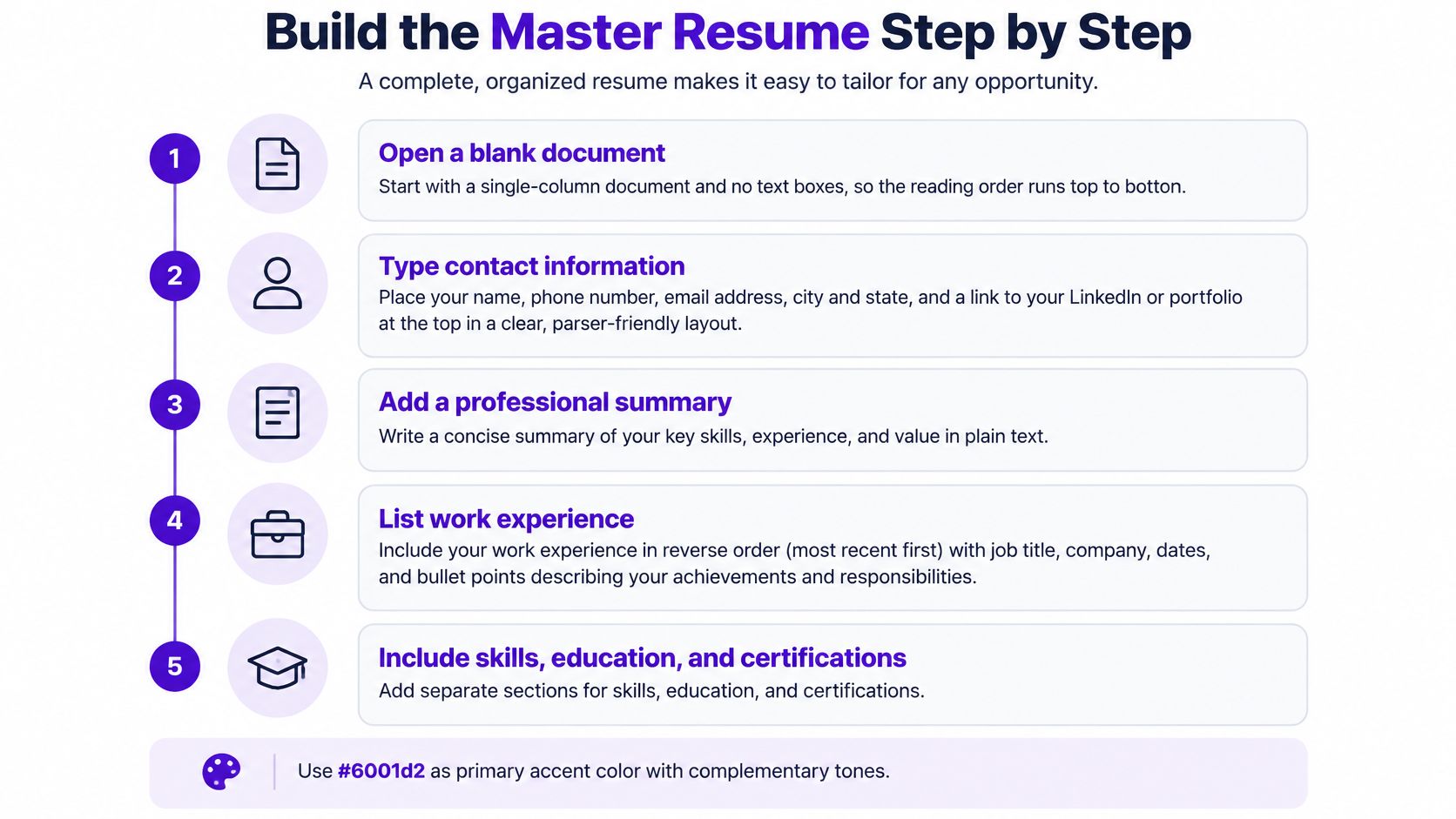
Use this visual as a build checklist.
Build the source document
Open a blank document. Use a single text column without floating objects. Set paragraph styles for section headings and body text so later edits don't create inconsistent spacing.
Type contact information in the body. Include your name, city or region, phone, professional email, and relevant LinkedIn profile. Write the details as actual text rather than using an image banner.
Draft a concise summary. Name the target role, then identify your strongest relevant experience and outcomes. Use verified measurements where available; otherwise describe scope, tools, or responsibilities precisely. Don't invent figures to make the opening look impressive.
Build reverse-chronological experience. Give each position a clear block containing job title, employer, location, and dates, followed by accomplishment bullets. Keep promotions distinct so readers can understand progression. Begin bullets with actions, then explain what you changed, delivered, or maintained.
Add categorized skills. Separate software, methods, and other relevant capabilities with plain labels. A comma-separated list is sufficient. Remove obsolete or peripheral skills that distract from the work you want.
Enter education and certifications. Include the degree or credential and institution or issuer. Distinguish completed qualifications from ongoing study, and avoid implying an expired credential is active.
Validate the export
- Run the paste test. Export the intended submission file, select its text, and paste it into Notepad or another plain-text editor. Check that headings appear on their own lines, employers remain paired with dates, bullets survive, and contact details aren't missing.
A clean paste is evidence of readable extraction, not a guarantee that every employer's system will map every field correctly.
Compare the extracted text with the rendered document. Fix missing content in the source file, then export again rather than repairing only the plain-text copy. Preserve this master separately from application-specific versions so tailoring never overwrites your underlying employment record.
Placing Job Keywords Without Stuffing Your Resume
Proof beats keyword count. A skills list tells the recruiter what you claim to know; an accomplishment explains where you used it and what happened.
Keep the job posting beside your resume while analyzing terminology.
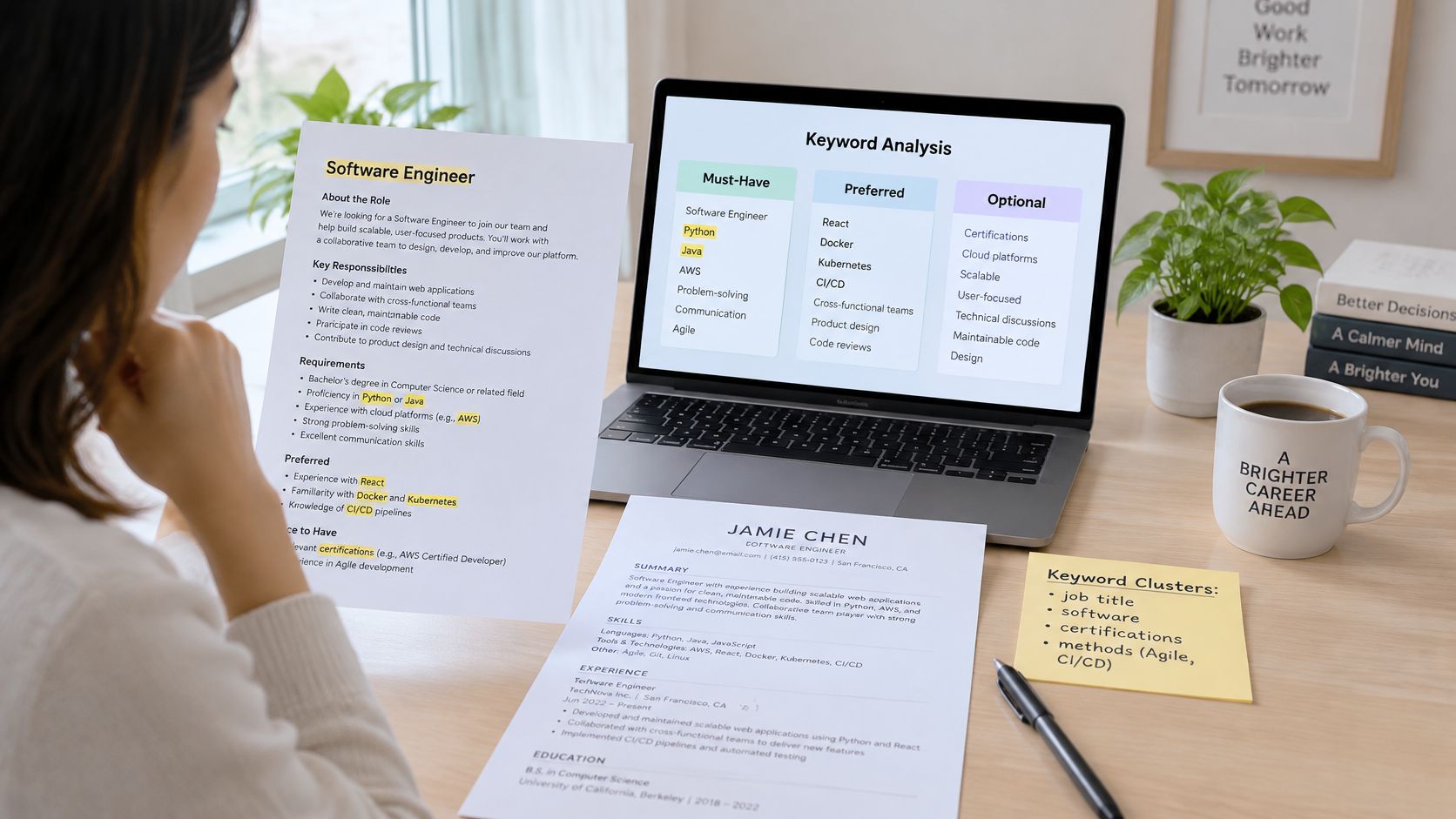
Read the posting like a specification. Extract job titles, tools, certifications, methods, and required competencies, then separate must-have, preferred, and contextual terms. Don't assume every repeated phrase represents a mandatory qualification.
Automated screening can involve keyword requirements and qualification rules, as explained in testimony submitted to the EEOC on automated hiring systems. That makes accurate terminology useful, but it doesn't justify copying qualifications you don't possess.
Connect the term to an accomplishment
Consider this hypothetical rewrite:
- Before: Responsible for reporting.
- After: Built a monthly SQL reporting dashboard for regional operations teams, replacing manual spreadsheet consolidation.
The revised version names the tool, deliverable, audience, and process improvement. If you have a documented time saving, add it; if not, the specific description still provides stronger evidence than an invented metric.
Preserve the employer's wording when it matches your experience. Add recognized synonyms where they clarify the work, such as stakeholder management alongside client relationships, but don't treat related concepts as automatically interchangeable.
For technical roles, nexus IT group's resume wording tips for technology professionals can help you choose precise action language. Use wording resources to improve clarity, not to inflate your contribution.
This video offers another way to review the keyword-selection process.
Keep a simple evidence log
| Target term | Resume location | Supporting proof |
|---|---|---|
| SQL | Skills and relevant experience | Reporting dashboard built using SQL |
| Stakeholder management | Experience | Coordinated requirements and approvals |
| Required certification | Certifications | Credential actually held |
The guide to resume keywords for ATS can help you identify terms without turning the document into a keyword inventory.
Review the result in separate passes:
- Machine-readable coverage: Search the extracted text for job-critical terms, including useful full-name and acronym variants.
- Human credibility: Read each occurrence and confirm that your experience supports it.
Never add hidden white text, paste the entire posting into the file, or repeat a tool name without new information. For mandatory licenses or authorization requirements, use accurate terminology and answer the associated form question truthfully. Wording can clarify eligibility; it can't create it.
Test, Score and Protect Your Resume Before Applying
Audit the finished submission file, not just the document you edited. An export, conversion, or last-minute revision can introduce a problem that wasn't present in the master.
Jobscan's 2024 analysis found that 492 of 500 Fortune 500 companies, or 98.4%, used an ATS, as reported in Scult's explanation of ATS screening. That makes file verification a sensible habit when applying to large employers.
Run this audit before sending:
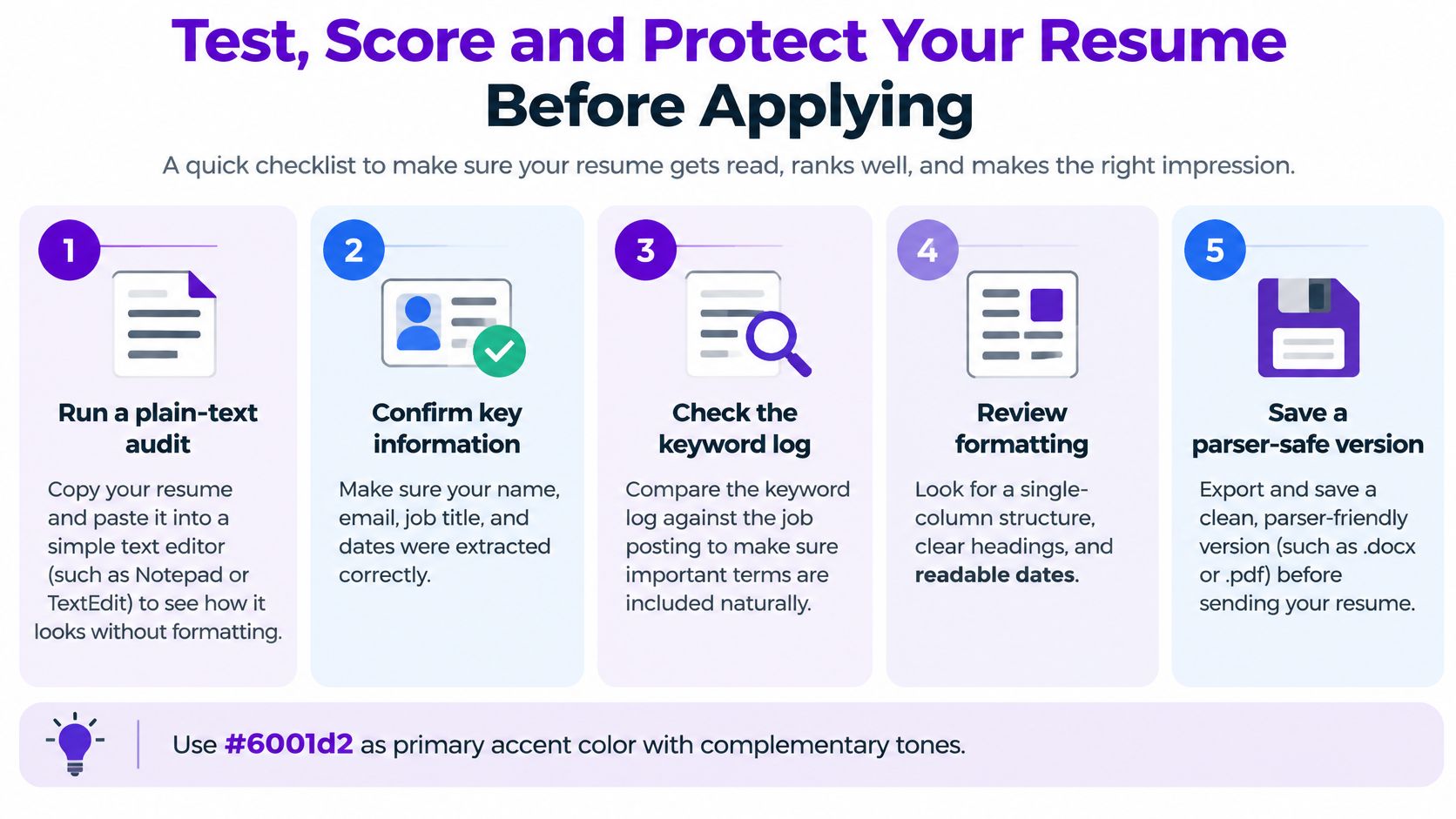
- Extract the text: Confirm nothing disappears or changes order.
- Inspect identifying fields: Check your name, email, job titles, employers, and dates.
- Compare terminology: Check the keyword log against the actual posting.
- Review spelling variants: Use the employer's preferred form where appropriate, such as program management or programme management.
- Inspect the uploaded profile: Correct autofilled fields when the portal allows it.
Use this checklist beside the exact file you intend to upload.
Treat a score as a diagnostic
Resume checkers may assess formatting, keyword coverage, content, impact, and relevance. Their score reflects their own criteria, not access to the employer's decision rules. The explanation of online ATS resume scores helps put that feedback in context.
Don't improve a score by making the resume less accurate or less readable.
Accept suggestions you can support. Reject recommendations that add unfamiliar tools, exaggerate responsibility, or remove necessary context. A missing-keyword alert can reveal either a wording gap or a genuine qualification gap; those require different responses.
Limit unnecessary disclosure
Before uploading to an optional scorer, identify the operator, read its privacy notice, and check retention and deletion terms. Avoid unnecessary birth dates, photos, identity numbers, and full street addresses unless the application context legitimately requires them.
WorkInsiders' guide to AI resume screening discusses candidate-data concerns and New York City's Local Law 144, under which employers using covered automated employment decision tools must provide notice and meet bias-audit requirements. Coverage isn't universal, so look for the employer's actual AI-use notice, accommodation process, and route for requesting human consideration rather than assuming a particular right applies.
In 2025, 44% of organizations using AI for recruiting applied it to resume screening, according to SHRM's Talent Trends survey, as reported by Stealth Agents.
Before submission, complete the paste test, keyword-log review, and privacy check. None substitutes for the others.
Save the Right Version and Apply
Keep one master resume as your source of truth. Save a separate application version with a recognizable filename containing your name, the company, and the target role.
- Copy the master. Don't overwrite the file containing your complete, verified history.
- Tailor selectively. Adjust the headline, summary, skills, and evidence bullets to emphasize the posting's requirements.
- Preserve employment facts. Don't change employers, official titles, dates, or credentials to manufacture a match.
- Recheck the export. Confirm that the revised file still extracts correctly and that dates remain attached to the appropriate roles.
- Verify form answers. Check authorization, licenses, location, and experience against your actual circumstances. Clarify apparent discrepancies instead of guessing which answer will advance you.
- Upload the requested format. When either is accepted, DOCX is a conservative default. If you submit a PDF, verify that its text remains selectable.
Check any populated application fields before clicking submit. Then save the submitted resume alongside the posting so you can prepare for an interview using the same claims the employer received.
This week, choose a real vacancy, tailor a copy of your master, and submit it only after the uploaded fields match your intended application.
Creating a resume with Eztrackr is free, and our builder can match keywords and rewrite bullets for a specific job. Review the suggested changes, adjust anything that needs correction, and download the customized resume as a PDF. Start with a posting you're ready to apply for, then run the final extraction and accuracy checks before sending it.