Kanban Task Management: How to Build a Board That Works
Your task list keeps growing, but the same unfinished work follows you from Monday to Friday. A resume needs tailoring, someone owes you feedback, and a deadline is buried in an email thread. You're busy, yet it's hard to say what will get finished next.
Kanban task management gives each piece of work a visible state and, even more, controls how much you start. You don't need elaborate software to begin. You need clear columns, manageable cards, and rules that make finishing work more important than adding work.
Kanban Board Columns at a Glance
Start with a sheet of paper divided into To Do, In Progress, and Done. Put every task in exactly one place. Unlike a long checklist, this layout separates work you intend to do from work you've started.
A card should describe a concrete deliverable you can finish in days, not a project that could occupy months. Replace “Improve resume” with “Tailor resume for the operations analyst role.” Put the first action, owner, and completion requirement on the card.
Basic kanban board columns and how work leaves them
| Column | What Belongs There | How Work Leaves It |
|---|---|---|
| To Do | Ready tasks with a clear first action | Pulled into In Progress when a slot opens |
| In Progress | Tasks someone is actively working on | Moved to Done when the definition of done is met |
| Blocked or Waiting | Tasks stuck on another person or a missing input | Returned to In Progress once the blocker is cleared |
| Done | Finished tasks kept briefly as evidence of progress | Archived at the weekly review |
Give Each Column a Clear Job
To Do isn't a dumping ground. Keep vague ideas in a separate backlog until you can describe what someone should do next. Order ready cards by importance so choosing work doesn't require another planning session.
In Progress should show actual commitments, not everything you hope to touch. Done should mean the deliverable meets its requirements, not that you've stopped working on it. For a submitted application, that might mean the form was sent, confirmation was recorded, and the submitted documents were saved.
Add Blocked or Waiting when outside dependencies regularly interrupt work. Record what's missing, who can provide it, and when you'll check again. Don't hide an unresolved task by moving it back into To Do.
Practical rule: Moving a card changes its recorded state. It doesn't erase the responsibility to finish it.
Work normally moves right after meeting the column's exit rule, but a blocked task may return to active work once its dependency clears. If every card has an owner and a next move, the layout is useful. If cards sit indefinitely without either, sharpen the rules before adding more columns.
Kanban Principles and Benefits for Personal Work
Toyota's supermarket method, proposed in 1954, let a downstream process withdraw only the parts it needed, with a kanban card signaling what required replenishment, according to Rework's history of Kanban. The important idea wasn't the card itself. Production followed a need rather than an upstream decision to make more.
A personal board makes that distinction visible at your desk.
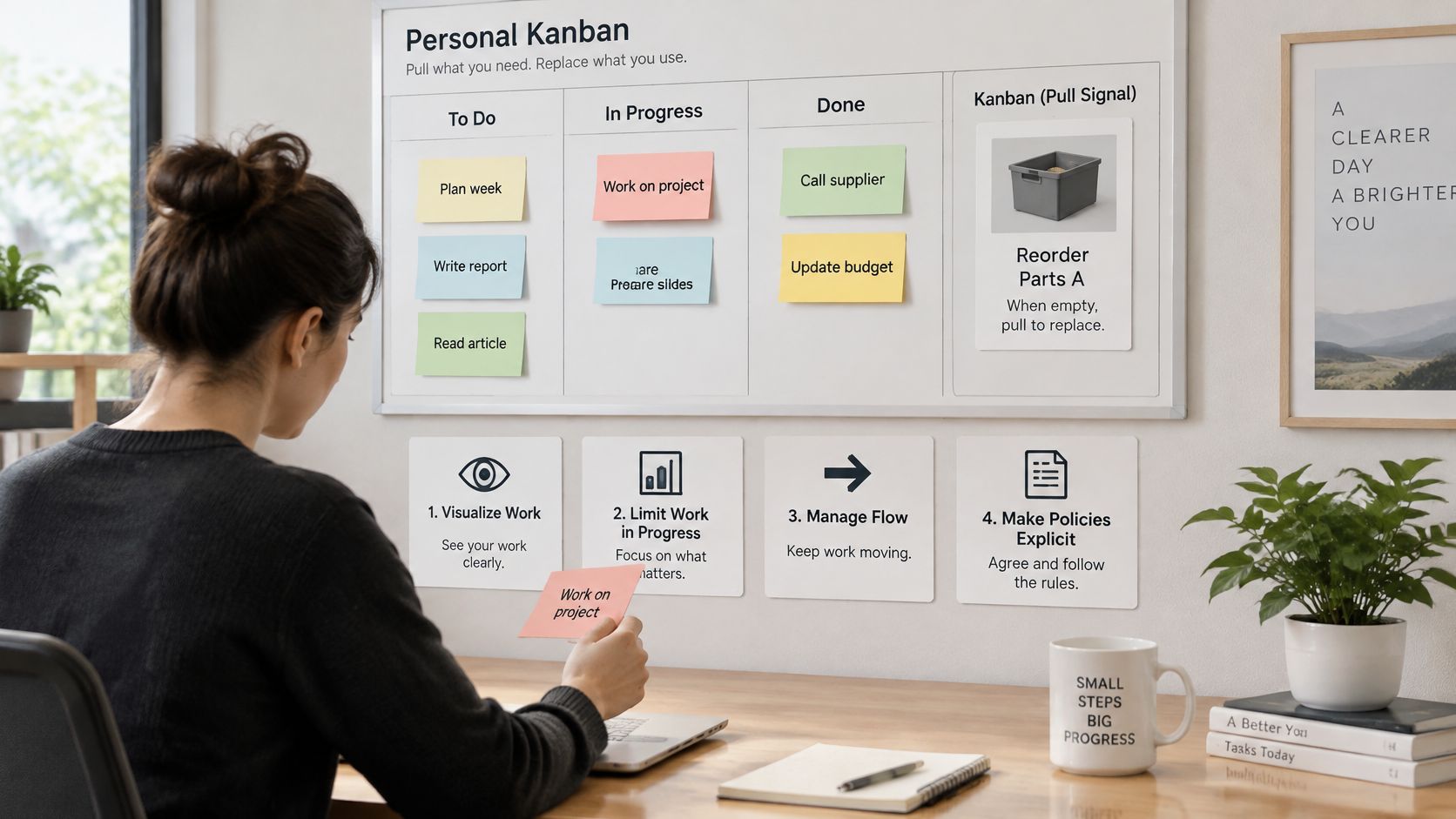
Carry the Pull Principle Into Daily Work
Say you're preparing applications while updating a portfolio. Starting another portfolio page may feel productive, but it won't help if your existing pages are waiting for proofreading.
Apply these operating principles:
- Make work visible. Include unfinished commitments, not just new requests.
- Limit active work. Leave room to complete and correct what you've started.
- Pull when capacity opens. Don't begin something just because it's available.
- Write explicit policies. Define what makes work ready and what makes it complete.
The adaptation to software and knowledge work developed during the 2000s, incorporating visual columns, explicit WIP limits, and swimlanes, as described by the Institute of Project Management's Kanban history.
For personal work, the practical benefits are fewer half-finished commitments, clearer priorities, and an earlier opportunity to notice a queue that isn't moving. Pair the board with deliberate job-search stress management, rather than using visibility as an excuse to demand more from yourself.
For a visual explanation of the method, use this accompanying video.
A personal board has one owner, but it still needs operating rules. Kanban is a flow-control system, not a decorated checklist.
How to Set Up Your Kanban Board in Five Steps
Use paper and sticky notes if you work in one place. Choose a spreadsheet or digital board when you need searchable records, attachments, or access away from your desk. Don't spend your first session comparing automation features.
Build Around the Work You Already Have
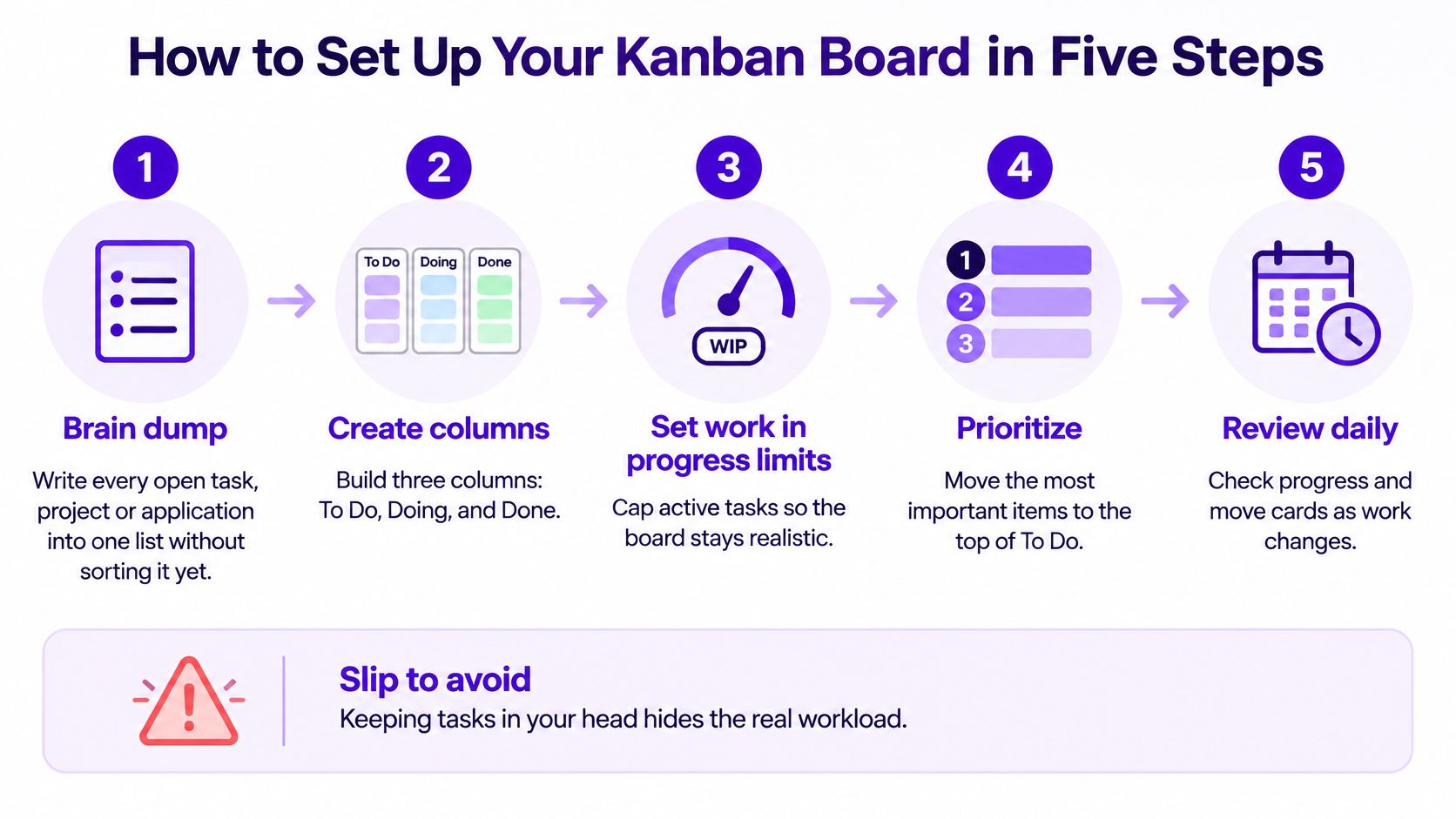
Brain dump every open commitment. Capture tasks, projects, applications, and promised follow-ups before sorting them; keeping some in your head conceals the workload. Break broad projects into actionable cards, and keep uncertain ideas outside the ready queue.
Create To Do, In Progress, and Done, then add Blocked if external dependencies justify it. Resist creating a column for every minor action, because a board that requires interpretation won't help you make quick decisions.
Write entry and exit rules. For example, a task enters To Do when its next action and required inputs are clear, and leaves In Progress when its deliverable passes the stated check. Don't rely on an unwritten understanding of what “finished” means.
Put a starting WIP cap at the top of each active column and arrange ready cards by priority. Choose a cap you can realistically honor, rather than one large enough to accommodate every existing commitment.
Book a short weekly review. A practical starting appointment is fifteen minutes to inspect blockers, archive completed work, remove obsolete tasks, and reorder the queue. Update cards as work changes during the week, so the review isn't spent reconstructing events.
Use the setup graphic as a compact reminder of capture, limits, prioritization, and routine maintenance.
Migrate Without Creating Duplicate Work
If you already track applications in Excel or Google Sheets, retain the useful history. An import-from-spreadsheets option can help move existing records into a board without retyping them. Clean up duplicates and inconsistent statuses before importing, rather than carrying those problems into a different interface.
Keep the card template short: deliverable, owner, next action, relevant date, and links to supporting material. Add fields only when you'll use them to make a decision. A detailed template nobody maintains is less useful than a compact one everyone trusts.
Test the setup by choosing your next task. If you need to inspect every card before deciding, your priorities or readiness rules aren't clear enough.
Don't wait for a perfect board. Start using it, then change a rule when actual work reveals a problem.
Setting WIP Limits Without Stalling Work
Treat the following caps as illustrative starting experiments, not universal standards. The To Do limit controls the size of the ready queue; the active-work limit controls commitments. A waiting cap is an escalation trigger, not permission to stop recording blocked work.
Starting WIP limits and the signals that they need adjusting
| Stage | Starting WIP Limit | Sign the Limit Is Too Loose | Sign the Limit Is Too Tight |
|---|---|---|---|
| To Do | 15 items | Cards go untouched for two weeks | Nothing is left to pull into active work |
| In Progress | 3 items per person | Work spreads across many open items | The team waits idle while ready work exists |
| Blocked or Waiting | 5 items | Blocked cards pile up without follow-up | Blocked cards are cleared the same day |
| Done | No cap; archive weekly | Finished items are never archived | Not applicable |
A work-in-progress limit caps how many items can occupy a stage; when it fills, stop pulling new work and address the constraint, an operating mechanism described in this ACM review of Kanban practices. Starting additional tasks doesn't resolve an overloaded review queue. It creates more work that will eventually need the same reviewer.
Read the Signals Before Changing the Cap
Persistent saturation calls for investigation. Check whether cards are oversized, approval capacity is missing, or an unresolved dependency is holding everything up. Raising the limit may conceal the constraint rather than remove it.
An empty ready queue can indicate overly restrictive replenishment, but it can also mean nobody has prepared the next tasks. Likewise, same-day clearance in Waiting isn't automatically a problem. Tighten or loosen a cap only when it interferes with useful work.
For a personal experiment, allow yourself three active cards: tailoring an application, preparing interview examples, and updating a portfolio case study. When another attractive role appears, save it rather than immediately starting another tailoring task. Keep finished cards available for the weekly review.
Blocked cards still count toward your overall commitments, even when you display them separately. Otherwise, you can evade the limit by moving unfinished tasks into Waiting.
Change one limit at a time. Try an adjustment over a couple of review cycles, then compare finishing times and idle periods before making another change.
Measuring Flow with Cycle Time and Lead Time
Cycle time measures elapsed time within your defined active-work boundary. Lead time covers the item's full journey through the system, including its initial wait. Neither should be confused with hands-on effort recorded on a timesheet.
Write down those boundaries before calculating anything. For an application task, active work might begin when tailoring starts and finish at submission, while lead time begins when you save the role. If the role sits untouched in Saved, that delay belongs in lead time.
Use Little's Law as a Capacity Check
For consistent boundaries and reasonably stable flow, average cycle time is approximately average WIP divided by average throughput; the University of Oulu paper on Kanban flow gives the example of 30 active items completing at 10 per week, implying about 3 weeks, compared with about 2 weeks at 20 active items and unchanged throughput.
How WIP changes expected cycle time at constant throughput
| Active Items (WIP) | Weekly Throughput | Expected Average Cycle Time |
|---|---|---|
| 30 | 10 per week | About 3 weeks |
| 20 | 10 per week | About 2 weeks |
| 15 | 10 per week | About 1.5 weeks |
The final row is calculated using the same relationship. These are capacity illustrations, not promises: if lowering WIP also lowers throughput, the expected result changes.
Record Transitions, Not Just Completion
Capture the date a card enters each column. A spreadsheet can handle this initially; a task-tracker dashboard becomes useful when you need to inspect trends without rebuilding calculations.
Track the median alongside a slower-tail percentile, such as the 85th percentile, rather than relying on the average alone. The median describes a typical item; the slower tail helps you notice work that regularly takes much longer.
- Inspect waiting. A small active-work duration relative to total lead time points toward delays before work starts.
- Inspect aging. Review unfinished cards as well as completed ones, so stalled work doesn't disappear from your assessment.
- Compare like with like. Don't mix a quick follow-up email with a substantial portfolio project and interpret the combined average as a reliable forecast.
A rising card count isn't proof of improvement. Look for steadier completion, shorter avoidable waits, and fewer aging commitments.
Using Kanban on a Team Board
A team board needs named ownership and shared policies, not just shared access. Give every card one accountable owner, even when several colleagues contribute. That person keeps the status current and arranges the next handoff.
Agree on the work types before creating swimlanes. Client requests, bugs, and planned projects can occupy separate horizontal lanes while using the same workflow columns. Pretty Progress offers a useful visual-management perspective on how to turn scattered tasks into clear progress, particularly when colleagues need a common view rather than separate personal lists.
Make Capacity a Shared Agreement
Consider a hypothetical four-person team testing a personal allowance of three active cards. Its column cap would be twelve, but that arithmetic is only a starting ceiling. If everyone depends on the same reviewer, the team may need a lower total.
Use both individual and column limits to prevent work accumulating around one specialist. Don't let an urgent swimlane become an unlimited bypass. When an emergency arrives, explicitly decide what pauses and who informs the affected stakeholder.
- Begin the daily check with Blocked. Ask what input is missing and who will obtain it.
- Inspect work nearest completion. Help a colleague finish before pulling another assignment.
- Review the next pull. Confirm that the highest-priority ready card has the necessary inputs.
Define Completion by Work Type
A bug might require a reproduced failure, a verified fix, and a release note. A client deliverable might require internal review and delivery confirmation. Write those requirements on a card template so people don't debate them at every handoff.
Hold a periodic flow review, using a monthly appointment as a practical starting cadence. Examine throughput, cycle time, aging work, and the mix of completed items together. Counting cards alone encourages people to split easy tasks into smaller pieces without improving delivery.
Management boundary: Use the board to improve coordination, not to rank employees by how many cards they move.
When someone repeatedly exceeds a limit, investigate conflicting assignments and hidden responsibilities before assuming poor discipline.
Run a Job-Search Board Without Burnout
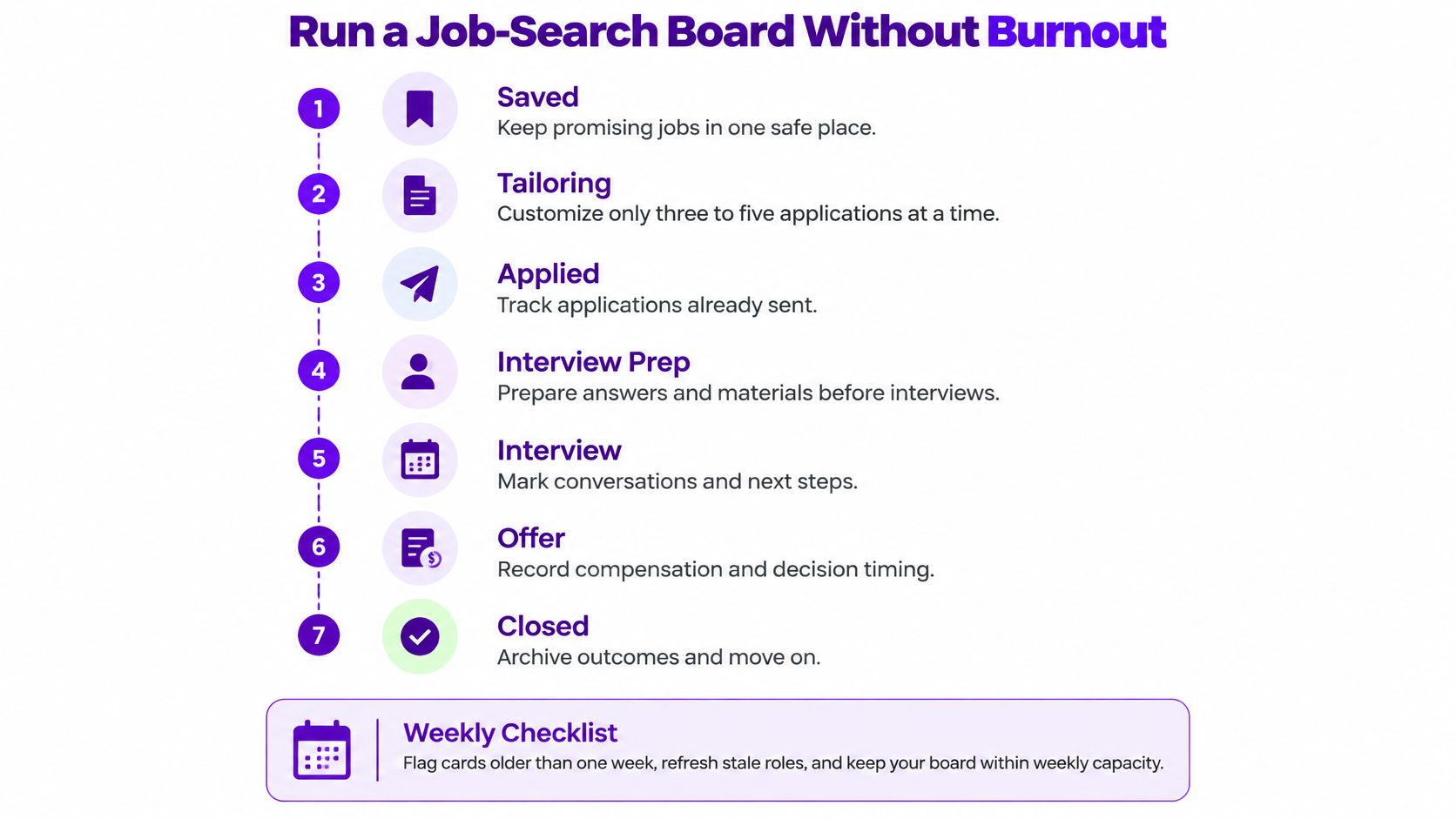
Build a job-search workflow around Saved, Tailoring, Applied, Interview Prep, Interview, Offer, and Closed. These stages separate preparation from employer-controlled waiting and keep an offer from being mistaken for a completed decision.
As a starting experiment, cap Tailoring at three to five applications, choosing the lower end when assessments or interviews already occupy your schedule. That's a capacity recommendation, not a target you must hit. Keep roles you haven't committed to in Saved.
Use this workflow graphic as a reminder to include preparation and closure, not just submissions.
Run a Weekly Check Without Reopening Every Decision
Give each application card a role title, employer, posting link, deadline, next action, and follow-up date. Store the submitted resume version and relevant documents with the record, so an interview invitation doesn't trigger a search through downloads.
During your review:
- Flag aging cards. Use a chosen reminder threshold, such as fourteen days, to inspect silence rather than automatically treating it as rejection.
- Check role availability. Close expired postings or record that the listing has disappeared.
- Record application context. Note source, resume version, referral status, and your assessment of role fit.
- Schedule the next action. Distinguish a promised employer update from a follow-up you control.
- Protect preparation time. Reduce new tailoring commitments when interviews or assessments need attention.
The graphic's earlier aging check can serve as a light scan; your chosen follow-up threshold should reflect the employer's stated timeline. Don't send reminders because a card has changed color.
A spreadsheet is enough for a small pipeline. A dedicated job application tracker is another option when you want application cards, documents, and status changes in one place.
Treat Outcomes as Hypotheses, Not Verdicts
FastApply's account of Huntr's Q2 2025 analysis of 461,000 tracked applications reports that 14.3% of users required more than 100 applications before receiving an offer, illustrating why application volume alone is an incomplete measure of progress (FastApply's analysis). That finding describes tracked users, not a required application quota for your search.
Track conversion between meaningful stages: submitted applications to interviews, interviews to later conversations, and later conversations to offers. Compare response latency, source, referral status, and resume version alongside role fit. No single field can establish why an employer made a decision.
Suppose referred applications receive more replies than job-board submissions. A useful hypothesis is that referrals deserve more of your networking time. An unsupported conclusion is that your resume fails whenever you apply without one.
Keep observations separate from interpretations. “No reply by the stated update date” is an observation. “The employer rejected me because I lack experience” is an explanation you usually can't verify.
Silence records an unknown outcome. It isn't evidence that you're unqualified.
Keep Accountability Separate From Self-Judgment
Jobvite's 2025 Job Seeker Nation Report found that 66% of respondents felt burned out by searching for work, according to the Job Seeker Nation Report. A board that displays every unanswered application indefinitely can turn an organizational aid into a repeated reminder of uncertainty.
Measure controllable actions separately from outcomes. Researching a suitable employer, improving a relevant example, asking for an introduction, and preparing thoughtful interview questions are actions you can complete. Receiving a response isn't.
Set a closure policy before you need it emotionally. After your chosen silent period and any appropriate follow-up, archive the card with a neutral reason such as no response. Reopen it if the employer returns; archiving is housekeeping, not a prediction.
Keep sensitive notes private, especially on shared devices or boards. Record rejection feedback accurately without converting it into a permanent judgment about yourself. If feedback is vague, leave the cause unknown rather than inventing a flaw to fix.
Schedule recovery periods without application targets. If opening the board consistently intensifies anxiety, reduce the visible queue, pause nonessential metrics, or take a break from reviewing outcomes. The board should support a sustainable search, not demand constant attention.
Start today by creating the stages, choosing your active-work cap, and booking a brief weekly review. Pick one promising role and write its next concrete action before adding more cards.
Eztrackr offers a kanban board and timeline for organizing applications and reviewing their progress. Visit Eztrackr, bring your current applications into one view, and use clear stages and a manageable active queue to plan your next job-search session.