Job Search Process Steps That Actually Get Replies
In Monster's November 2024 job-search-fatigue poll, 59% of surveyed U.S. workers said they rarely heard back after applying, and 33% said they never heard back. That's a strong reason to replace spray-and-pray applications with a process that records what you tried, where you tried it, and when you'll stop waiting for a reply, as the Monster poll on job-search fatigue makes clear.
The job search process steps below treat each application as a time-bounded experiment, not a tally to increase at any cost. You'll set a focused target, save roles before postings disappear, tailor evidence to each role, and make follow-up a calendar decision rather than a test of patience.
The Six Stages of a Weekly Job Search
Start with a written target, not a job board. Decide which titles you'll pursue, where you can work, what pay you'll consider, and which skills a role must use. Without those boundaries, it's easy to spend an evening saving jobs that don't fit your experience or needs.
Keep 8 to 12 active roles in your pipeline. That gives you enough options to keep moving without making careful tailoring unrealistic. Use the table as a weekly rhythm, not a measure of how hard you're trying. The time ranges are practical planning estimates, not a virtue score.
| Stage | Output | Time this week | Done when |
|---|---|---|---|
| Set the target | Titles, location or remote rule, pay floor, three must-have skills | 2-3 hours | Target page is written before browsing |
| Source and save | Saved role with company, source, deadline, and posting text | 3-4 hours | Each role is saved before the listing can vanish |
| Tailor | One resume version and short answers per role | 30-45 minutes per role | Claims match real experience, not stuffed keywords |
| Apply | Submission on the employer channel plus the date | 20-30 minutes per role | Confirmation or sent copy is stored |
| Follow up | Dated follow-up note or closed-out role record | 10 minutes per role | Reply is logged or the role is closed |
| Interview and decide | Stories, questions, and outcome notes | 1-2 hours per screen | Stage is updated and a decision is recorded |
Make the pipeline manageable
When you save a role, capture the company, source, deadline, and full posting text. A listing can be edited or removed, and you'll need the original wording to tailor your materials and prepare for a conversation. Keep these details together rather than relying on a browser tab you may not find later.
Tailoring and applying are separate tasks. For each role, first make a version of your resume that emphasizes relevant, verifiable evidence. Then submit through the channel the employer requested and save the confirmation or a copy of what you sent. A draft sitting on your desktop isn't an application.
Follow-up belongs in your calendar from the moment you apply. Interview preparation, by contrast, can wait until a person responds. Use that time to keep the pipeline current rather than rehearsing for a conversation that may never happen.
Start today: Write your target page before opening another job board. Give every role that follows a clear next step and a close-out date.
If you're considering a substantial career pivot, first learn what the new work involves and which requirements employers expect. For example, someone exploring commercial driving can explore a career change into trucking before narrowing their target roles. Then treat each application as an experiment: record what you sent, track what happened, and close the loop when it's time.
How to Move a Role from Saved to Submitted
A saved listing isn't ready to submit just because it looks promising. Move it through a short sequence that connects the employer's requirements to evidence you can support.
The resume workflow and ATS claims discussed in this resume-statistics article point to a more defensible approach than chasing a supposed universal pass rule: use clear formatting, truthful language, and a checkable record of the version you submitted.
Five actions before you send
Split the posting into parts. Copy the required skills, preferred skills, expected outcomes, and exact screening terms into a one-page role brief. This helps distinguish a must-have qualification from a nice-to-have. It also keeps you from treating every phrase in a long posting as equally important.
Match requirements to proof. For each required skill, note a project, result, tool, or certification that demonstrates it. If you can't support a requirement, put it on a gap list rather than implying you have it. For example, if a posting asks for dashboard experience, identify a dashboard you built and what decision it supported.
Create a role-specific resume. Use standard headings, conventional text, and clearly stated dates. Borrow the employer's terminology only when it accurately describes your work. A polished column layout or graphic doesn't help if it makes an essential skill hard to read, and repeating keywords without evidence can undermine your credibility.
After saving the file, extract its text and check the reading order. Confirm that headings, employer names, dates, and skills appear where you expect. Don't assume a PDF, a column, or one missing keyword automatically triggers rejection. A simple text check tells you whether the document is legible without pretending to predict an employer's screening system.
Submit through the requested channel. Use the employer's application portal or other specified method. Save the posting, exact resume file, and submission date together. This makes it possible to identify the materials you used if a recruiter contacts you later.
Label the application record. Add the source, any referral contact, and the resume version to the same record. A draft isn't a submission, and a file called “Resume final” won't help you distinguish versions later. Give each version a clear name that identifies its role or target.
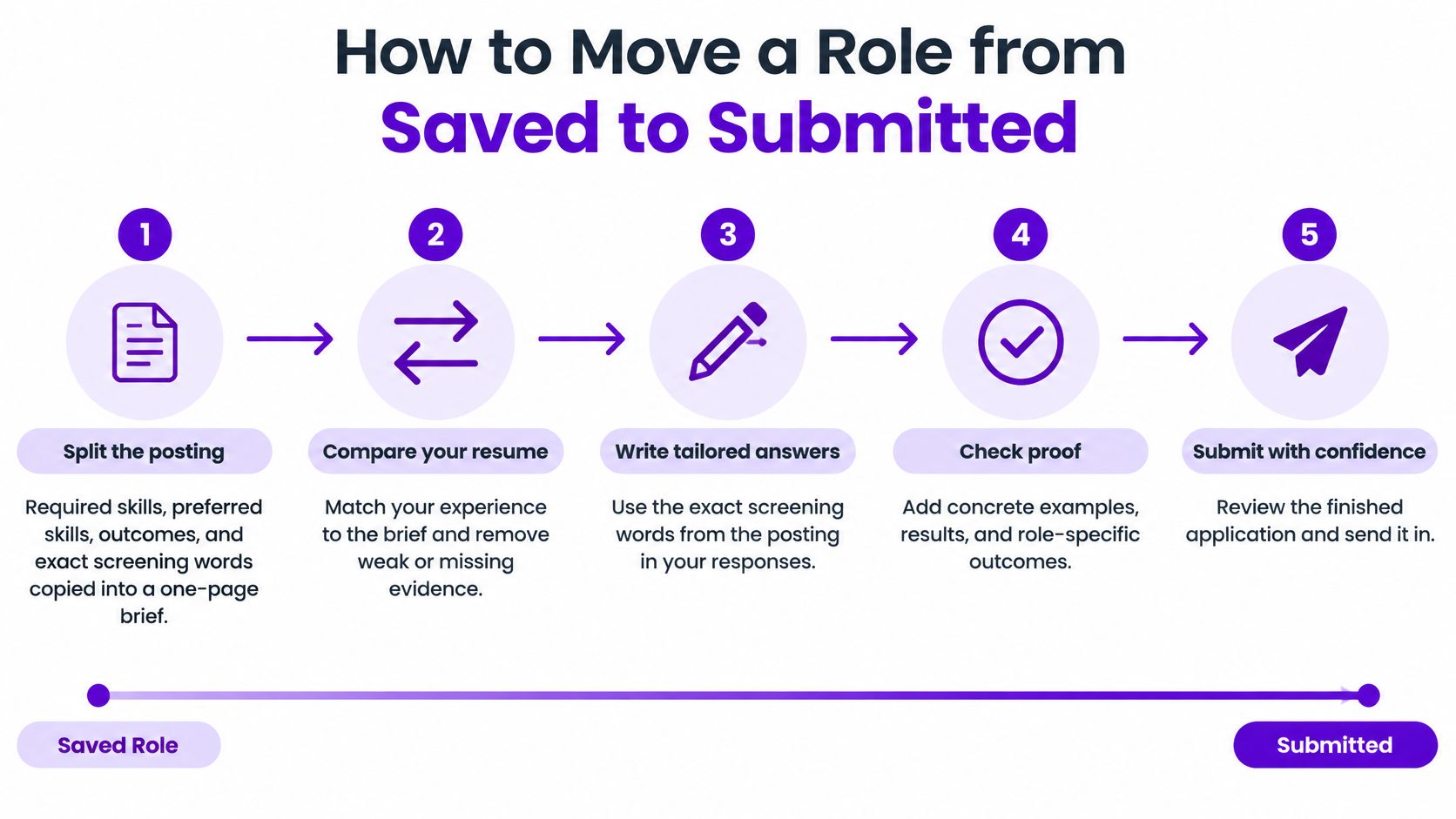
The point isn't to game an automated score. It's to make your qualifications readable, connect the posting's priorities to truthful examples, and keep an accurate record of what you sent. Save the final version only after you've checked that its claims are accurate and its text still reads correctly.
An Evidence Check After AI Drafting
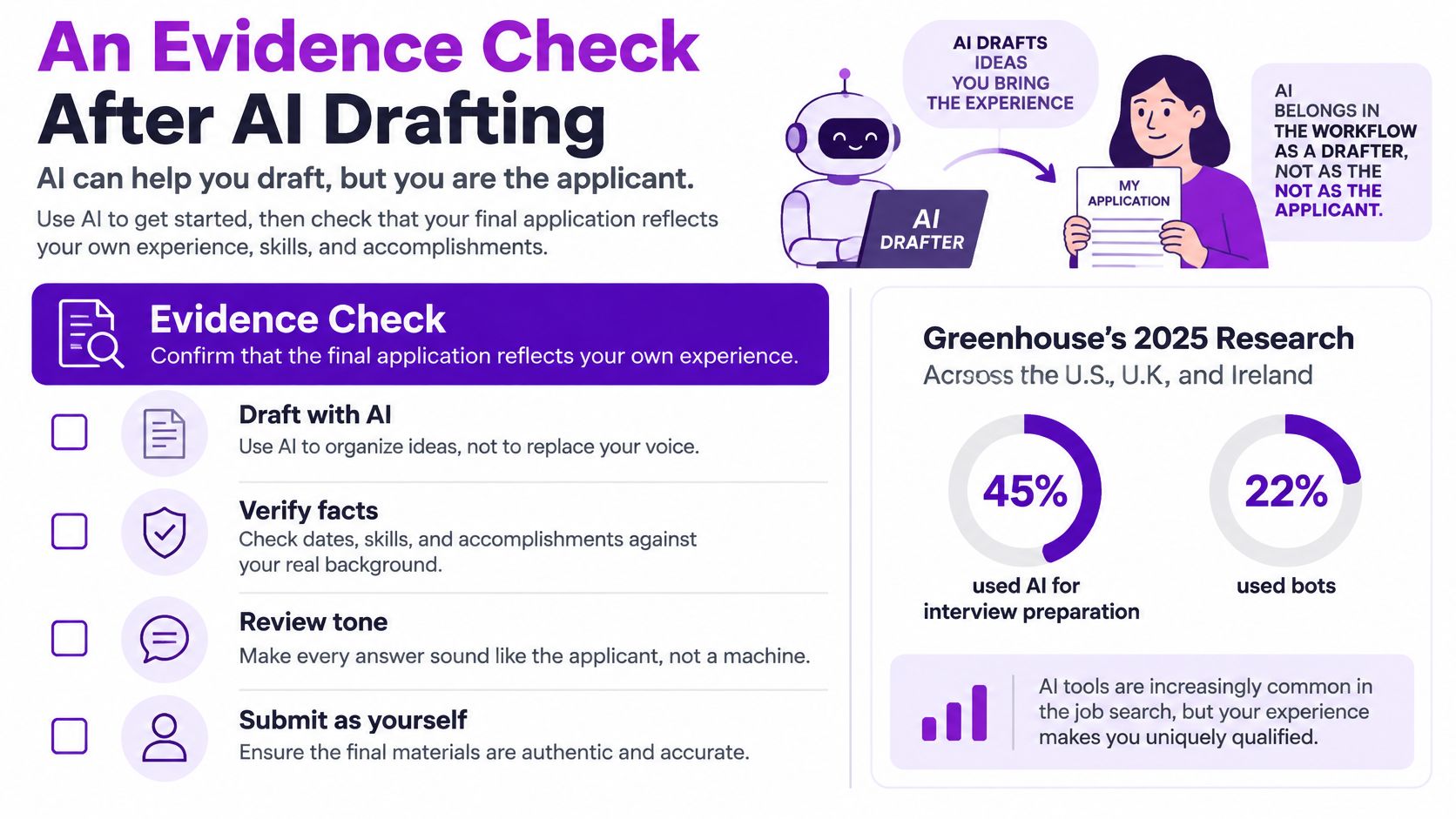
AI can speed up a first draft, but it can't take responsibility for what you claim. In Greenhouse's 2025 research across the U.S., U.K., and Ireland, 45% of candidates used AI for interview preparation, 22% used bots to apply automatically, and 26% said AI made it harder to stand out. More recent U.S. findings reported that 40% admitted adding skills or keywords they didn't possess, according to Greenhouse's 2025 workforce hiring report.
That gap between drafting quickly and representing yourself accurately is where an evidence check matters. Use AI to organize information or suggest wording, then check each line before it leaves your hands.
The four-part audit
Verify the keywords. For every skill in your resume or answer, identify the work that supports it. If you can't name a project, task, or example, remove the claim or describe the skill more accurately.
Attach proof to major claims. A strong bullet gives the reader something concrete to understand: the problem you handled, what you did, or a result you can explain. Keep a project, work sample, certification, or interview story ready when a claim needs more context.
Keep your own voice. Read each sentence aloud. If it sounds like a copied posting or uses grand language you wouldn't use in conversation, rewrite it. The aim is clear and relevant, not artificially polished.
Track skills you still need to build. Put missing qualifications on a gap list. If they matter to your target, consider a project, sample, or certification that could help you develop and demonstrate them. Don't manufacture experience to fill a blank.
Keyword stuffing can make an application appear to match at a glance, then leave you struggling when someone asks for a real example. Automatic-apply bots can also skip the careful role, source, and document checks that make your search measurable. A generator is most useful when it has both the posting and your actual evidence, and you review its draft before sending anything.
If you use an AI cover letter writer, treat its output as a starting point. The finished letter should reflect why this role fits your experience, not just repeat the language of the vacancy.
Referral Steps That Change Interview Odds
A referral works best as a planned application channel, not a vague networking warm-up. Build the role target first, then ask a credible contact for specific help only when you can show why you fit.
Build the target role. Identify the vacancy and the requirements that make it a match before approaching anyone. A clear target lets you ask about a real opportunity rather than asking a contact to find work for you.
Find a credible internal contact. Look for someone who knows the team, the work, or the hiring process. A contact's usefulness comes from relevant context, not from having a company name on their profile.
Make a specific request. Share the role, a short explanation of your fit, and a resume customized for the position. Ask whether they'd be comfortable referring you or sharing how the team handles applications. Make it easy to understand what you're asking for.
Apply through the referral path. Follow the company's referral process, then complete the application yourself. A request or promise to refer isn't a submitted application.
Record the result. Track the source, date, stage, and outcome separately from applications you submitted without a referral. That lets you compare channels instead of treating one positive or negative result as a general rule.
The difference can be meaningful. A Federal Reserve Bank of New York study on referrals found that referred applicants were 7.3 percentage points more likely to receive an interview and 2.4 percentage points more likely to receive an offer than job-board applicants. Among candidates who had already been interviewed, referrals raised the probability of an offer by 14.0 percentage points.
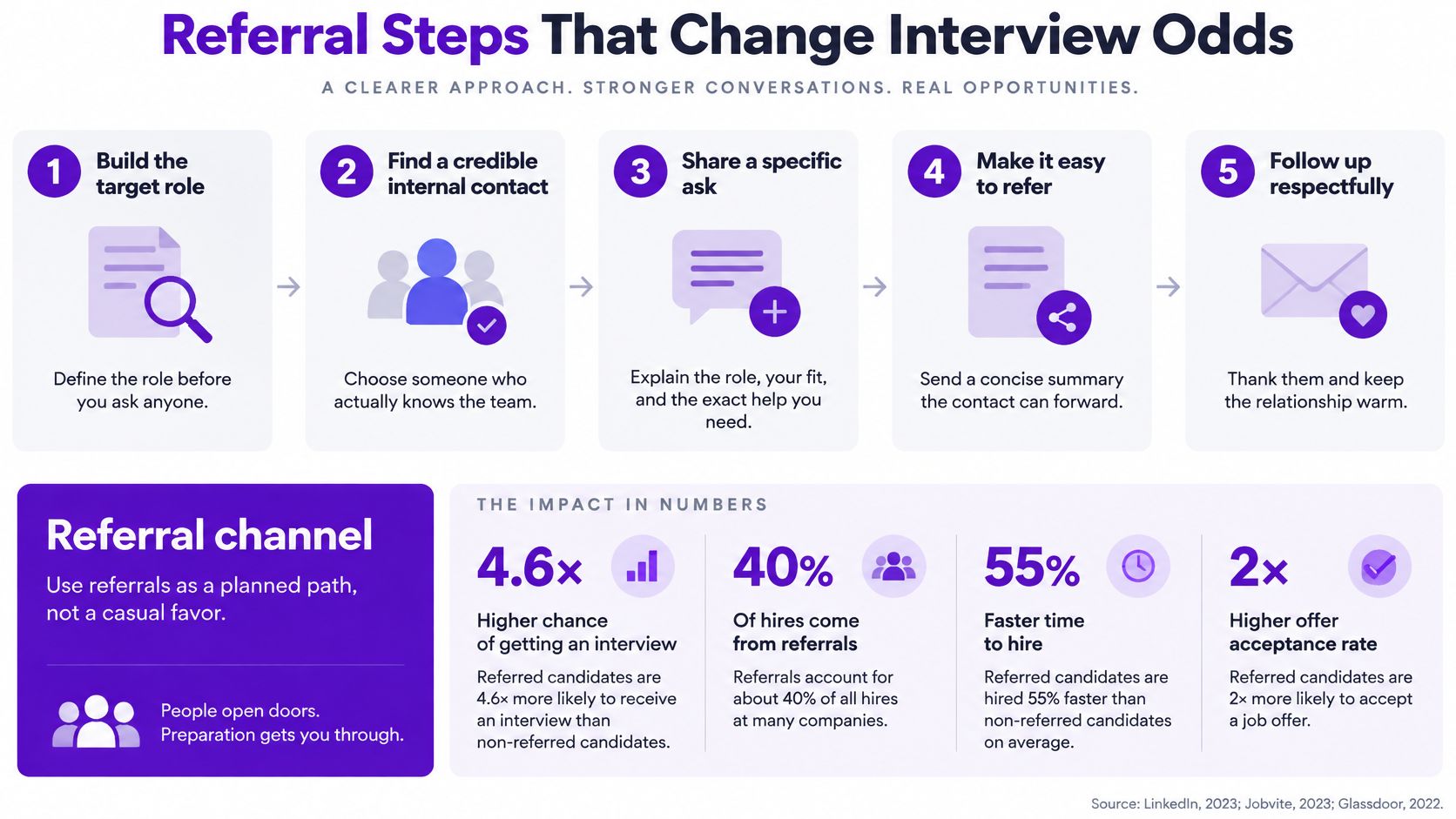
Those findings support treating referrals as a distinct channel, not assuming any particular contact guarantees a result. When you compare your own outcomes, account for differences in job family, seniority, location, and qualifications as far as you can.
Avoid three common mistakes: asking without showing role fit, contacting people only when a vacancy appears, and counting a request as successful before you submit. A contact can help you understand the role and improve visibility, but you're responsible for the accuracy of every claim in your application. If you're writing to someone you don't know well, a letter of introduction can help you explain the connection and request clearly.
The video below offers another look at how referrals fit into a job search.
A Follow-Up Calendar for Silent Employers
Silence is common enough that it deserves a rule, not an improvised response. In its coverage of online recruiting, iHire reported that 59.0% of candidates identified applying and receiving no response as a top job-search challenge, while 50.7% of employers reported frustration with candidates ghosting them. A separate 2025 survey found that 28% of ghosting occurred after application submission and before candidates reached an interview, according to iHire's State of Online Recruiting coverage.
For each application, set a submission date, an expected response window, follow-up dates, and a close-out date. Record any recruiter or referral contact too. These fields turn waiting into a finite process, so you know when to send a note and when to put your attention elsewhere.
| When | Action | Channel | If there's no reply |
|---|---|---|---|
| Day 0 | Log submission date, resume version, source, and any contact; set the close-out date | Tracker | Set the day-7 reminder |
| Day 7 | Send one note naming the role and the apply date | Recruiter email, or the portal if none | Keep the scheduled close-out date |
| Day 14 | Send a second note only if you have a real contact | Recruiter email or the contact's preferred channel | Don't invent a new contact or keep chasing |
| Day 21 | Close the role if there's been no human reply | Update the application record | Keep the record and free the active slot |
Follow up without making a new job
On day seven, keep the note brief and specific: name the role, state when you applied, and ask whether there's an update on the process. Use a recruiter's email if you have one. If you don't, use the application portal rather than trying to guess someone's address.
A second message makes sense only when there's a real person to contact. If there isn't, don't send the same request through multiple channels just to feel active. You can use a second follow-up email after an interview as a reference for a later-stage conversation, but an unanswered application doesn't require an endless sequence of messages.
When the close-out date arrives without a human reply, mark the role closed and keep its record. Silence isn't proof that your qualifications were weak; it's a lack of information about that employer's decision. Review which companies, sources, role types, and follow-up approaches produce human contact, then put more time toward the channels that give you useful responses. An open application can consume attention even after it stops offering a realistic next step.
Interview Prep After a Reply
Start preparing when a person replies. Your job is to support the claims you've already made, not invent a new story for the interview.
Build a story for each required skill. For every major requirement, choose a project you can explain in detail. Describe the situation, the action you took, and the result. If you can't answer follow-up questions about an example, choose a stronger one.
Draft answers to likely questions. Prepare concise responses to prompts such as why you want the role, what made a project difficult, how you measure success, and which skill you're still developing. Say the answers aloud so you can hear where they sound vague or over-rehearsed.
Confirm the logistics. Check the interview format, interviewer names, time zone, and any test or work-sample request. Add those details to the application record so you aren't searching through messages at the last moment.
Prepare questions for the team. Ask about current priorities and what success would look like in the role. The answers can help you decide whether the opportunity matches the target you set.
Record a decision after the conversation. Within a day, log the stage, outcome, and any promised follow-up. Choose whether you'll advance, decline, or wait for a specific update. If you're preparing for an interview in English, interview English for Moroccan professionals offers relevant practice and language guidance.
Use AI to rehearse questions or critique clarity, not to supply a story you can't defend. Keep each example grounded in your own work, then spend the planned 1-2 hours per screen on the details most relevant to that role.
Funnel Numbers That Tell You Where to Spend Time
Raw application volume doesn't tell you which part of your process needs attention. After 15 to 20 applications have either received a reply or reached their close-out date, review stage conversion. Don't count applications that are still open and waiting; their outcomes aren't known yet.
| Ratio | How to count it | Weak pattern | One change to make |
|---|---|---|---|
| Applied to screen | Replies divided by submissions that are answered or closed | Low replies across every source | Retarget titles, level, or location |
| Screen to interview | Hiring-team interviews divided by recruiter screens | Screens that stall | Rewrite stories for the posted gap |
| Interview to offer | Offers divided by interviews | Strong interviews, no offers | Revisit level, scope, or pay |
| By source | The same ratios split by board, career page, and referral | One source produces the replies | Shift hours to that source |
| By resume version | Screens per tailored file | A version has enough sends and zero screens | Retire that version |
Change one thing at a time
A low applied-to-screen rate across every source points first to your target or sourcing choices. Check whether the titles, seniority, and location match your experience and constraints. If one source generates the human responses while another doesn't, redirect some search time rather than sending more applications through the weak channel.
If recruiter screens stall before hiring-team interviews, listen for the gap between what the posting asks for and what your examples demonstrate. Your next adjustment should be a clearer story that addresses that requirement. If interviews go well but offers don't follow, review role level, scope, and compensation fit before rewriting a resume that already earns interviews.
Keep the denominator honest. Include only answered or closed applications, then compare like with like by source, role family, and resume version. A version with enough submissions and no screens is a candidate for retirement, not a reason to keep changing unrelated parts of your search.
End the weekly review with one change: tighten the target, switch a source, or strengthen a proof point. If you alter everything at once, you won't know which adjustment helped.
Run the Next Week from One Tracker
Set up one board for the roles you're pursuing this week before opening another job site. Each application card should show its stage, source, resume version, submission date, follow-up reminders, close-out date, and any contact. Keep the posting, submitted file, and interview notes with the card so you can understand the full history in one place.
A single tracker makes the system easier to maintain than a mix of browser tabs, inbox searches, and separate spreadsheets. Eztrackr's Job Tracker lets you save details from popular job boards with one click; its Kanban board groups applications by hiring stage, and the tracker provides overall job-search statistics and insights. A task-tracker dashboard can also help you think through how to keep active work and next steps visible.
Use the first block of the week to update your target and close out applications past their decision date. Use the next block to work only on saved roles: tailor the resume, check every AI-assisted claim against real experience, submit through the employer's channel, and set reminders. Stop adding roles when your active pipeline is full.
The search is moving when applications advance, close, or produce useful information, not when the submission count rises. Choose one board, give each open role a next step, and run one clean week before adding another source.
Eztrackr helps you save job details, organize applications by hiring stage, and see job-search statistics in one tracker. Put this process to work by setting up your pipeline and follow-up dates in Eztrackr.