Resume Parsing Technology: How It Works in 2026
You've sent out polished applications before, watched the “submitted” message appear, and then heard nothing for weeks. That silence often isn't about your skills. It's about whether resume parsing technology could read your resume cleanly enough for a recruiter's system to turn it into searchable data in the first place.
That's why people get frustrated with ATS advice. They think in terms of a human reading a story, but the software often starts by looking for fields, not narratives. If your name, dates, skills, and titles don't survive that conversion, your application can end up harder to find, sort, or shortlist, even when you're qualified.
The Invisible Filter Between Your Resume and a Recruiter
The easiest way to understand resume parsing technology is to treat it like a silent receptionist. You send a file, and the software decides whether that file becomes a clean candidate record or stays as messy text no one can search well. A recruiter rarely opens a pile of raw resumes first, they usually query structured data that was extracted earlier.
That difference matters. In your head, the recruiter reads your experience, understands your path, and compares you to the role. In the system, a search for a title, skill, or date range often happens before a human ever looks at the document.
If the parser reads your resume accurately, a recruiter can find it by the fields that matter. If it doesn't, your application may still exist, but it's effectively harder to surface. For a plain-language overview of how applicant tracking systems move resumes around after upload, this ATS workflow guide helps connect the dots.
Practical rule: if the software can't turn your resume into structured fields, your chances of being seen drop long before a recruiter gets involved.
That's why parsing isn't a trivia topic for job seekers. It's the first filter your resume meets, and understanding how it decides what to keep is a survival skill, not a niche technical detail.
How Resume Parsing Actually Works Under the Hood
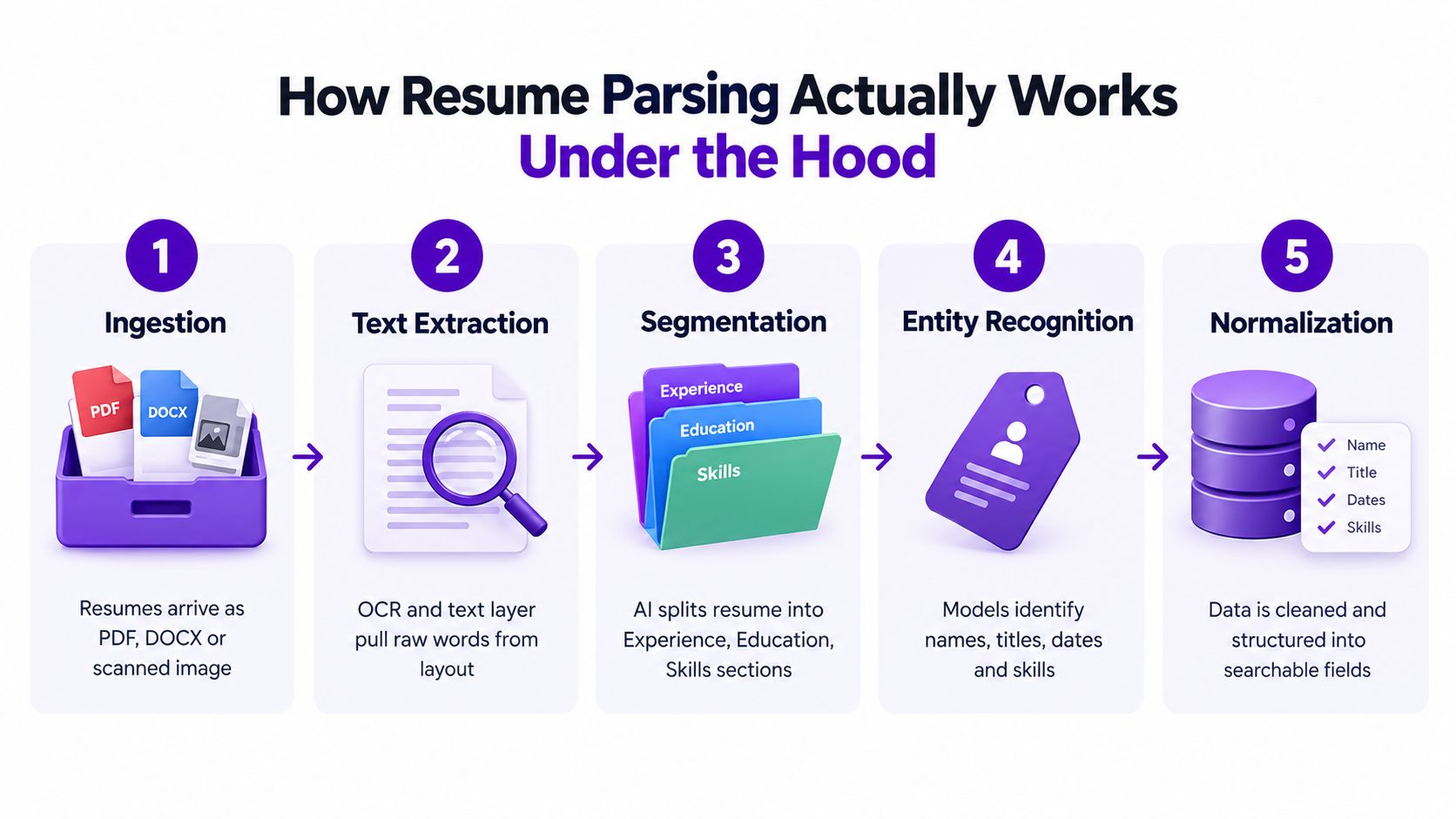
Think of the parser as a filing clerk who first opens the envelope, then sorts every line into the right drawer. A resume can arrive as a PDF, a DOCX file, or even a scanned image. If the file is image-based, OCR steps in first so the words become machine-readable text.
From raw file to structured sections
Next comes segmentation. The system tries to figure out where Experience, Education, Skills, and other sections begin and end by using headings, spacing, font clues, and layout patterns. That matters because the parser needs to know whether “Python” belongs in a skills section, a project description, or a line of work history.
Entity extraction comes after that. The system tags specific pieces of information, such as names, companies, job titles, dates, and degrees. The more modern systems blend dictionaries, rules, and language models so they can cope with unusual phrasing rather than only matching exact keywords.
Then the parser normalizes the data. “Sr. Software Engineer” can be converted into a more standard title, and “Jan 2020 to Present” becomes a structured date range the database can compare. A useful way to see this in a broader document-processing context is AI document review software, because the same core idea applies, extract meaning, then structure it for later use.
A parser is only useful once the output is searchable. Until then, it's just a smarter way to read text.
Finally, the structured record lands in the ATS or job platform database. That's what powers filters, matching, and search. If you want the visual version, the embedded video below shows the logic in motion.
Four Generations of Parsing and Where Each One Breaks
Resume parsing has gone through four broad generations, and each one still shows up in real products. The differences matter because a tool that feels “smart” may only be smart in one narrow way. What looks like one feature is often a stack of methods with very different failure modes.
What the four generations do well
| Generation | Core Method | Accuracy Range | Key Strength | Main Weakness |
|---|---|---|---|---|
| Keyword and regex parsing | Pattern matching | Lower on messy resumes, stronger on very clean text | Fast and cheap | Breaks on synonyms, reordered sections, and creative titles |
| Rule-based and template-driven parsing | Hand-built rules and layouts | About 85% to 95% on clean resumes, according to the supplied industry summary | Solid on standard formats | Falls apart on unconventional designs and non-English content |
| Classical NLP and statistical models | Entity recognition and taxonomies | Commonly 85% to 94% in survey-level results for parsing and related extraction tasks | Better on messy inputs | Still struggles with context-heavy phrasing |
| LLM-powered semantic parsing | Context-aware extraction | 95%+ accuracy is reported in the supplied industry summary | Handles nuance and multilingual layouts better | Adds latency, privacy, and hallucination risk |
The first generation is basically a brittle search pattern. If a resume uses the wrong title or hides details in a creative layout, it can miss the field entirely. The second generation improves structure, but only as long as the resume looks like the templates it was trained around.
The third generation adds language understanding. It can often identify roles and skills more reliably because it knows that “managed a team” and “led a small group” can express similar meaning. But context still trips it up when wording is unconventional or ironic.
The fourth generation tries to read more like a person would. It can infer seniority, normalize fuzzy job titles, and cope better with multilingual text, but it also introduces new risks. If a model over-infers, it may produce confident but wrong output, which is a different kind of problem than a simple missed keyword.
The most realistic takeaway is simple. Most production systems blend these generations rather than choose one. A vendor might use rules for obvious fields, NLP for extraction, and semantic models for edge cases, because no single method wins everywhere.
Why Average Accuracy Is a Misleading Number
A single accuracy score makes parsing sound cleaner than it is. It suggests a resume either “works” or “doesn't work,” but real parsing performance is uneven by field and by format. A system can look strong on average while still failing exactly where candidates and recruiters care most.
Field reliability is uneven
Names, emails, and straightforward work history usually parse better than more ambiguous fields. Skills sections, total years of experience, education majors, and certifications are harder because they require context and normalization, not just text detection. Pronouns, addresses, and language proficiency often perform worse still because they're either inconsistently stated or embedded in a layout the parser doesn't understand well.
| Field or Resume Type | Standard Resume | Non-Standard Layout | Multilingual Resume |
|---|---|---|---|
| Name and email | Usually strong | Can break if tucked into graphics or headers | Can be misread if typography is unusual |
| Work history | Usually strong | Drops when columns or tables are used | Loses reliability when roles appear in mixed languages |
| Skills | Often solid, but not perfect | Weakens in dense layouts | Can lose one language or the other |
| Certifications and education | Moderate to strong | Declines when formatting gets creative | Can confuse degree names and institutions |
| Hard-to-parse resumes | Better than average | Weakest zone | Weakest zone |
The long-tail failures are where the damage happens. Tables, multi-column designs, header images, icon-only contact lines, and text inside graphics all raise the odds that the parser misses something important. Career changers can also get hurt when a title reads one way to a human and another way to software, especially if the wording is unconventional.
A bilingual resume creates another problem. If the parser is tuned to one language or template family, it may capture only part of the content and ignore the rest. That is why “average accuracy” can be a comfort metric rather than a useful one.
Check the edge cases first: if your contact line, latest role, and main skills don't survive a plain-text paste, the parser probably won't preserve them either.
For job seekers, the practical lesson is blunt. The more your resume looks like a brochure, the more likely software is to misread it. For recruiters, the lesson is just as blunt, because the candidates most likely to be missed are often the ones with non-standard, scanned, or multilingual resumes.
How to Write a Resume That Parses Cleanly
The best parsing advice sounds boring because boring is exactly what software understands best. Clean structure beats visual flair when the goal is machine readability. If you want your resume to survive the first pass, make it easy for the parser to find the obvious things.
Start with structure, then tighten the wording
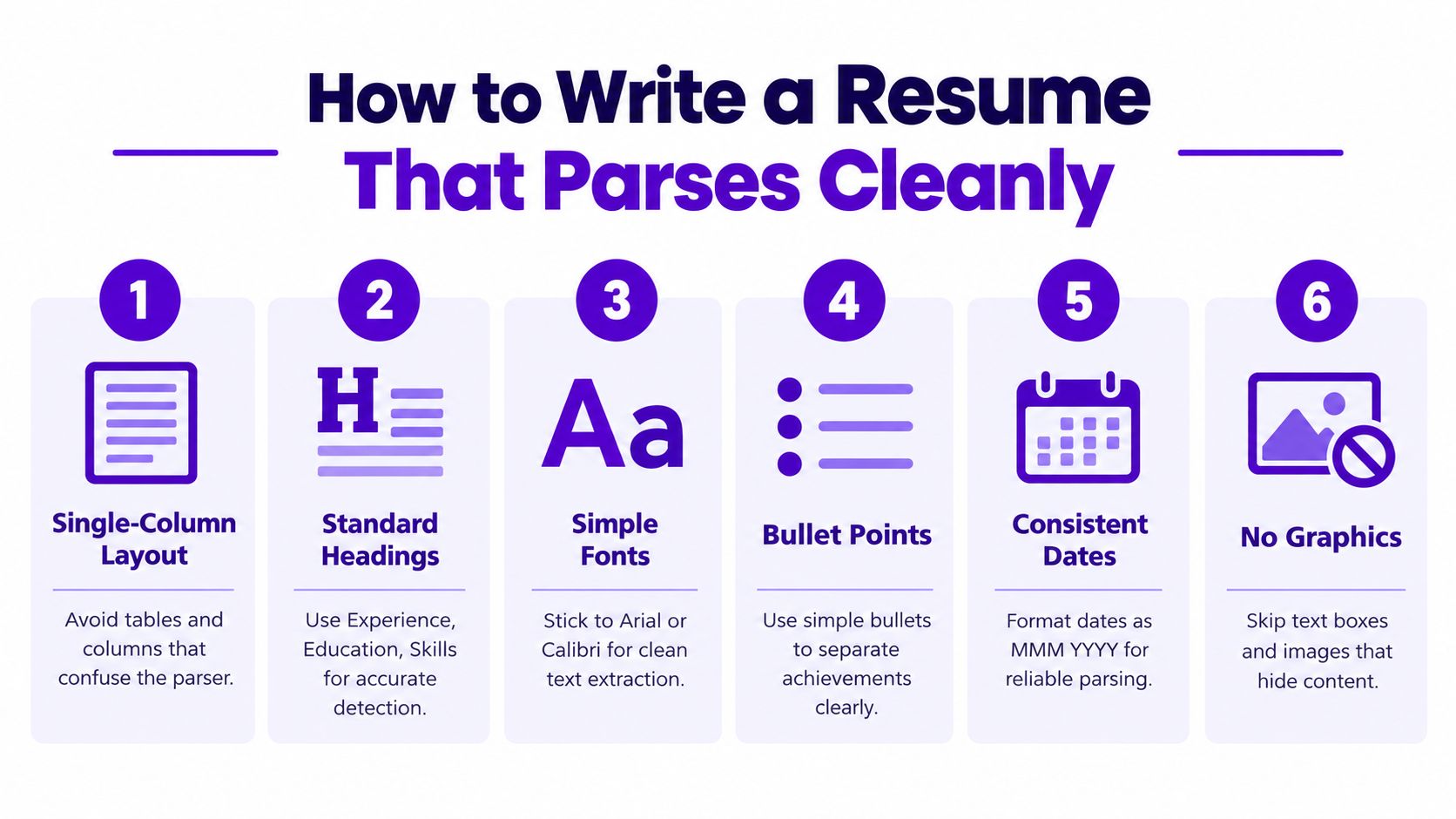
Use a single-column layout. Tables, sidebars, and text boxes may look polished, but they often confuse field detection. Standard headings such as Experience, Education, and Skills give the parser obvious anchors, while plain text contact lines help it read your name, phone, and email without guessing.
The wording matters too. If your title is creative, pair it with a conventional equivalent, such as “Growth Marketer, Account Manager track.” Spell out acronyms the first time you use them, and keep key skills in a dedicated section instead of burying them in dense paragraphs. Dates should be written consistently, ideally in a full month and year format, because that's easier for software to map into a timeline.
The ATS keyword guide is useful if you want to align wording with the job description without stuffing the page with repeated terms. That matters because parsers and recruiters both respond better when skills are explicit rather than implied.
- Use one column: Keep the reading path simple so the parser doesn't have to decide between competing text blocks.
- Use standard headings: The software can't tag what it can't recognize.
- Use real text, not images: Contact details inside icons or screenshots often get lost.
- Keep dates consistent: Mixed date styles create avoidable extraction errors.
- Avoid text-heavy graphics: Infographics are great for humans, but risky for parsing.
- Test the output: Paste the resume into plain text and see what survives.
If you want a quick self-test, strip the formatting and read the plain-text version. If your latest role, dates, skills, and contact info still make sense there, you're in much better shape.
Where Parsed Data Goes in a Modern Job Search Workflow
Once a resume is parsed well, it stops being a static file and starts behaving like a profile. In tools such as Eztrackr, a candidate can upload a resume once, then reuse the structured data across saved jobs, application drafts, and profile-based workflows. That avoids the old routine of typing the same work history into every form.
The flow is straightforward. The parser extracts the profile, the system stores it as structured fields, and later features can reuse those fields for auto-fill and tracking. A candidate can open a saved role, match the extracted skills against the posting, and generate a cover letter that references actual experience instead of generic placeholders.
A cleaner path from upload to application
That same structure also helps with organization. Because the data is tagged, a job seeker can search by seniority, technology stack, or role type instead of scrolling through a flat list. Recruiters using similar structured fields can shortlist faster because the system is comparing like with like.
If you're comparing tools that handle job-board collection and application tracking, this best job scraper overview is a useful reference for the broader ecosystem around collection and automation. Eztrackr's own job board integration notes show how parsed data can move from a saved posting into a tracked application without re-entering everything by hand.
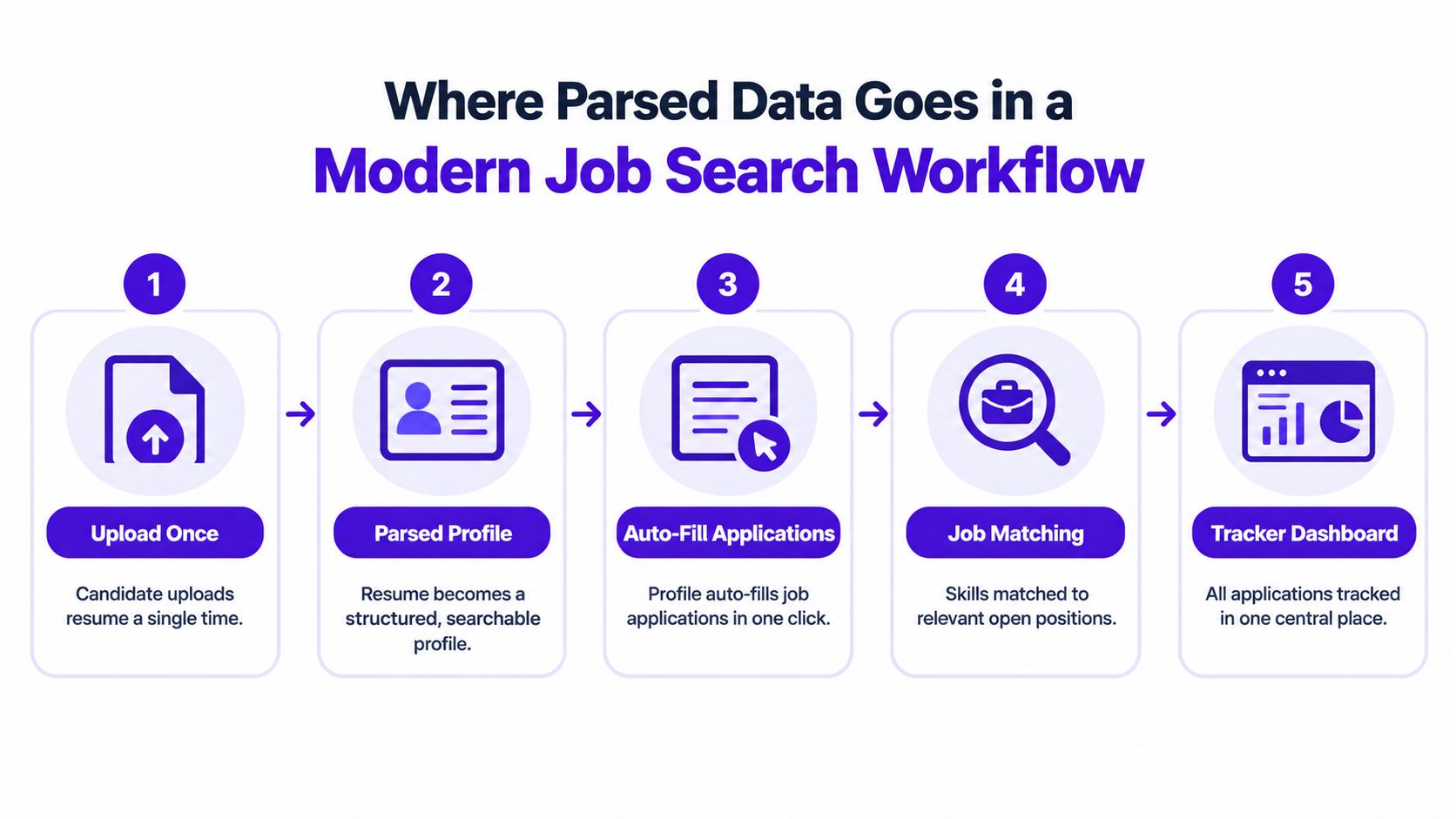
The big shift is not just speed. It's continuity. The same parsed profile can support personalized applications, status tracking, and later interview prep without making you rebuild the same data each time.
Benefits, Bias, and the Fairness Trade-Offs
Parsing exists because manual screening is slow and inconsistent. Structured data helps recruiters review candidates faster, search by skills, and work from the same fields instead of comparing every resume by eye. It can also reduce the need for candidates to rely on personal formatting tricks or insider knowledge just to get noticed.
But the trade-offs are real. If a parser misreads a title, a skill, or a date, a qualified candidate can disappear from the shortlist without ever knowing why. The risk isn't only technical, it's procedural, because the system can reproduce the same kinds of exclusion hiring teams were trying to reduce.
Speed helps, but so does oversight
Bias can re-enter the process when systems infer names, addresses, or other personal details that a team meant to ignore. That's especially sensitive when parsers are used as a first gate and the human reviewer only sees the cleaned record, not the original context. Candidates also rarely see how their data is scored or stored, which leaves consent fuzzy in practice even when it exists on paper.
Fairness starts with visibility: low-confidence fields, reviewable scores, and human override buttons are more useful than a flashy accuracy claim.
A practical example is the candidate whose job title is read in the wrong context. A label that a human understands as one function can get mapped to another, and the screening result changes with it. The fix isn't to abandon parsing, it's to demand systems that surface uncertainty instead of hiding it.
That means the most responsible setups don't just auto-decide. They flag weak extractions, preserve the original text, and let humans check the edge cases before rejection becomes final.
Future Trends and the Privacy Questions Coming With Them
Parsing is moving toward systems that understand layout and context more like a human does. That includes semantic models that interpret meaning rather than only keywords, and multimodal systems that read the visual structure of a page alongside the text. There's also growing interest in keeping sensitive resume data off vendor servers through on-device or more privacy-preserving approaches.
The next shift is transparency. Some parsers now return a confidence score beside each field, which matters because one weak extraction shouldn't carry the same weight as a strong one. Platforms like Eztrackr also point toward a more candidate-visible workflow, where people can inspect and edit what was extracted before it gets used elsewhere, instead of discovering mistakes after the fact. For a broader look at AI hiring workflow questions, this job and hire AI guide is worth reading alongside the parsing topic.
What to ask before you trust the output
The policy questions are getting sharper. GDPR-style explanation rights, bias audits, and candidate consent dashboards are all pushing hiring teams toward more accountable tooling. The open question is how far inference should go, especially when a parser starts guessing at fit, personality, or other traits that weren't explicitly written down.
For job seekers, the most useful move is simple. Ask for a copy of the parsed profile and compare it with the original resume like a recruiter would. If the extracted version is wrong, you've found a problem before it costs you an interview.
If you're trying to organize applications, protect your resume data, and make sure parsing doesn't work against you, Eztrackr gives you a structured way to save jobs, parse resume details, and track what happens next. It's a practical place to see how parsed data, document handling, and application tracking fit together in one workflow.