How to Make a One Page Resume: Step-by-Step Guide 2026
Recruiters in a 2012 eye-tracking study by TheLadders, with 30 professional recruiters over 10 weeks, spent an average of approximately 6 seconds on a resume before an initial decision, according to the TheLadders eye-tracking study. A later discussion of the 2018 follow-up put that first look at 7.4 seconds, and it didn't fully disclose sample size, recruiter experience, or job types. Treat those figures as a reason to prioritize, not as a stopwatch. How to make a one page resume is a career-stage decision about what earns the page, not a rule that every history must shrink.
Which Content Earns a Place on One Page
A one-page resume is a first-pass argument, not a compressed autobiography. Your name, target role, strongest qualification, and best measurable results have to sit in the upper half, with clear labels, short bullets, and real white space. Anything a recruiter can't use for this job is taking a line from something they can.
The test for every line is simple. Does this strengthen the case for this specific role? If the answer is no, it goes. I would cut in this order: a generic objective, duties with no outcome, skills repeated in two sections, then older detail that doesn't change the match.
| Career stage | Keep on the page | Cut or shorten | Summary length |
|---|---|---|---|
| Student or recent graduate | Education, coursework tied to the role, projects, internships, part-time jobs with transferable duties | Objective statements, high school details, hobbies unless relevant | 2-3 lines or none |
| Early career (2-5 years) | Last two or three roles, three to four bullets each, core skills | Duties older than about 8 years, repeated bullets across roles | 2-3 lines |
| Mid-career (5-10 years) | Last 10-15 years, leadership scope, measurable results, current tools | Tasks without outcomes, obsolete tools, older roles listed in full | 3-4 lines |
| Senior or specialist (10+ years) | Recent 10-15 years, top achievements, certifications, selected projects | Early roles beyond 15 years, exhaustive project lists | 3-4 lines |
| Career changer | Transferable skills, relevant projects, certifications, related volunteer work | Unrelated job duties, full history of the old field | 2-3 lines |
Students usually win with education, projects, and transferable part-time work. Early-career candidates win with the last two or three roles. Mid-career and senior people win with recent scope, results, and current tools, not a full archive. Career changers win by keeping transferable proof and dropping the old field's daily duties.
Self-audit: List every line you would cut. Keep any line whose removal makes the story for the target job weaker.
A bullet should show an action and a result, such as "reduced processing time by 18%," not "responsible for process improvement." That 18% is an illustration of the shape, not a benchmark you need to hit.
How to Build Your One-Page Resume in Order
Build from the posting, not from a generic career dump. University of Maryland's resume guide recommends mirroring both the full term and the acronym, such as User Experience (UX), because search looks for both. University of Maryland and the University of Virginia also warn that tables, text boxes, graphics, columns, headers, and footers can break parsing or hide contact details.
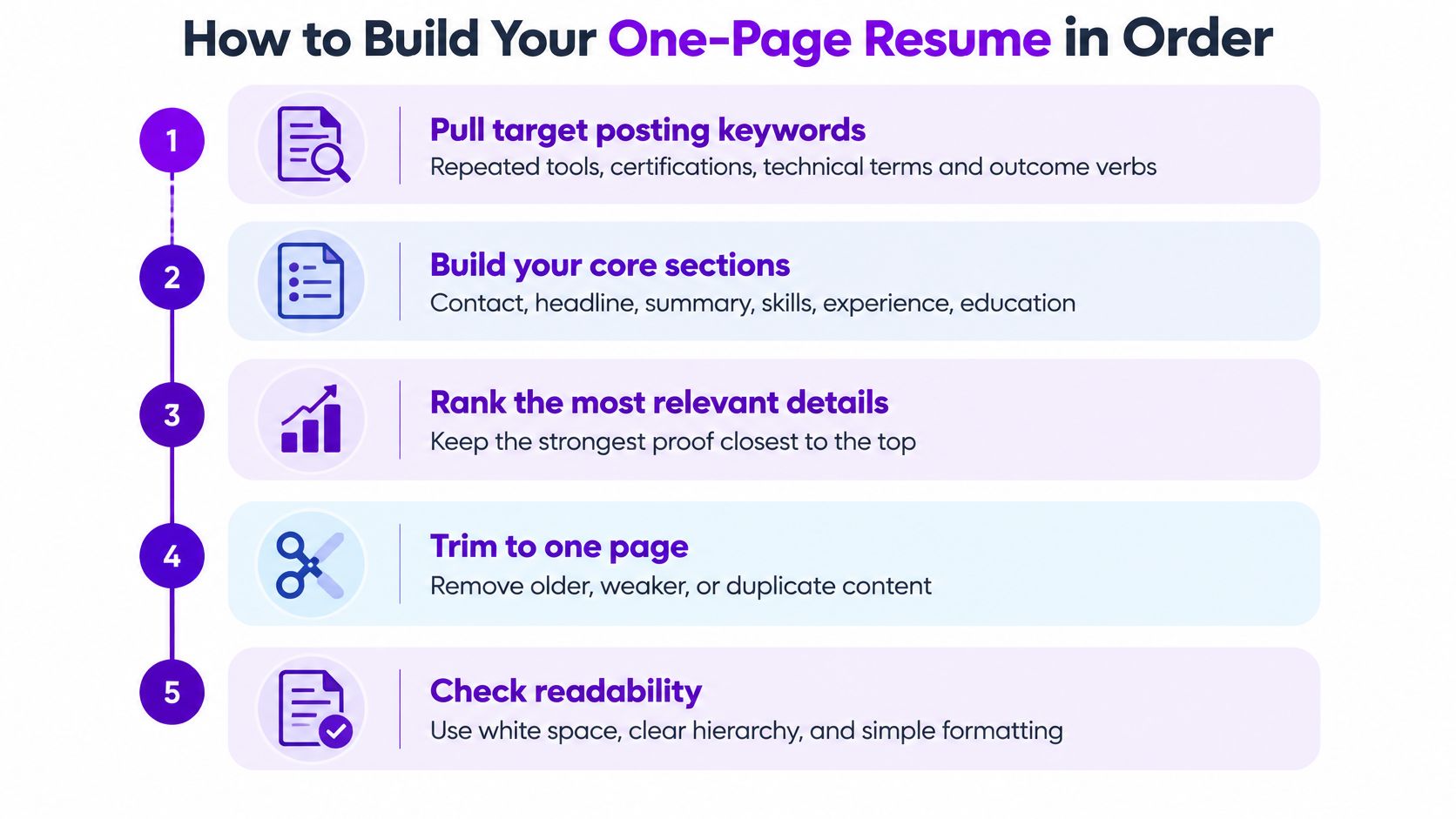
- Pull the posting's language first. Copy the repeated tools, certifications, technical terms, and outcome verbs into a short list, and write each acronym beside the full term. The slip is grabbing every phrase, including ones you haven't done.
- Write the header in the body, not a running header. Name, city, phone, email, and the target job title belong on the first lines. A title that doesn't match the posting wastes the one line people see.
- Draft a two- or three-line professional summary. Name the role, years of relevant experience, and one proven strength. If the summary restates bullet one, delete one of them.
- Write experience newest first. Use headings such as Professional Summary, Work Experience, Education, and Skills. Give the current role three to five one-line bullets in the pattern action + method or tool + measurable result, and older roles one or two. Drop duties that don't support the target job.
- Add skills, education, and certifications under those standard labels. A skills list that copies the bullets word for word burns lines you needed for proof.
- Trim lowest-impact bullets until the page holds. The strongest evidence stays in the top half. If you're cutting a result to keep a task, you've trimmed backward.
- Export, then test the file. Use DOCX when the employer doesn't specify a format, and PDF only when they accept it. Select all, paste into a plain text editor, and confirm reading order, dates, symbols, and section labels survived.
Use one left-aligned column, a standard font around 10 to 12 pt, margins of 0.5 to 1 inch, and ordinary bullets. A finished page shows the name and target role at once, two or three evidence-backed lines near the top, and white space between sections.
Writing Bullets Recruiters Scan in Seconds
“Responsible for weekly reporting” repeats a duty without showing its value. “Cut weekly reporting time from 6 hours to 90 minutes by automating data pulls in Excel and SQL” shows what changed and how. On a one-page resume, that difference matters: each bullet should earn the space it takes.
Use action + method or tool + measurable result. For a support or sales role, “Handled customer calls” becomes “Resolved 40 billing tickets a day in Zendesk and cut repeat contacts by 12%.” If revenue was not tracked, use another relevant measure, such as volume handled, time saved, error rate, team size, customers served, or the share of a backlog cleared. Social Security Administration resume guidance recommends using numbers, percentages, timeframes, and savings to make work impact clear.
Length and where the words go
Aim for one line per bullet, with two as the limit, and keep each under about 20 words. Read it aloud. If it sounds like a clear description of work, keep it. If it echoes the job posting without evidence, rewrite it.
Use exact job terms in the headline or summary, skills section, and bullets that reflect real experience. Each term usually needs to appear only once or twice. Repeating every phrase from the posting takes space from proof and can make the resume feel less credible.
The U.S. Social Security Administration's Work Incentives Planning and Assistance program advises against pictures, tables, columns, and text boxes because they can interfere with applicant tracking system parsing. It also recommends readable fonts and a PDF or DOCX file rather than an image. Standard headings such as Experience, Education, and Skills make the document easier for both software and people to scan.
A resume bullet point generator can help shape a first draft, but check every detail before using it. Keep only results you can support, and do not claim a number you cannot explain. On a one-page resume, a concise, accurate bullet is more useful than a polished line that overstates your contribution.
Layout Settings That Keep Your Resume ATS-Readable
A two-column template with icons may look polished, but a parser can scramble its text. Skills arranged in a table can turn into a jumble, too. Build hierarchy with bold headings, consistent spacing, and one left-aligned column. When space gets tight, prioritize readable type and clear sections over squeezing in every detail.
A hiring simulation involving 482 professionals and 7,712 resumes found that two-page resumes were preferred 2.3 times more often than comparable one-page resumes and scored higher on quality. The study was vendor-funded, so treat the finding cautiously, as summarized by Mirrai Careers. Use settings that make the content easy to parse and scan, rather than shrinking it until it fits.
| Element | Safe choice | Risky choice |
|---|---|---|
| Font | Calibri, Arial, Helvetica, Georgia, or Times New Roman | Decorative or script fonts |
| Body text size | 10-12 pt | Below 10 pt to squeeze content in |
| Margins | 0.5-1 inch on all sides | Under 0.5 inch to fit more lines |
| Layout | One column, left-aligned text | Two-column sidebars, text boxes, side-by-side blocks |
| Tables | Plain bulleted text | Tables for skills grids or timelines |
| Contact details | First lines of the body text | Header or footer areas |
| Graphics and photos | None | Icons, charts, logos, photos |
| File format | DOCX by default, PDF only when accepted | GIF, PNG, JPG, or TXT |
Put your contact details in the document body, not a header or footer, where some systems may miss them. For U.S. applications, a photo is usually a poor trade: it takes space and does not strengthen the evidence for your fit. If a role specifically expects one, consult professional photo specs for resumes, but keep the image off the resume you submit through an applicant tracking system.
If the page needs columns or icons to look finished, strengthen the content hierarchy first. Clarify the summary and make each bullet earn its space.
For a practical structure check, use this guide to create an ATS-friendly resume. Compare your draft against a single column, standard section labels, and readable body text before sending it.
When a Second Page Is Justified
One page is the right default for students and early-career applicants. It is a bad default when relevant proof won't fit without lying by omission.
Evidence summarized from recruiter interviews, collected in this resume evidence note, found skimmable structure important to 92% of respondents, relevant experience and skills to 88%, natural keyword use to 76%, short bullets to 72%, and simple consistent formatting to 68%. Only 8% of those interviewed recruiters had configured content thresholds, so the fear that one missing phrase triggers an automatic reject is likely overstated. Parsing trouble tracks more often to tables, text boxes, images, columns, and contact details in headers or footers.
Review time points the same way. In 2024, recruiters spent an average of 2 minutes 24 seconds on one-page resumes and 4 minutes 5 seconds on two-page resumes, figures ResuFit reported from a ResumeGo study.
Keep page two only if it adds role-specific evidence, measurable outcomes, certifications, leadership scope, or relevant projects. If deleting it weakens the match, keep it. Short is not the same as focused. Cutting older but transferable experience can hurt a career changer. Keeping irrelevant detail creates clutter at any length.
If page two stays, put your name and a page number in the body of that page, not a running header. Start page two on a role boundary so one job's bullets aren't split, and leave the summary on page one as the anchor.
One-Page Examples for Students, Career Changers and Senior Staff
The same cut looks different by stage. These three files all fit one page, and each lost something on purpose.
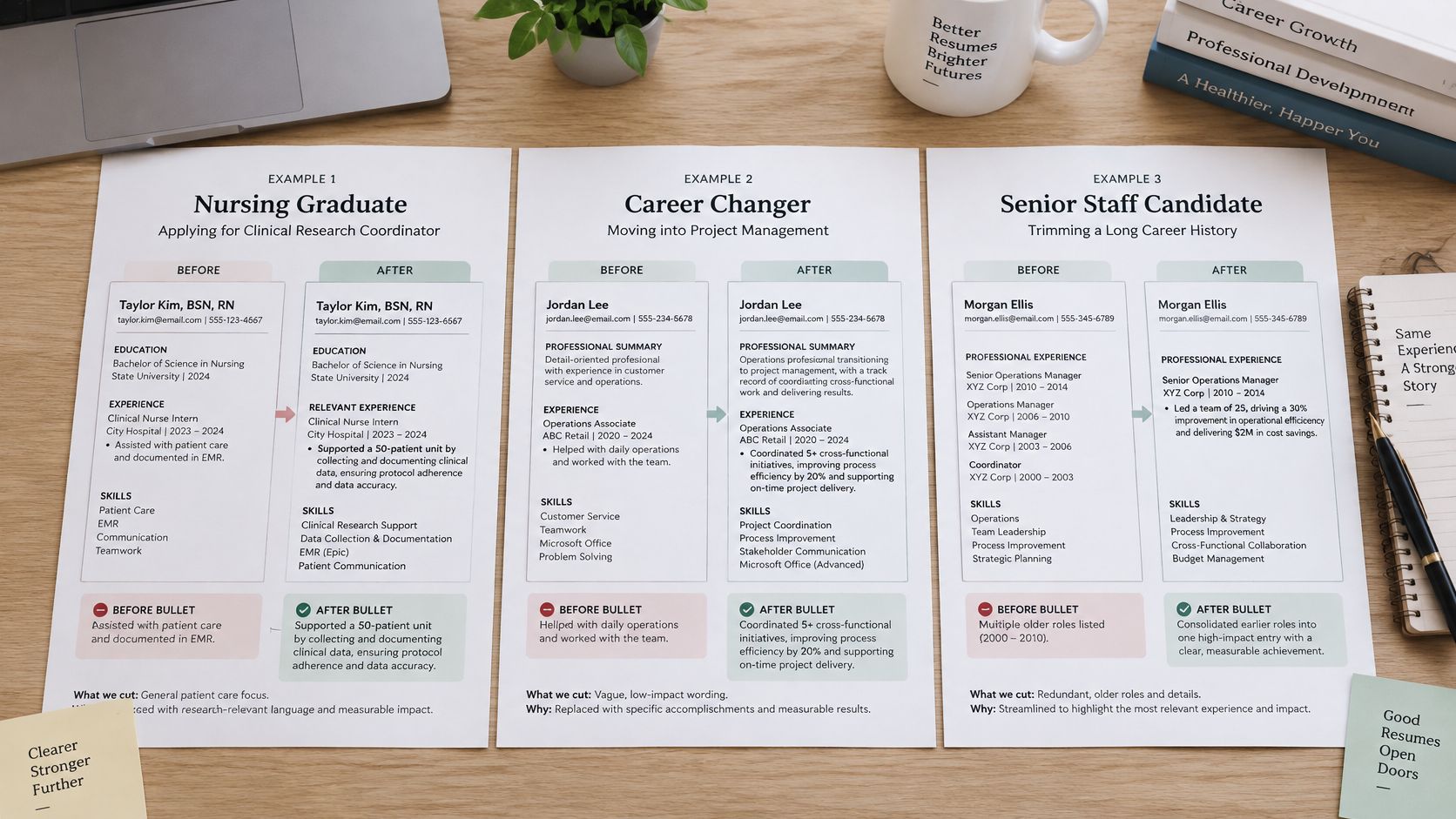
Nursing graduate, clinical research coordinator
The target is a coordinator role, so education and a capstone study lead. The heavy line is the capstone, not the job title.
- Before: "Participated in campus activities and volunteered at health fairs throughout high school."
- After: "Ran a 40-participant capstone on medication adherence and logged consent and visit data in REDCap."
- Cut: High school activities. A part-time pharmacy technician job stays, narrowed to patient-record duties.
Logistics coordinator, nine years, moving into operations analytics
The summary has to name the analytics tools. The last ten years stay, with outcomes such as shipment accuracy or cost per order. A 2011 warehouse role shrinks to one line.
- Before: "Responsible for warehouse operations, inventory counts, and supervising seasonal staff since 2011."
- After: "Raised shipment accuracy to 99.2% and cut cost per order 8% by rebuilding the weekly forecast in Excel and SQL."
- Cut: The full early warehouse narrative. For the summary that has to carry a field switch, a resume summary for changing careers is a useful pattern to copy in structure, not in wording.
Software engineer, fourteen years, staff role
Three flagship projects with business impact, the certifications, and the team-lead scope stay. Older jobs become one line each. The line that should carry the page is the project with a user or revenue result, not a list of languages.
- Before: "Worked on numerous services, owned on-call, and contributed to many internal tools across several teams."
- After: "Led a team of six to rebuild checkout, cutting p95 latency 30% and lifting completed orders 4%."
- Cut: The exhaustive project list. Early roles beyond the recent window stay as one line so the career doesn't look like it started last year.
A short walkthrough of the same trade-off, what to keep when the page is already full, is worth ten minutes before you start deleting:
Check Your One-Page Draft Before You Apply
Review the exported file, not the draft in your editor. Check that the page makes your case clearly and keeps only details relevant to the role.
- Read it aloud. The name, target role, and strongest result should register quickly. If they do not, move them higher.
- Check the top third against the posting. Work core keywords naturally into the summary and first bullets rather than placing them in a block at the bottom.
- Verify headings and contact details. Use clear labels such as Experience, Education, and Skills. Keep your phone and email near the top.
- Remove lines that do not support your fit. Start with the lowest-impact bullet. A review of common resume mistakes can help catch objectives and repeated skills.
- Choose the length based on evidence. Keep one page when each remaining line strengthens your application. Use a second page when it holds relevant proof that would otherwise be lost, not leftover history.
Before applying, audit your online presence before applying. Public profiles that conflict with your resume can undermine an otherwise clear application.
If you want an outside read, Eztrackr's Resume Scorer evaluates format, content, impact, and relevance, with a breakdown of strengths and areas for improvement. The page-count decision is yours.
Eztrackr's Resume Builder can tailor your resume to a job with one click, matching keywords and rewriting bullets for an ATS-ready result. Review and adjust the changes before downloading the PDF. Creating a resume is free, and you can upload an existing resume or start from scratch. Get started at Eztrackr.