How to List Dates on a Resume for ATS and Recruiters
Let's get this out of the way first: yes, you absolutely have to put dates on your resume. For both your work experience and education, they're non-negotiable.
Dates give recruiters and the Applicant Tracking Systems (ATS) they use a clear timeline of your career path. Without them, your resume is just a list of jobs with no story.
Why Dates on Your Resume Are a Critical First Impression

Here's the hard truth—recruiters are scanning, not reading, when your resume first lands in front of them. The dates you list instantly create a career story that either makes them lean in or toss your application in the 'no' pile.
This first impression is everything, especially when a single corporate job posting attracts an average of 250 applicants. With that kind of volume, recruiters spend just 7.4 seconds on that initial scan. Clear, consistent dates are your ticket to surviving that first cut.
The Recruiter and ATS Perspective
Think of your resume's timeline as its backbone. For an ATS, those dates are just data points it uses to calculate your total years of experience. If a job requires five years of project management experience, the software scans your dates to see if you meet that basic requirement. Missing or messy dates can get you automatically rejected before a human ever sees your name.
For the human recruiter, that timeline tells a richer story. They're looking for things like:
- Career Progression: Do your dates show a logical path of growth and increasing responsibility?
- Stability: Are you sticking around and making an impact, or does it look like you're job-hopping?
- Relevance: How recent is your most relevant experience? Is it from last year or a decade ago?
A well-formatted timeline proactively answers a recruiter’s most pressing questions. It signals professionalism, attention to detail, and a clear understanding of what employers look for in resumes, building immediate trust. To dive deeper, check out our guide on what employers look for in resumes.
Resume Date Formatting Quick Guide
Before we dive into the nitty-gritty, here's a quick cheat sheet. This table breaks down the best ways to format dates to keep your resume clear, professional, and ready for both human eyes and scanning software.
| Scenario | Recommended Format | Why It Works |
|---|---|---|
| Standard Roles | Month Year – Month Year (e.g., Jan 2020 – Aug 2022) | This is the universal standard. It's easy for both ATS and recruiters to read and provides all the necessary detail without clutter. |
| Current Role | Month Year – Present (e.g., Sep 2022 – Present) | "Present" is the clearest, most professional term. It avoids ambiguity and is universally understood by all systems. |
| Minimizing Gaps | Year – Year (e.g., 2019 – 2021) | If you have a short gap (a few months), this format can smooth over the timeline without being dishonest. Use it consistently if you go this route. |
| Short-Term Projects | Month Year – Month Year or just Year | For freelance or contract work, stick to the standard format. If it was a very short project within one year, just listing the year (e.g., 2023) is fine. |
| Very Old Experience | No Dates (for roles 10-15+ years ago) | After a certain point, the specific dates matter less than the experience itself. Removing them keeps the focus on your recent, relevant accomplishments. |
Following these simple guidelines ensures your timeline tells the right story at a glance. It’s a small detail that makes a huge difference.
The Best Ways to Format Your Resume Dates
When it comes to putting dates on your resume, clarity and consistency are your two best friends. There's a reason you see the Month Year – Month Year format so often. Think "January 2021 – May 2023." It's the undisputed gold standard.
This format just works. It leaves zero room for a recruiter to guess how long you were in a role. More importantly, those Applicant Tracking Systems (ATS) that scan your resume first are programmed to understand this exact structure. If you get creative and use only years for recent jobs, you risk the software miscalculating your experience or even flagging your application as incomplete.
The Gold Standard for Work Experience
For any job you've held in the last 10 to 15 years, just stick to the month-and-year format. It's the simple, correct way to give hiring managers the detail they're looking for.
Here’s what that looks like on the page:
- For a completed role:
Oct 2020 – Dec 2023 - For your current position:
Jan 2024 – Present
Always, always use "Present" for your current job. I've seen people use "Current" or just leave the end date blank, but "Present" is the most professional and, you guessed it, the most ATS-friendly term out there.
Pro Tip: You can totally spell out the full month (October), but using a standard three-letter abbreviation (Oct) saves valuable space while keeping things perfectly clear. The trick is to pick one style and stick with it all the way down your resume.
Handling Older Roles and Education Dates
Now, what about that job from way back when? As you go further back in your career, the nitty-gritty details matter a lot less.
For any role you held more than 15 years ago, it’s a smart move to switch to a Year – Year format (like 2005 – 2008). This keeps the focus on your recent, more relevant accomplishments and can help you sidestep any potential age bias.
The same logic applies to your education. Unless you just graduated, nobody needs the month you received your diploma.
- Education Example:
Bachelor of Science in Marketing, State University, 2016 - Certification Example:
Project Management Professional (PMP) Certification, 2021
International Date Formatting
Applying for a job in another country? You've got to be mindful of how they write their dates. In the US, we're all about MM/DD/YYYY, but much of the rest of the world uses DD/MM/YYYY.
To avoid any possible mix-up, your safest bet is to always write out or abbreviate the month. Something like 25 June 2024 or 25 Jun 2024 is universally understood and removes all guesswork. If you want to go deeper on this, check out our complete resume formatting guidelines to get every section looking perfect.
In a market this competitive, tiny details like date formatting can make a surprising difference. For anyone using a tool like Eztrackr's resume builder, getting the months and years right is critical. Competition is fierce—graduate roles saw a staggering 140 applications per position in 2023-24, which is a 59% increase from the year before. You can read more on these trends in this detailed statistical report.
How to Handle Gaps and Short-Term Roles
Let’s be honest: an employment gap on your resume can feel like a glaring red flag. But it absolutely doesn't have to be a dealbreaker. Instead of trying to sweep it under the rug, the best move is to frame it with confidence.
Whether you were taking courses, caring for family, or traveling the world, those experiences are part of your professional story. It's all about controlling the narrative. A smart date format or a quick, well-worded explanation can turn a potential negative into a story of resilience and proactive career management. Recruiters are human; they get that life happens. Your job is to show them what you did with that time.
Addressing Employment Gaps Strategically
Got a gap of a few months? The easiest fix is to use a Year – Year format for your dates. This can smooth over the timeline without being the least bit dishonest. For instance, if you left a job in November 2022 and started your next one in March 2023, listing the roles as 2020 – 2022 and 2023 – Present is perfectly fine. It keeps the focus on your experience, not the short break in between.
For longer gaps—think a year or more—it’s usually best to address it head-on, but keep it brief. A single, concise line is all it takes to explain the time away.
- For Professional Development:
2022 – 2023: Full-time professional development, completed certifications in Agile and Scrum. - For Personal Leave:
2021 – 2022: Sabbatical for family care and international travel.
This simple line fills the void and answers the recruiter’s question before they even have to ask. It shows you were intentional with your time, turning an empty space into a period of purpose.
Don't over-explain or apologize for a gap. A brief, positive framing is all you need to keep your career timeline moving forward. The goal is to acknowledge it and pivot back to your relevant skills.
Consolidating Short-Term and Contract Work
"Job-hopping" can make some hiring managers nervous, but a string of short-term contracts or freelance gigs is a completely different ballgame. The trick is to present this work as a cohesive portfolio, not a jumbled list of one-off jobs.
Group similar projects under a single, powerful heading.
Take a look at this approach:
Consultant & Freelance Web Developer | 2021 – 2023
- Partnered with three e-commerce startups to build and launch their Shopify storefronts, increasing client sales by an average of 30% post-launch.
- Developed a custom WordPress theme for a B2B SaaS company, improving site speed and user engagement metrics.
- Managed ongoing site maintenance and feature updates for a portfolio of five small business clients.
See how that works? It reframes what could look like unstable employment into a clear story of consistent, diverse experience as a self-employed pro. This strategy is a lifesaver for career changers, and there are some great resume templates for career changers designed to highlight this kind of experience.
This handy decision tree shows exactly how to pick the right date format depending on the role's age.
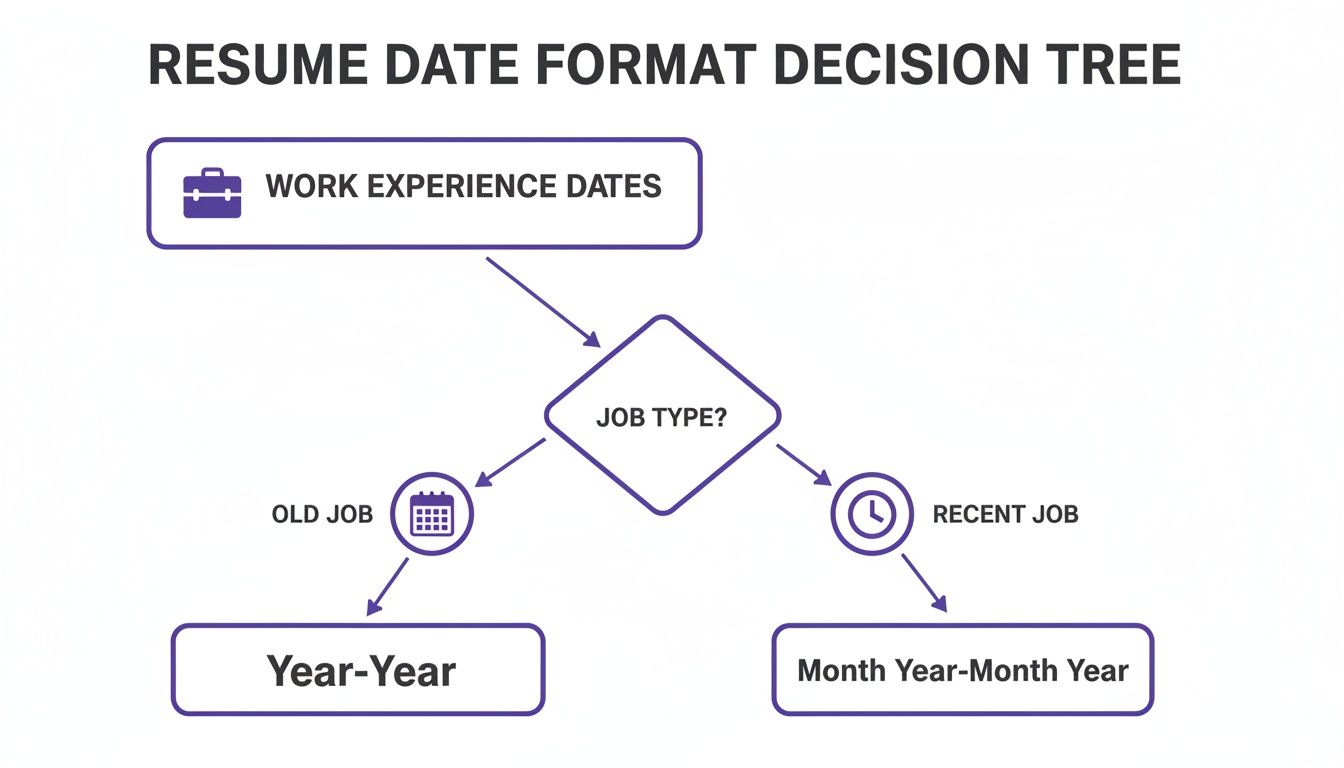
As the visual shows, sticking to Month Year – Month Year for your recent roles is essential for clarity. For older experience, simplifying to Year – Year is a smart, strategic move that keeps the focus where it matters most.
Here’s a quick-glance table to help you navigate some of the trickiest timeline situations you might face.
Handling Challenging Timelines on Your Resume
| Situation | Problematic Approach | Strategic Solution |
|---|---|---|
| A 4-month employment gap | Leaving a blank space on the timeline or trying to stretch dates. | Use a Year – Year format to de-emphasize the short gap between roles. |
| A series of short-term contracts | Listing each 3-month contract as a separate job, looking like a job-hopper. | Group all related contracts under one title like "Freelance Consultant" with a single date range. |
| A 2-year gap for personal reasons | Omitting the period entirely, creating a huge, unexplained hole in your resume. | Add a single line explaining the time, e.g., "Sabbatical for family care," and focus on your readiness to return. |
| Getting laid off after 6 months | Trying to hide the role or fudging the end date. | List the role honestly with its accomplishments. If asked, explain the layoff was due to restructuring. |
Ultimately, honesty and strategy are your best friends. By presenting these periods thoughtfully, you maintain control of your career narrative and show employers that you’re a resilient and capable professional.
Understanding How ATS and Recruiters Read Your Timeline

So, you’ve just hit 'submit' on that dream job application. What happens next? Your resume embarks on a two-stage journey. First, it lands in an Applicant Tracking System (ATS), the software that acts as the initial digital gatekeeper. Only if it makes the cut does it get passed along to a real, live human recruiter.
Knowing what both the software and the person are looking for in your dates is the key to getting past that first filter. They’re scanning for different things, but a clear, consistent timeline is non-negotiable for both.
First Up: How the ATS Parses Your Dates
Think of an ATS as a data-crunching machine. It isn't there to admire the narrative of your career; its job is to extract raw facts. When it sees dates, its main goal is to calculate your total years of experience and figure out how long you stayed in each role.
Let's say a job requires "5+ years of marketing experience." The ATS will scan for every role with "marketing" in the title, find the dates, and do the math. A simple formatting hiccup can cause it to miscalculate your timeline and toss you into the 'no' pile, even if you're a perfect fit.
To make sure the robots read your resume right, stick to these rules:
- Use Standard Formats: Always, always use
Month Year – Month YearorMonth Year – Present. The software is specifically programmed to recognize this structure. - Ditch the Ambiguity: Don't use vague terms like "Summer 2022" or just quarter numbers like "Q3 2021." Be specific and stick to the month.
- Spell It Out: Use "January" or "Jan" instead of number-only formats like
1/2023. Different date formats (mm/dd/yyvsdd/mm/yy) can easily confuse the system.
If you really want to see what the software sees, running your resume through a good resume ATS scanner is a great move. It gives you a clear picture of how your data is being parsed so you can fix any issues before you apply.
Next: What a Recruiter Sees in Your Timeline
Once you’ve passed the ATS screening, a recruiter finally lays eyes on your resume. They’re also looking at your dates, but they’re trying to piece together a story. They have just a few seconds to understand your career’s momentum and stability.
Here, your dates anchor your experience and help recruiters quickly figure out if you're relevant. A resume without precise dates, like June 2020 – Present for your current job, can look suspicious or just plain sloppy.
A recruiter isn't just checking off boxes on a list. They're trying to build a mental picture of your professional journey—fast. A logical, easy-to-scan timeline shows you respect their time and have a coherent career path.
Your timeline helps a recruiter instantly answer a few critical questions:
- Is your experience recent? They need to know if your key skills have been put to use lately.
- Does your career show progression? Ideally, your dates tell a story of growth and increasing responsibility.
- How long do you stick around? A history of job-hopping with very short stints can be a red flag for commitment issues.
At the end of the day, a clearly dated resume just makes the recruiter's job easier. It builds a foundation of trust and professionalism, giving them a reason to slow down and actually read what you’ve accomplished.
How to Handle Dates in Special Career Situations
Let's be real: career paths are rarely a straight line. They twist, they turn, and sometimes they loop back on themselves. Your resume doesn't need to pretend otherwise.
Things like career changes, going back to school, or juggling multiple gigs at once are totally normal. The key is how you format the dates for these scenarios. Get it right, and you can transform potential red flags into a compelling story about your unique strengths and adaptability.
It’s all about building a timeline that makes sense and tells the story you want to tell. Handled correctly, these "special situations" can actually showcase your growth and make you a more interesting candidate.
For Career Changers and Students
Pivoting into a new industry? Your most relevant experience might be from three jobs ago, and that's okay. Don't bury it at the bottom of your resume.
Instead, create a dedicated "Relevant Experience" section right at the top. You can pull roles from different points in your career and list them there, complete with their original dates. This strategy puts your best foot forward, instantly showing the recruiter you have what it takes.
If you're still a student, clarity is your best friend. Don’t make a hiring manager guess if you’ve graduated. Just add your expected graduation date—it's that simple.
- Example:
Bachelor of Arts in Communication, University of California | Expected May 2025
This tiny detail makes a huge difference. In fact, one report found that 64% of resumes that clearly stated university timelines saw higher callback rates because it showed a clear plan for growth. You can dig into more resume data trends on Enhancv.com if you're curious.
Showcasing Promotions and Overlapping Roles
Getting promoted is a big deal, and your resume needs to show it off effectively. Instead of listing the same company twice, group your roles together under one company heading to show a clear path of advancement.
Company Name, San Francisco, CA | June 2020 – Present
Senior Marketing Manager | January 2023 – Present
- Led a team of five to increase lead generation by 40% in the first year.
Marketing Manager | June 2020 – December 2022
- Developed and executed three multi-channel marketing campaigns.
This format instantly tells a story of success and loyalty. It’s clean, easy to scan, and much more powerful than two separate entries.
What if you were working multiple part-time jobs at the same time? Just list them chronologically like any other role. The overlapping dates (like Jan 2022 – Dec 2023 and May 2022 – Present) will do the talking for you, showing that you can handle multiple responsibilities at once. It’s a subtle way to highlight your incredible work ethic and time management skills.
Common Questions About Resume Dates Answered
Even when you think you have the rules down, a few tricky situations always seem to pop up when you're finalizing your resume. Let's tackle some of the most common questions I see from job seekers so you can get your timeline locked in with confidence.
Should I Remove Dates from Old Jobs to Avoid Ageism?
Absolutely. For any experience that's more than 10-15 years in the past, dropping the dates is a smart move.
My go-to strategy is to create a new section at the very bottom of the resume called something like "Previous Professional Experience." Under that heading, just list the company and your job title. No dates needed. This keeps the focus squarely on your recent, most relevant accomplishments without giving away your age.
Just be sure to keep the detailed, month-and-year format for all your recent roles—that clear, current timeline is what recruiters want to see.
How Do I Show a Promotion at the Same Company?
This one's a classic. The key is to never list the same company twice. It just looks messy and confuses the reader.
Instead, list the company name once, along with your total time there. Then, indent each role you held as a separate entry underneath, giving each its own specific date range. It looks clean and is super easy to scan.
- Global Tech Inc. | June 2020 – Present
- Senior Marketing Manager | Jan 2022 – Present
- Marketing Manager | June 2020 – Dec 2021
This "stacked" format is the industry standard for a reason. It immediately shows a hiring manager your career progression and proves you earned more responsibility, which is a huge green flag.
What Is the Best Way to List My Current Job?
Stick to the script on this one: "Month Year – Present". For example, "October 2021 – Present." This is exactly what recruiters and every Applicant Tracking System out there are built to recognize.
Always use the word "Present" for your current role. I've seen people try "Current," "To Date," or just leave the end date blank, but these can trip up the software. "Present" is the clearest, most ATS-friendly option, hands down.
Using this standard format makes your timeline instantly clear and professional. It’s a small detail, but getting it right helps you make a great first impression.
Stop drowning in spreadsheets and start landing interviews. Eztrackr organizes your entire job search with a powerful kanban board, AI-powered application tools, and insightful analytics. Take control of your career journey and try it for free at https://eztrackr.app.