What Is Resume Parsing and How It Actually Works
Resume parsing is the technology that automatically reads your resume, extracts the important bits like your skills and work history, and neatly organizes it all into a structured digital profile for recruiters. It's the very first hurdle your application has to clear when you apply for a job online.
Your Resume Is Read By a Robot First
Long before a human hiring manager ever lays eyes on your resume, it’s almost guaranteed to be scanned by a digital gatekeeper. This system is called an Applicant Tracking System (ATS), and it's used by a staggering 98.4% of Fortune 500 companies—plus countless smaller ones—to manage the flood of applications they get every day.
The secret sauce that makes this initial screening possible is resume parsing.
Think of a resume parser as a speed-reading robot. Instead of a person manually highlighting your experience, the parser instantly scans your resume and sorts every detail into the right digital bucket. Your contact info goes here, your work history goes there, and your skills get filed away, all in a fraction of a second. This process turns your carefully formatted document into a standardized, searchable candidate profile inside the company's database.
This is exactly how a recruiter can screen hundreds of applicants in just a few minutes. Understanding how this system "sees" your resume is the key to making sure your qualifications don't get lost in translation. For a deeper look into how these systems operate, you can learn more about what a resume ATS scanner is really looking for.
What Parsers See vs. What They Miss
The trick is knowing what the technology easily understands versus what trips it up. That beautiful, creative formatting you spent hours on might look great to a human, but it can be completely invisible—or worse, totally confusing—to a parser.
Here’s a simple trick: Copy all the text from your resume and paste it into a plain text editor like Notepad. If the result is a jumbled, disorganized mess, that’s probably how the ATS sees it, too.
Let's break down which resume elements are generally parser-friendly and which can get your application tossed out before it ever reaches a real person.
What a Resume Parser Sees vs. What It Misses
Here's a quick overview of what parsing technology can easily digest and what often causes errors or gets ignored entirely.
| Element | Parser-Friendly (Usually Seen) | Parser-Unfriendly (Often Missed) |
|---|---|---|
| Layout | Simple, single-column format | Multi-column layouts, tables, and text boxes |
| Headings | Standard titles like "Work Experience" or "Skills" | Creative or unusual section titles |
| Contact Info | Placed in the main body of the resume | Tucked away in the document's header or footer |
| Graphics | Simple bullet points (•, ▪) | Logos, images, charts, and skill-rating graphs |
| File Type | .docx or a text-based .pdf | Image-based .pdf files, .jpg, or .pages |
Ultimately, a clean and straightforward resume is always your safest bet. While a bit of design flair can be tempting, it's just not worth the risk of being invisible to the very systems designed to find you.
How Resume Parsing Technology Actually Works
So, what’s really going on when you upload your resume to a job portal? It might feel like magic, but it's actually a pretty logical, step-by-step process that turns your carefully crafted document into a neat, searchable digital profile. Let's pull back the curtain and see how the tech does its job.
The whole thing kicks off the second your file hits their server. The system doesn't care about your fancy fonts or clever layout—at first, it just sees a file. Its first task is to break it down into something it can actually read.
From Document to Data
At the heart of it, resume parsing is a tag-team effort between a few key technologies. First, the system has to convert your resume—whether it's a PDF, a Word doc, or something else—into raw, machine-readable text. This is where Optical Character Recognition (OCR) comes in. Think of OCR as the system's eyes; it scans the document and transforms all the letters and words into a format the software can start to chew on.
Once the text is extracted, the real brains of the operation get to work. Natural Language Processing (NLP) steps in to make sense of it all. It doesn’t just see words; it understands what they mean in context. For example, NLP is smart enough to figure out that "Java" in your skills section is a programming language, not the island you vacationed on.
This diagram gives you a simple, three-step look at your resume's journey from a file to a profile.
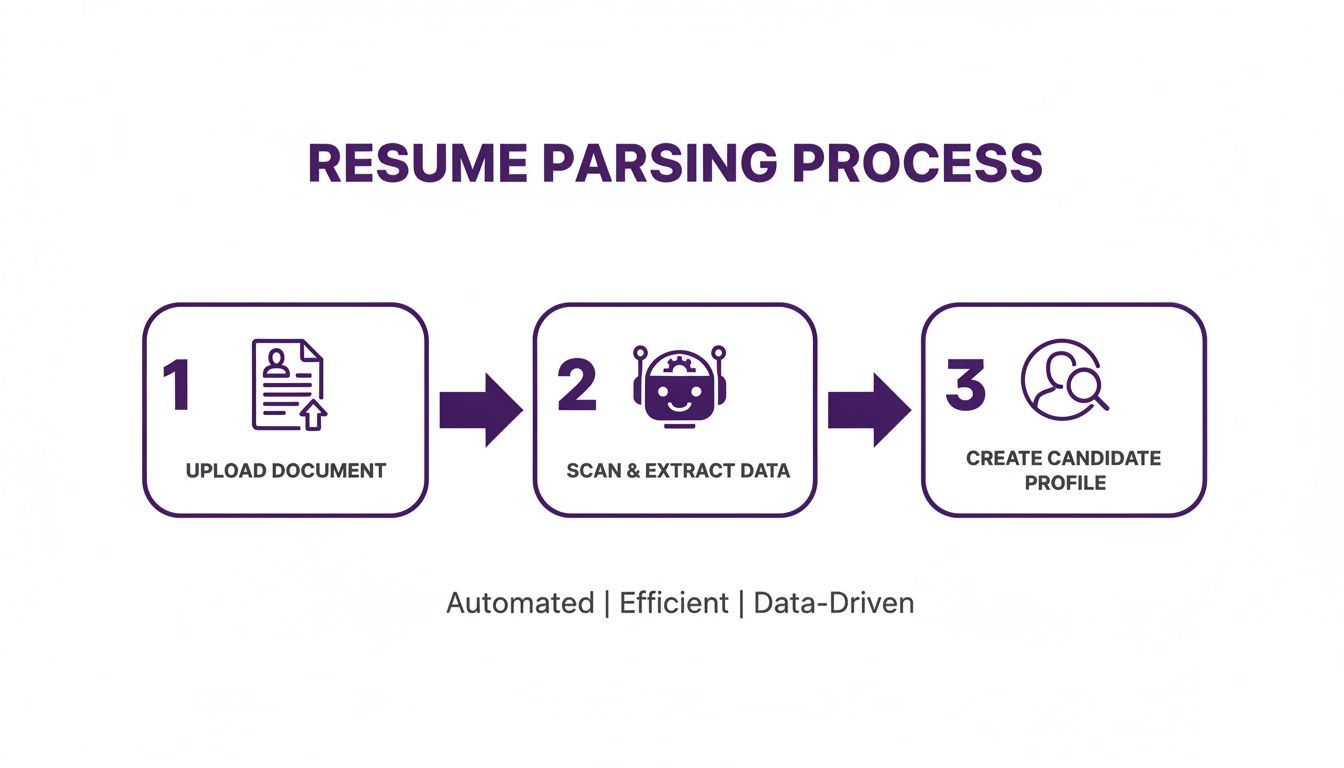
As you can see, it's a straightforward flow: your document gets uploaded, the data gets pulled out, and it's all used to build a profile that recruiters can easily search and filter.
Categorizing Your Career
Finally, machine learning models take the stage. These models have been trained on millions of resumes, so they’re incredibly good at spotting patterns and putting your information into the right buckets. This is how the system knows that "2019–2023" next to a company name is your employment history, or that "Bachelor of Science" under a university name is an educational credential.
The whole point of this process is to take your resume apart and rebuild it as structured data. Every little piece of information—from your email address to your job duties—gets tagged and dropped into the correct field in your applicant profile.
This powerful combination of OCR, NLP, and machine learning is what lets modern parsers quickly figure out everything from your contact info to your professional certifications, no matter how your resume is formatted. The speed is staggering; a high-end parser can digest a complex resume in just 1-3 seconds, while it might take a human 10-15 minutes to do the same thing. For big companies, this means massive cost savings and way faster hiring cycles—some have cut their screening time by over 85%.
Why Recruiters Depend on Resume Parsing
To get your resume past that first digital hurdle, you have to understand why it’s there in the first place. Companies aren't using this tech just to make your life harder; they’re trying to solve a huge operational headache. For any decent job opening, a recruiter is likely staring down a tidal wave of hundreds, if not thousands, of applications.
Without some kind of automation, that volume is just impossible to manage. A recruiter would spend their entire day just sifting through resumes, with zero time left to actually interview people or connect with promising candidates. Resume parsing technology is the essential tool that keeps them from drowning.
This is where you see the real value for employers. The whole system is built for speed, fairness, and creating a long-term talent pipeline.
Speed and Efficiency in Hiring
The most obvious win is speed. A person might take a few minutes to scan and digest one resume, but a parser does it in seconds. This lets a hiring team churn through a massive pile of applications in a tiny fraction of the time.
This isn't just about saving a few bucks on labor. It directly impacts their ability to hire the best people before someone else does. In a hot job market, top candidates are often off the table in just 10 days. A slow, manual process means you lose the best applicants before you even send the first email.
By automating that initial screening, recruiters can jump straight to the shortlist of candidates who actually match the job description. This slashes the time-to-hire.
Ensuring Consistency and Fairness
Resume parsing also brings a much-needed layer of consistency to the process. When humans are doing the initial screening, unconscious bias can easily creep in, leading them to focus on things like names, the university someone attended, or a flashy previous employer.
A parser, on the other hand, is completely impartial. It’s programmed to look for specific skills, years of experience, and qualifications, and it pulls those same data points from every single resume. This standardization helps level the playing field, making sure people are judged on their qualifications, not on details that could trigger a biased reaction. After a parser grabs the basic data, recruiters often use other tools, like a People Enrichment API, to build a more complete professional picture, helping them assess candidates even more objectively.
Creating a Searchable Talent Database
Finally, parsing isn’t just a one-and-done thing for the current job opening. Every resume that gets scanned is converted into neat, structured data, building a valuable, searchable talent database for the company. This becomes a goldmine for future hiring.
Think about it: a new role opens up unexpectedly. Instead of posting an ad and starting from scratch, a recruiter can just search their own database for people who already have the right skills and have shown interest in the company before.
This lets them:
- Fill roles faster by tapping into a pre-vetted pool of candidates.
- Cut sourcing costs by finding qualified people without paying for new job ads.
- Re-engage with past applicants who were a great fit but maybe not for the role they originally applied for.
When you understand these reasons, you see that making your resume "parser-friendly" isn't about trying to trick a robot. It’s about making it dead simple for employers to see your value—quickly and consistently.
How to Craft a Perfectly Parsable Resume
Alright, now you know what resume parsing is and why it's the first gatekeeper in your job search. So, how do you build a resume that sails right through?
Creating a parser-friendly resume isn't about sucking the personality out of your professional story. It's about being smart with structure and clarity, ensuring the system can accurately pull your qualifications and present them to a human.
Think of it this way: you wouldn't scribble your address on a crumpled napkin and expect the mail to arrive. You’d write it clearly on a crisp envelope. Your resume needs that same level of clean, direct communication for the automated systems reading it first.
Start with a Solid Foundation
More than anything else, the basic layout of your resume determines whether a parser can make sense of it.
Those fancy, multi-column templates with intricate tables and text boxes might look slick, but they're a nightmare for most Applicant Tracking Systems. They often scramble the information, reading columns out of order or missing entire sections.
Stick to a clean, single-column format. It’s simple, effective, and ensures the parser reads your experience chronologically, just like you laid it out.

This image shows a resume with a straightforward structure and standard sections—exactly what a parsing tool is built to understand.
Choose Your Words and Fonts Wisely
With a solid structure in place, the next step is to look at the details. The language you use and even your font choice can make a huge difference.
- Use Standard Section Headings: Get straight to the point. Ditch creative titles like "My Professional Journey" and stick to the classics: "Work Experience," "Education," and "Skills." These are the signposts the ATS is looking for.
- Select Simple, Clean Fonts: Ornate, script-like fonts can trip up the Optical Character Recognition (OCR) software. Go with standard, sans-serif fonts like Arial, Calibri, or Helvetica. They’re clean and easy for machines to read.
- Avoid Special Characters and Graphics: A simple bullet point (•) is perfectly fine, but steer clear of complex symbols, emojis, charts, or those graphical skill-rating bars. They’re often misinterpreted or completely ignored by the parser.
For a deeper dive into getting the presentation just right, check out our complete guide on resume formatting guidelines proven to work with modern ATS.
Tailor Your Resume with Keywords
This is where the magic happens. Getting past the initial automated screening is all about speaking the same language as the job description.
Parsing software is programmed to scan for specific keywords and phrases that match the role. If your resume doesn't contain them, it's not going to make the cut.
The best strategy is to mirror the language in the job posting. If the description asks for "project management" skills, the phrase "project management" had better be in your resume.
Manually digging through job descriptions for the right keywords can be a real grind. This is where modern tools give you a serious edge. Tools like Eztrackr’s AI resume builder and its ATS-score feedback help ensure your application parses perfectly, keeping you out of the 'black hole' where an estimated 75% of resumes vanish due to compatibility issues.
By strategically aligning your skills and experience with what the employer is asking for, you're not just gaming a system—you're making it clear that you're a great fit. This simple step turns the parsing process from a roadblock into your first big win.
Fixing Common Resume Parsing Errors
Ever felt like you sent your resume into a black hole? You’ve got the skills, the experience, and you’re a perfect fit, but… crickets. A silent resume parsing error is often the culprit.
These aren't some complex technical glitches. They're usually simple formatting choices that look great to us humans but completely confuse the automated systems reading them. The good news? They’re almost always an easy fix. Let's walk through the most common tripwires and how to sidestep them.
Think of it as a quick audit. By checking your resume for these red flags, you dramatically boost the odds that a real person actually gets to see your qualifications.
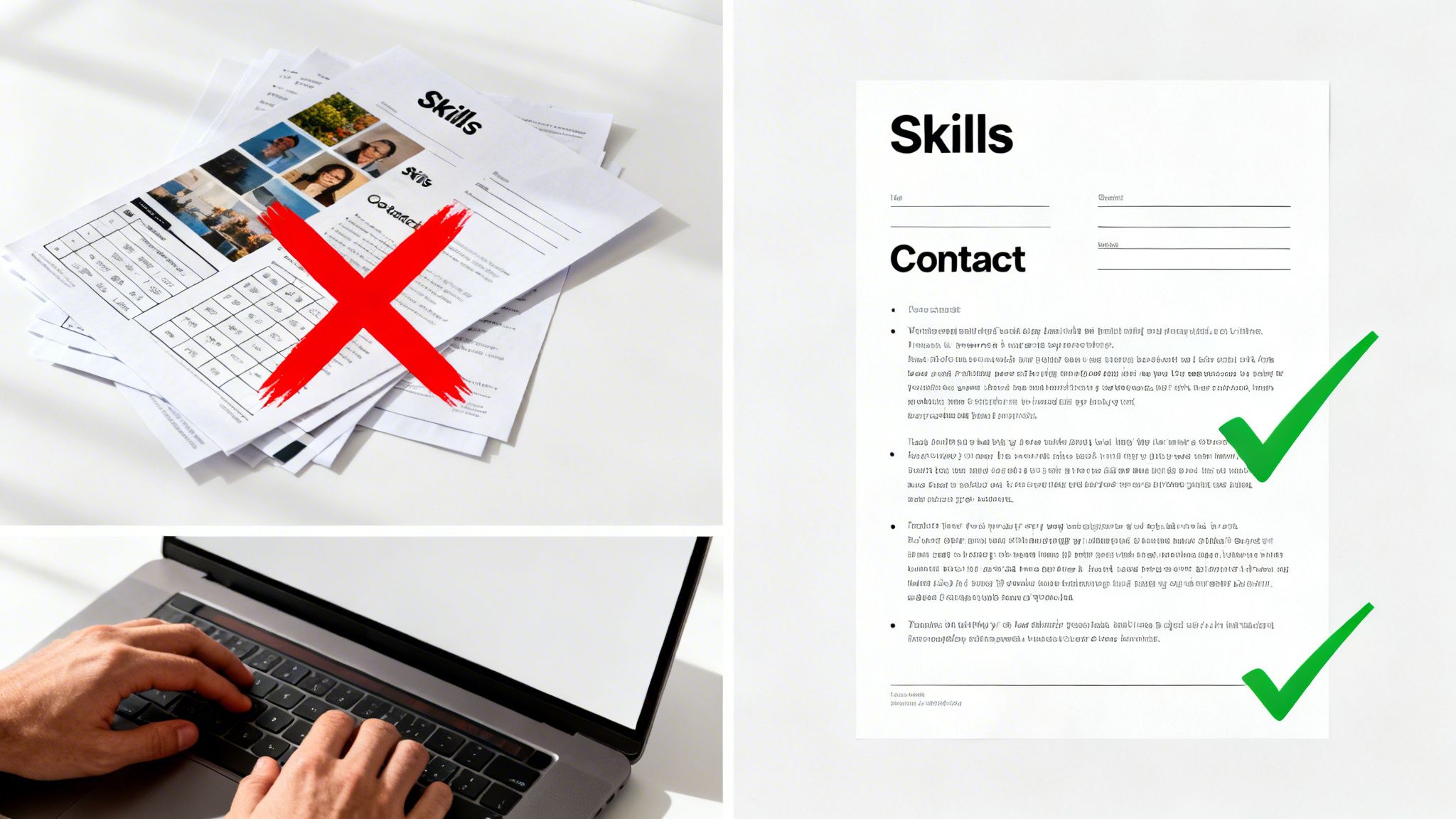
Information Is Missing or Scrambled
One of the most frequent (and frustrating) problems is when key details just vanish. You upload your resume, and suddenly your contact info or an entire job entry has disappeared from the system. It’s like magic, but not the good kind.
Nine times out of ten, the problem is simple: you put that info in the header or footer of the document. Many parsers are specifically coded to ignore those sections entirely, making your name and phone number totally invisible.
The fix is a breeze: move all your essential info into the main body of the resume. The very top of the page is prime real estate for your contact details.
On a similar note, things like text boxes and tables can cause chaos. They might look organized to you, but they can make the parser read your experience out of order, jumbling your skills and work history into nonsense. Stick to a clean, single-column layout to keep things straight.
Skills and Qualifications Are Not Recognized
You’ve got a killer skill set, but the application system doesn’t seem to think so. What gives? This usually happens when we try to get a little too creative with how we display our abilities.
An ATS only cares about one thing: clarity. If the machine can’t read it, it doesn’t exist.
To make sure your skills get counted, you have to keep it simple.
- Ditch the Graphics: Get rid of any charts, graphs, or fancy star-rating systems you’re using to show how good you are at something. A parser can’t read an image.
- Avoid Funky Symbols: Stick to standard bullet points. Unusual characters or icons next to your skills are just digital clutter to an ATS.
The solution? A straightforward text list. Instead of a five-star rating for “Project Management,” just list “Project Management” with a simple bullet point.
If you want to be certain your resume is clear of these issues, running it through a free ATS resume checker can give you instant feedback on its compatibility.
Resume Parsing Troubleshooting Guide
Sometimes, you just need a quick cheat sheet. Here’s a rundown of the most common parsing errors and how to knock them out so your resume gets the attention it deserves.
| Common Error | Why It Happens | How to Fix It |
|---|---|---|
| Missing Contact Info | Information was placed in the document's header or footer, which parsers often ignore. | Move all contact details (name, phone, email, LinkedIn) to the main body of the resume. |
| Jumbled Work History | Tables, columns, or text boxes were used to structure content, confusing the parser's reading order. | Use a simple, single-column layout. Avoid tables and text boxes for crucial information. |
| Unrecognized Skills | Skills were displayed using graphics, charts, or rating systems (e.g., star ratings) that are unreadable. | List all skills as plain text using standard bullet points. Spell them out clearly. |
| File Upload Failure | The resume was saved as an image-based PDF (e.g., from a scanner or design tool) instead of a text-based file. | Save the document directly from your word processor (like Word or Google Docs) as a text-based PDF or .docx file. |
| Incorrect Dates | Non-standard date formats (e.g., "Spring 2022" or "22/03") can confuse the system. | Use a standard, consistent format like "Month Year" (e.g., "March 2022") for all dates. |
With these quick fixes, you can be confident that the information you've worked so hard to build is being communicated clearly to both the software and the hiring manager on the other side.
The Entire Document Fails to Upload
The ultimate roadblock: the system won’t even accept your file. This is almost always a file format problem.
While most applicant tracking systems accept both DOCX and PDF files, not all PDFs are created equal. If you scanned your resume or designed it in a program like Canva and saved it as a PDF, you may have an image-based PDF. To a parser, that’s just a picture of words—completely unreadable.
The surefire way to avoid this is to always save your resume directly from your word processor (like Microsoft Word or Google Docs) as either a .docx file or a text-based PDF. This guarantees the text is selectable, searchable, and ready for the machines.
The Future of Job Applications and AI
Resume parsing is leaving its simple data-entry days in the rearview mirror. It's becoming a seriously smart career tool, powered by AI that actually understands the story behind your experience, not just a list of keywords. The tech is getting better at grasping context, figuring out what skills you have without you explicitly listing them, and even predicting your potential. It paints a much fuller picture of what you bring to the table.
But this evolution isn't just a win for recruiters. The real game-changer is how this technology is now in the hands of job seekers. Instead of being some mysterious black box you have to outsmart, parsing is becoming a tool you can use to your own advantage.
The new wave of job tools flips the script. They don't just analyze your resume for a company—they analyze the company’s job description for you.
Turning the Tables with AI
Think about it. When you use a platform like Eztrackr, the parsing engine is suddenly on your team. You save a job posting, and in a flash, the system breaks down the description, pulls out the most critical requirements, and lines them up right next to your resume. This gives you an instant, honest look at where you're a strong match and where you might have some gaps to fill.
Suddenly, a tool designed for HR screening becomes your personal job search strategist. As AI becomes more embedded in the hiring process, it pays to understand how these systems work, especially when it comes to deploying AI applications like a resume reviewer that directly shape how you're seen as a candidate.
This kind of intelligent analysis helps you:
- Spot Skill Gaps: Immediately see the must-have qualifications for a role and how your background stacks up against them.
- Tailor Applications with Precision: Get real, data-driven suggestions on which keywords and skills to highlight for that specific job you're eyeing.
- Track Your Opportunities Strategically: Ditch the messy spreadsheets. You can now manage your job search with a clear view of your strengths for every single application.
Ultimately, the future of resume parsing is a partnership. It’s no longer just a wall you have to climb over. It's becoming a bridge that connects your unique skills to the right opportunities, giving you the insights you need to apply smarter and land interviews faster.
Still Have Questions About Resume Parsing?
Even after getting the basics down, a few common questions always seem to come up. Let's tackle them head-on.
Does a Creative or Visual Resume Ever Work?
Look, those beautifully designed resumes can be showstoppers… if you hand them directly to a hiring manager or showcase them in your portfolio. For design roles, they can be fantastic.
But for online applications? They're almost guaranteed to fail an ATS scan. The complex formatting, columns, and graphics will scramble the parser.
The smart play is to have two resumes. Keep a clean, simple, ATS-friendly version for all your online submissions. Save the fancy, visual one for networking events or when you have a direct line to a person.
Should I Use a PDF or DOCX File for My Resume?
Honestly, both are usually fine these days. The most important rule is to follow the instructions on the job application if they specify a preference. Modern parsers can handle both formats pretty well.
If you want the safest bet, go with a text-based PDF. You create this by saving your document from a word processor (like Word or Google Docs), not by scanning a paper copy. This locks in your formatting so it looks great to human eyes, but the text is still perfectly readable for an ATS. It's the best of both worlds.
How Do I Know if My Resume Is ATS Friendly?
The easiest way is to use a tool built for the job. Resume checkers can score your resume against a specific job description and tell you exactly how compatible it is.
But if you want a quick and dirty DIY test, try this: copy all the text from your resume and paste it into a plain text editor like Notepad or TextEdit. Does it look like a jumbled mess? Are sections out of order? If so, that’s probably what the ATS is seeing, too.
Ready to stop guessing and start getting noticed? Eztrackr’s AI-powered tools analyze your resume against job descriptions to give you a clear compatibility score, helping you tailor your application with confidence. See how it works at https://eztrackr.app.