How to Track Job Applications and Win Your Next Role
To really get a handle on your job search, you need one central place—like a spreadsheet or a dedicated tool—to keep track of every single role you apply for. Think of it as your mission control, where you log the company name, job title, application date, and where you are in the interview process. This simple step is what stops you from missing follow-ups and helps you actually see what's working.
Why Your Job Search Needs a Tracking System
Jumping into a job search without a system is like trying to navigate a new city without a map. Sure, you might get there eventually, but you'll waste a ton of time, burn through your energy, and probably miss out on some great opportunities along the way.
The point isn't just to "stay organized." It's about turning a chaotic, often frustrating process into a smart, data-driven campaign.
In today's market, meticulous tracking is non-negotiable. When you're sifting through tons of positions on various boards, including specialized platforms like blockchain-jobs.com, the sheer number of applications can get overwhelming fast. A good system saves you from embarrassing mistakes, like applying for the same job twice or forgetting a key detail a recruiter mentioned.
From Chaos to Clarity
A well-maintained tracker is your command center. It gives you an at-a-glance overview of every application, helping you see your entire pipeline and decide where to focus your energy next. No more digging through your inbox or browser history to find that one email. Everything you need is in one spot.
Here’s a glimpse of what a simple, effective job tracker dashboard can look like. It gives you a crystal-clear visual of your entire application funnel.

This kind of dashboard instantly shows how many applications are in each stage, from "Applied" to "Offer," turning your fuzzy sense of progress into hard data you can actually use.
The Strategic Advantage of Tracking Data
Beyond just keeping things tidy, tracking your job search gives you incredibly valuable data. As you log your activities, you'll start to spot patterns. Which job boards are actually getting you interviews? Which version of your resume is landing the most responses? This is the kind of information that lets you make strategic moves instead of just guessing.
By 2025, it's expected that the average job seeker will send out anywhere from 32 to over 200 applications just to land one offer. With numbers that high, tracking becomes essential to avoid burnout and manage your time effectively over a search that could take months.
A job tracker isn't just a to-do list; it's an analytical tool. It tells you what's working and, more importantly, what isn't, allowing you to pivot your strategy for better results.
Ultimately, a good tracking system just frees up your mental energy. When every detail is logged and every follow-up is scheduled, you can stop worrying about the small stuff. That leaves you more time and brainpower to focus on what really matters: acing interviews and landing your next great role. It’s the foundation for a smarter, less stressful job hunt.
Choosing the Right Application Tracking Method
So, how should you actually track job applications? This really comes down to a classic dilemma: stick with what’s familiar and simple, or embrace something a bit more powerful?
There’s no single right answer here. The best method for you depends on your personal style, how many jobs you're applying for, and whether you're a data person who loves to spot trends. Most people start down one of two paths: the trusty old spreadsheet or a dedicated tracking tool.
Spreadsheets vs. Specialized Tools
Let's be honest, we've all started with a spreadsheet. Whether it's Google Sheets or Microsoft Excel, it feels like the natural first step. It’s free, you already know how to use it, and you can set up columns for the company, job title, and application date in a few minutes. If you’re only applying to a handful of jobs, this can get the job done.
But what happens when you ramp up your search? That simple spreadsheet starts to show its cracks. The manual data entry becomes a real chore, and it's surprisingly easy to make typos or forget to update a status. More importantly, it's just a passive list. It doesn't remind you to follow up or give you a visual sense of your progress. It's just… a grid of text.
That’s where dedicated tools come into the picture. A spreadsheet is a logbook, but a specialized tool is more like a project manager for your career. These platforms are built from the ground up to solve the real-world headaches of job hunting.
For instance, a tool like Eztrackr comes with a browser extension that saves a job posting with a single click, automatically pulling in all the key details. That alone saves you from the endless, soul-crushing cycle of copy-and-paste.
Plus, many of these tools use visual pipelines, like a Kanban board, which are far more intuitive for seeing where each application stands. You can drag and drop jobs from "Applied" to "Interviewing" to "Offer," which is way more satisfying than changing a cell color in a spreadsheet. To see just how much a dedicated system can change the game, check out our guide on the benefits of a job application tracker.
The goal isn't just to record your applications but to manage them strategically. A dedicated tool moves you from simple logging to active pipeline management, giving you a clear view of your entire job search funnel.
At the end of the day, a dedicated tracker gives you back your time. It handles the boring administrative stuff so you can focus on what actually moves the needle—prepping for interviews, networking, and tailoring your resume. The built-in analytics can even show you what’s working and what’s not, an insight you’ll never get from a spreadsheet. While a spreadsheet is a fine place to start, a specialized tool gives you a serious competitive edge.
Comparing Job Application Tracking Tools
To make the choice clearer, let's break down the common methods side-by-side.
| Tracking Method | Best For | Key Advantages | Potential Drawbacks |
|---|---|---|---|
| Spreadsheet (Excel, Sheets) | Low-volume job seekers or those who prefer total manual control. | Free, highly customizable, and familiar to most users. No learning curve. | Prone to human error, completely manual, no automation for follow-ups. |
| Dedicated Tracker (Eztrackr) | Active job seekers applying to 10+ jobs who want efficiency and insights. | One-click job saving, automated reminders, visual progress boards, and analytics. | May have a slight learning curve; premium features might have a cost. |
| Simple Note-Taking App (Notion, Evernote) | Casual job seekers who prioritize flexibility and integrating notes with applications. | Extremely flexible, great for storing research and interview notes. | Requires significant setup to become a true tracker; lacks job-specific features. |
Ultimately, the right tool is the one that helps you stay organized and motivated without adding more stress to your job search.
Alright, you've picked your weapon of choice for tracking job applications. Now comes the fun part: building a system that actually works for you, not against you.
A great tracker is more than just a list of places you've applied. Think of it as your personal command center, giving you a bird's-eye view of your entire job search. Getting the setup right from the start is absolutely crucial—it'll save you from countless headaches later on.
The soul of any good system is the data you feed it. Being thorough right now means you won't be scrambling for info when a recruiter calls out of the blue about a job you applied to three weeks ago. Treat each entry like a complete case file for that opportunity.
Defining Your Core Data Points
Let's start with the basics. Every single entry in your tracker needs to have a few key pieces of information. Don't get lazy and skip these, even if it feels tedious. You'll thank yourself later.
These are the non-negotiables:
- Company Name and Job Title: This seems obvious, but be specific. A big company might have a dozen "Software Engineer" roles open. Note the exact title and team if you can.
- Application Date: This is your stopwatch. It tells you exactly when to start thinking about following up.
- Direct Link to the Job Posting: Job postings disappear all the time. Save a link, or better yet, download a PDF of the full description. You'll want to review the exact requirements right before an interview.
- Contact Information: If you have a name, email, or LinkedIn profile for a recruiter or hiring manager, this is pure gold. Log it immediately.
- Resume and Cover Letter Version: Did you send your "Project Manager" resume or the one tailored for "Scrum Master" roles? Knowing which documents you sent helps you stay consistent and track which version is landing you more interviews.
Your tracker’s real power comes from its details. Capturing the right information from the start turns a passive log into an active, strategic tool that helps you prepare, follow up, and analyze your performance effectively.
Creating a Visual Job Search Pipeline
Okay, now let's turn that pile of data into something you can actually use to see your progress at a glance. The most effective way to do this is to create a visual pipeline with clear stages, an idea borrowed straight from project management.
Instead of a single "Status" column filled with random notes like "emailed back" or "waiting," create a clean, multi-stage workflow.
If you're just starting, a well-organized spreadsheet can get the job done. In fact, we put together a whole guide on how to build a killer job search tracking spreadsheet that you can use as a template.
A typical pipeline might look something like this:
- Wishlist / To Apply: This is your staging area for interesting jobs you've found but haven't applied to yet.
- Applied: The second you hit "submit," the application moves here.
- Screening / Assessment: For any initial phone screens or those automated personality tests.
- Interviewing: This bucket is for all interview rounds, from the first call to the final panel.
- Offer: The finish line! This is for any offers you receive.
- Closed / Rejected: Don't neglect this one. Tracking rejections is just as important. It keeps your board clean and gives you data to analyze later.
When you use a dedicated tool like Eztrackr, this whole process becomes a simple drag-and-drop Kanban board, which is way more intuitive. There’s something incredibly motivating about physically dragging a card from "Applied" to "Interviewing" that a spreadsheet just can't replicate.
This visual feedback is key to staying pumped during what can be a long search. It transforms your tracker from a boring, static list into a dynamic dashboard for your career.
Mastering Your Daily Tracking Workflow
So, you’ve got a perfectly structured job application tracker. That’s a fantastic start, but it’s only half the battle. A system is only as powerful as the habits you build around it. To really get a handle on your job search, you need to weave tracking into your daily routine until it becomes second nature.
This isn’t about piling another chore onto your to-do list. It’s about creating a slick, efficient workflow that actually saves you time and mental energy down the road. The goal is to make logging an application a quick, reflexive action you take the second you hit "submit."
The Two-Minute Rule for Data Entry
One of the biggest mistakes I see people make is letting applications pile up before they log them. You tell yourself, "I'll get to it at the end of the day," but then you forget crucial details or, worse, can't find the link to the original job post.
A much better approach is the "Two-Minute Rule." The idea is simple: if a task takes less than two minutes, do it immediately. The moment you apply for a job, pop open your tracker and plug in the core details. This simple habit stops a backlog from ever forming and keeps your data accurate and ready to go.
- Bookmark Your Tracker: Keep your spreadsheet or tracking tool pinned in your browser for one-click access. Seriously, do it now.
- Use a Tool with a Browser Extension: Tools like Eztrackr let you save a job posting with a single click. It automatically grabs the company, title, and description, cutting your data entry time down to just a few seconds.
This whole process can be broken down into a simple, powerful system.
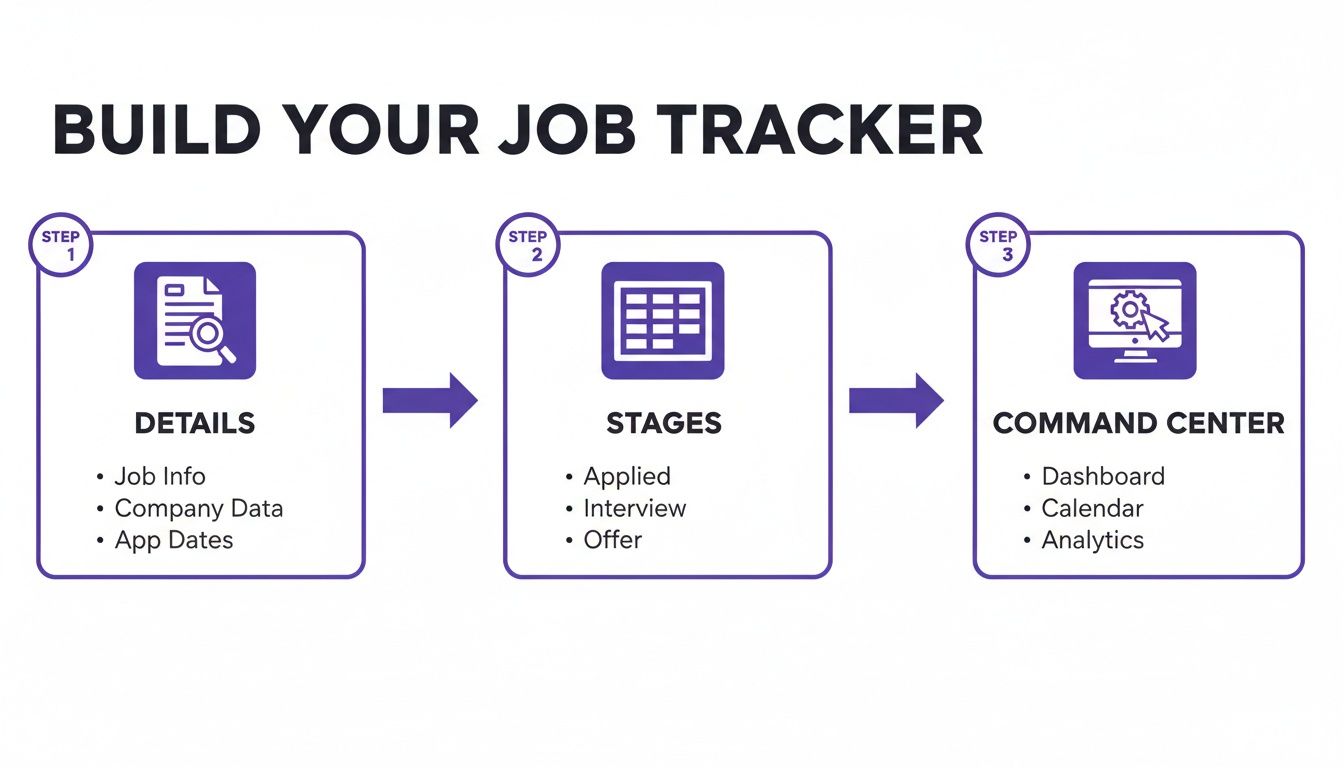
This shows the essentials of any good system: document the key details, see your progress through different stages, and use it as your central command center for the entire search.
Automating Your Follow-Up System
One of the biggest wins from diligent tracking is never letting an opportunity slip through the cracks. A well-timed follow-up can be the one thing that gets you an interview instead of being lost in the "resume black hole." In fact, one study showed that a structured follow-up can boost employer responses by as much as 40%.
Don't just rely on your memory. Set reminders the moment you log an application.
A job tracker isn't just a record of what you've done; it's a tool for scheduling what you need to do next. Use it to proactively manage your communication and keep your name top-of-mind with recruiters.
Most calendar apps work fine for this, but a dedicated tracker often has this functionality built right in. Schedule a reminder for 7-10 days after you apply to send a polite follow-up email. By making this a standard part of your workflow, you turn persistence into a system.
A lot of job seekers get great results by using a visual system to manage all these stages. You can learn more about how a personal Kanban board can completely transform your follow-up strategy and keep things moving forward. This approach turns your passive list into an active, dynamic tool that actually drives your job hunt.
Using Your Data to Optimize Your Job Search

This is where all your hard work starts to pay off. The system you've built to track job applications is way more than just a fancy to-do list—it's your own personal data goldmine. When you start analyzing this information, you can stop guessing what works and start making strategic moves that actually improve your results.
Your tracker holds the keys to the kingdom. It can tell you which resume version lands the most callbacks, which job boards are actually worth your time, and what your real-world application-to-interview cycle looks like. This is how you shift from a frustrating grind into a calculated campaign.
Calculating Your Personal Conversion Rates
Let's start by looking at your numbers. Don't worry, you don't need to be a data scientist. All you need to do is focus on a few key metrics to really understand your job search funnel.
Ask yourself a few simple questions:
- Applications to Screenings: How many applications does it take to get that first screening call? If the answer is 50, that’s your baseline.
- Screenings to Interviews: From there, how many screenings lead to a full-blown interview with the hiring manager?
- Interviews to Offers: Finally, how many of those interviews turn into a job offer?
Just knowing these ratios is incredibly powerful. For example, if you realize it takes you 40 applications to get a single interview, you suddenly have a clear, measurable goal instead of a vague feeling that you need to "apply more." It's a simple analysis that can completely reframe your expectations and your effort.
Your job search data tells a story. Analyzing your conversion rates reveals the plot, showing you exactly where the bottlenecks are in your process so you can fix them.
Identifying Your Most Powerful Channels
Next up, it’s time to slice your data by application source. Where are your best leads actually coming from? You need to group your applications into categories to see which channels are pulling their weight.
Think about common sources like:
- Big job boards (LinkedIn, Indeed, etc.)
- Niche, industry-specific job boards
- Direct applications on company websites
- Employee referrals
- Recruiter outreach
You might discover something wild—like the fact you spend 80% of your time on the major job boards, but almost all of your interviews come from direct applications or referrals. That's a game-changing insight. It tells you exactly where to double down and which channels you can safely pull back on.
Understanding the right approach for your specific industry can also give you an edge. Highly competitive fields often have their own unwritten rules, and job seekers can learn a lot from resources that break down specific application strategies for Formula 1 teams, for example.
When you get into the habit of reviewing these patterns, your tracker becomes a dynamic guide. It helps you tweak your methods, focus your energy, and build a much smarter overall approach. For a deeper dive into building these kinds of effective methods, check out our complete guide on creating a winning job search strategy.
Answering Your Top Job Tracking Questions
Even with a killer system, you're bound to have questions. Let's dig into a few common hurdles people hit when they track job applications and get you some practical answers to keep things moving.
"Help! I'm Totally Behind on My Tracking."
We’ve all been there. A few days of interviews and networking go by in a blur, and suddenly you realize you never logged the five applications you sent out on Monday. Don't sweat it—and definitely don't scrap your whole system.
Here's what you do: block off 30 minutes on your calendar. Right now. Use that time to pull up your "Sent" emails and your browser history, then work backward to log everything. It's way better to power through it in one focused session than to let it pile up and become a source of stress.
Your job tracker is a tool, not a test. Falling behind for a day or two doesn't mean you've failed. Just reset and get back to it. No big deal.
Once you’re caught up, remember the two-minute rule. Logging an application right after you hit "submit" is the single best way to make sure this doesn't happen again. It keeps your tracker accurate and reliable.
"How Much Detail Should I Actually Put in My Notes?"
You need enough detail to jog your memory, but not so much that you're writing a novel. The golden question is: if a recruiter called you out of the blue in two weeks, what would you need to know to sound prepared?
I always recommend sticking to bullet points. They're quick to write and even quicker to scan. Here’s a simple framework for what to jot down:
- Applied: Note which version of your resume you used. Was it the one tailored for "Project Management" or the one for "Product Owner"? Also, list a few key phrases from the job description.
- Interviewing: This is crucial. Log the names and titles of everyone you met. What were their big questions? What pain points did they mention?
- Follow-Up: A quick note like, "Sent thank-you email to Sarah on 10/26, mentioned our discussion on Q4 launch challenges."
This isn't just busywork; it's what sets you apart. Imagine walking into a second interview and being able to say, "When I spoke with Sarah, she mentioned the team was struggling with X. In my last role, I actually solved a similar problem by…" That's how you make an impression.
"When Can I Finally Delete All This Data?"
Don't be so quick to hit delete the second you sign an offer letter. That data is pure gold for your career. I tell everyone to hang onto their tracking data for at least one to two years.
Why? Because your tracker is the story of your job hunt. It's packed with insights you'll want later.
- Your Personal Metrics: It shows you exactly how many applications it took to get interviews and, ultimately, an offer.
- A Rolodex of Contacts: You have a pre-built list of recruiters and hiring managers to tap for networking down the road.
- What Actually Worked: You can easily see which job boards, resume versions, and outreach strategies got the best results.
When it's time for your next move, you won't be starting from zero. You’ll have a complete playbook to make your next search smarter and more efficient from the get-go.
Ready to ditch the messy spreadsheets and manage your job search with a tool that does the heavy lifting for you? Eztrackr lets you save jobs in a click, see your progress on a clean Kanban board, and even uses AI to help you write amazing application materials. Join over 45,000 job seekers and land your next role faster at https://eztrackr.app.