How to Present Yourself Professionally
You've polished your resume, rehearsed a few answers, and submitted several applications. Then an interview invite arrives, and you realize your professional image is scattered across your clothes, camera setup, voicemail, resume, LinkedIn profile, pitch, and follow-up messages. The problem isn't a lack of effort. It's that each channel tells a slightly different story.
Professional presentation is a system. Your appearance should support your pitch. Your pitch should match your resume. Your LinkedIn profile should confirm the same career direction. Your follow-up should sound like the person who showed up prepared. This guide shows you how to present yourself professionally by connecting every touchpoint to one tracked job-search workflow.
Why First Impressions Decide the Outcome
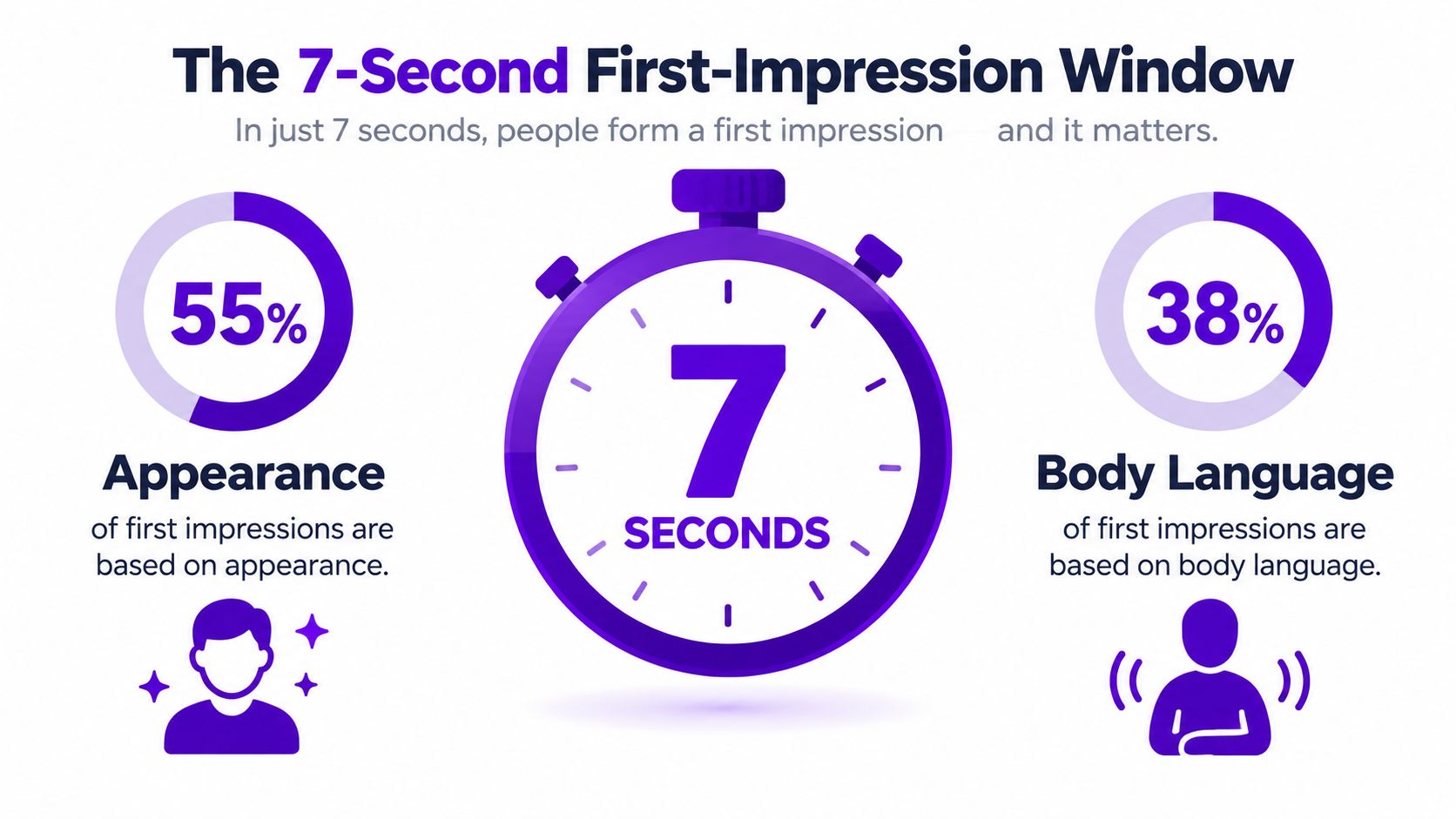
You have roughly seven seconds to establish a credible first impression, according to a widely cited summary of classic research on rapid social judgment. That summary attributes 55% of the first impression to visual appearance, 38% to voice tone, and 7% to actual words, as explained in this overview of first-impression research in business.
That should change how you prepare. A rehearsed answer doesn't rescue a distracted entrance, poor posture, wrinkled clothing, or a flat greeting. Before the interviewer evaluates your experience, they're already reading your grooming, clothing fit, facial expression, energy, eye contact, and vocal tone.
Turn the opening seconds into a checklist
Don't leave those signals to chance. Before an in-person meeting, check that your clothes are clean, pressed, appropriate for the industry, and properly fitted. If you're unsure about workplace expectations, this guide to polished work wardrobe advice can help you choose a professional baseline without overcomplicating the decision.
Then reset your body. Stand tall, lower your shoulders, take a quiet breath, and rehearse the interviewer's name before you enter. Put your phone away completely. A distracted glance can communicate less respect than your carefully prepared answer communicates competence.
For a virtual interview, the equivalent of walking through the door is your first camera frame. Scan the room for clutter, test the lighting, check your display name, and close unrelated browser tabs. Your background doesn't need to look expensive. It needs to look deliberate.
Practical rule: Prepare the first minute more carefully than any other minute. Enter calmly, greet the person by name, make comfortable eye contact, and let your voice sound prepared rather than hurried.
The wider application workflow starts here. Record the outfit you used, the setting that worked, and any feedback about your greeting or tone in your application tracker. That record makes your next interview preparation faster, while your resume, LinkedIn profile, pitch, and follow-up continue the same professional narrative.
Nailing the In-Person and Virtual Interview
Interview preparation becomes easier when you treat both formats as versions of the same event. The setting changes, but the standard doesn't. You still need to look prepared, listen closely, answer specifically, and leave the interviewer with a clear reason to remember you.
For an in-person meeting, choose the outfit in advance, groom carefully, print relevant resume copies, silence your phone, and arrive with enough time to settle your breathing. Accept water if it helps you stay comfortable. Sit with both feet grounded, keep your hands visible, and offer a natural greeting. At the end, thank the interviewer directly and mention one useful part of the conversation.
A virtual meeting needs an equally deliberate setup. Frame your head and shoulders clearly, place the camera near eye level, use light facing your face, and remove visual distractions behind you. Test your microphone, confirm the meeting platform, check your display name, close irrelevant tabs, and make sure your connection is stable. Keep notes beside the screen rather than typing throughout the call, because multitasking shows up through your eyes, pauses, and delayed responses.
Use one preparation table for both formats
| Prep Item | In-Person Action | Virtual Action |
|---|---|---|
| Appearance | Wear clean, well-fitted clothing suited to the role and workplace. | Dress with the same care, checking how colors and patterns appear on camera. |
| Arrival | Plan the route and arrive with time to reset before entering. | Log in early enough to test audio, camera, and display name. |
| Environment | Choose a quiet seat, silence your phone, and keep materials organized. | Use a tidy, well-lit setting and remove distracting notifications. |
| Greeting | Use a warm introduction, comfortable eye contact, and an appropriate handshake. | Look toward the camera while greeting and keep your voice clear. |
| Materials | Bring printed resumes and a short list of questions. | Keep your resume and questions open in a distraction-free document. |
| Closing | Thank the interviewer in person and confirm the next step if appropriate. | Close with the same appreciation and ask how the process proceeds. |
Shared mechanics matter more than format. Build answers with Situation, Task, Action, and Result, but don't force every response into a rigid speech. If a question is unclear, ask for clarification. Take brief notes when useful, then ask questions that reveal how the team measures success, what strong performance looks like, and what challenge the new hire will face first.
Reviewing common interview mistakes can help you identify avoidable habits before they appear in a real conversation. Log each interview as a stage in your tracker, along with the format, questions asked, examples you used, and follow-up date. That turns one interview into preparation data for the next one.
Resumes and LinkedIn Profiles That Get Read
Maya, a marketing coordinator with three years of experience, had the common problem. Her resume listed duties such as “managed social media,” “created reports,” and “supported campaigns.” The layout was crowded, the objective was generic, and her LinkedIn headline repeated her job title without explaining what she contributed.
The revised version made a sharper claim. Her bullets described the work, the audience, the action, and the result. Her summary connected campaign planning, reporting, and audience growth into one professional direction. Her LinkedIn headline used the same positioning, so the recruiter saw one coherent candidate rather than two disconnected profiles.
Give every document the same story
Maya's stronger resume didn't claim perfection. It replaced vague activity with evidence. Instead of “managed social media,” she could write a bullet such as “Planned and published content across priority channels, using performance reports to refine campaign themes.” If she has verified results, she should include them. If she doesn't, she shouldn't manufacture them.
Her LinkedIn profile then expanded the same story. A useful banner reinforces her field without turning the profile into an advertisement. The About section uses first-person language, explains the problems she solves, and names the type of work she wants next. Featured projects provide visible proof, while relevant skills and recommendations add context from other people.
Ask for recommendations with a specific request: “Would you be comfortable recommending me for campaign planning and performance reporting based on our work together?” Specific prompts produce more useful responses than “Can you endorse me?”
A recruiter may compare your dates, titles, employers, and career direction across documents. Any mismatch creates unnecessary doubt. Keep those facts consistent, then tailor the emphasis for the role. A marketing operations position may foreground reporting and process improvement, while a content role may lead with editorial planning and audience insight.
Use an ATS-friendly resume format that keeps the evidence readable for both screening software and humans. Your application tracker should store the version submitted for each role, not just the master resume. Update the corresponding LinkedIn language when your target direction changes. Tools that turn a LinkedIn profile into a video with AI can also help you experiment with presenting your professional story in a more engaging format, provided the result still sounds like you.
Elevator Pitches and Professional Email Etiquette
A strong pitch isn't a biography. It's a compact explanation of who you are, what you can prove, why this person or role matters, and what you want next. Use four slots:
- Hook: Name your professional lane.
- Proof: Give one relevant example.
- Relevance: Connect that experience to the listener's context.
- Ask: Request a clear next step.
Fill in this structure:
“I'm a [role or specialty] focused on [type of problem]. In my recent work, I [specific contribution or result]. I'm interested in [team, industry, or role] because [relevant connection]. Could I ask you [specific request]?”
A junior data analyst targeting SaaS roles might say: “I'm a junior data analyst focused on turning customer and product data into usable decisions. In my recent role, I built recurring reports that helped the team spot changes in user behavior. I'm targeting SaaS analytics teams because I enjoy connecting product questions to clear business actions. Could I ask you about the skills your team values most in an entry-level analyst?”
Say it aloud, record it, and remove every phrase you wouldn't say naturally. “I hope this finds you well” is rarely the strongest opening. Replace it with a reason for writing: “I saw your team is hiring for product analytics, and your path from support operations into data caught my attention.”
Match the email to the relationship
| Email Element | Cold Outreach | Warm Follow-up |
|---|---|---|
| Subject line | Specific topic and connection, such as “Question about SaaS analytics careers” | Shared context, such as “Following up on our product analytics conversation” |
| Opening line | Explain why you chose this person. | Refer to the meeting, introduction, or advice they gave. |
| Body | Make one focused request and show you've done basic research. | State what you acted on or what you found useful. |
| Call to action | Ask for a brief conversation or a targeted answer. | Confirm the next step without creating pressure. |
| Sign-off | Use a professional close and include your full name. | Keep the tone warmer while staying concise. |
Cold outreach should be shorter than your draft deserves. Delete your life story, broad praise, multiple requests, and attachments the recipient didn't ask for. Warm follow-up can include more context because the reader already knows who you are, but it still needs a single purpose.
A letter of introduction works best when the recipient understands the connection quickly, so use this letter of introduction structure before sending. For public-facing professional content, a LinkedIn content intelligence platform can help you study relevant themes, but don't copy another person's voice. Your written presentation should be as specific and credible as your spoken pitch.
Body Language That Signals Confidence
Hiring managers don't need theatrical confidence. They need to see that you can stay present under pressure. The most useful cues are small: an open chest, a steady gaze, a calm voice, and hands that aren't constantly hiding or moving.
| Cue | Reads as confident | Reads as nervous | Rehearsal drill |
|---|---|---|---|
| Posture | Sit upright with relaxed shoulders and a slight forward lean. | Collapse into the chair or rock backward repeatedly. | Stand against a wall, then sit while keeping the same alignment. |
| Hands | Keep them visible and use controlled gestures. | Grip objects, touch your face, or move constantly. | Answer questions with empty hands and review the recording. |
| Face | Use a relaxed expression that responds to the conversation. | Freeze into a permanent smile or avoid reacting. | Practice a mirror loop, neutral face, listening face, and speaking face. |
| Eye contact | Look at the person naturally in person, or toward the camera during key points. | Stare at your own image or look away during every answer. | Record a mock call and place a small visual marker near the camera. |
| Voice | Speak clearly with deliberate pauses. | Rush, trail off, or use a flat, quiet delivery. | Read a paragraph aloud, then repeat it with slower breathing. |
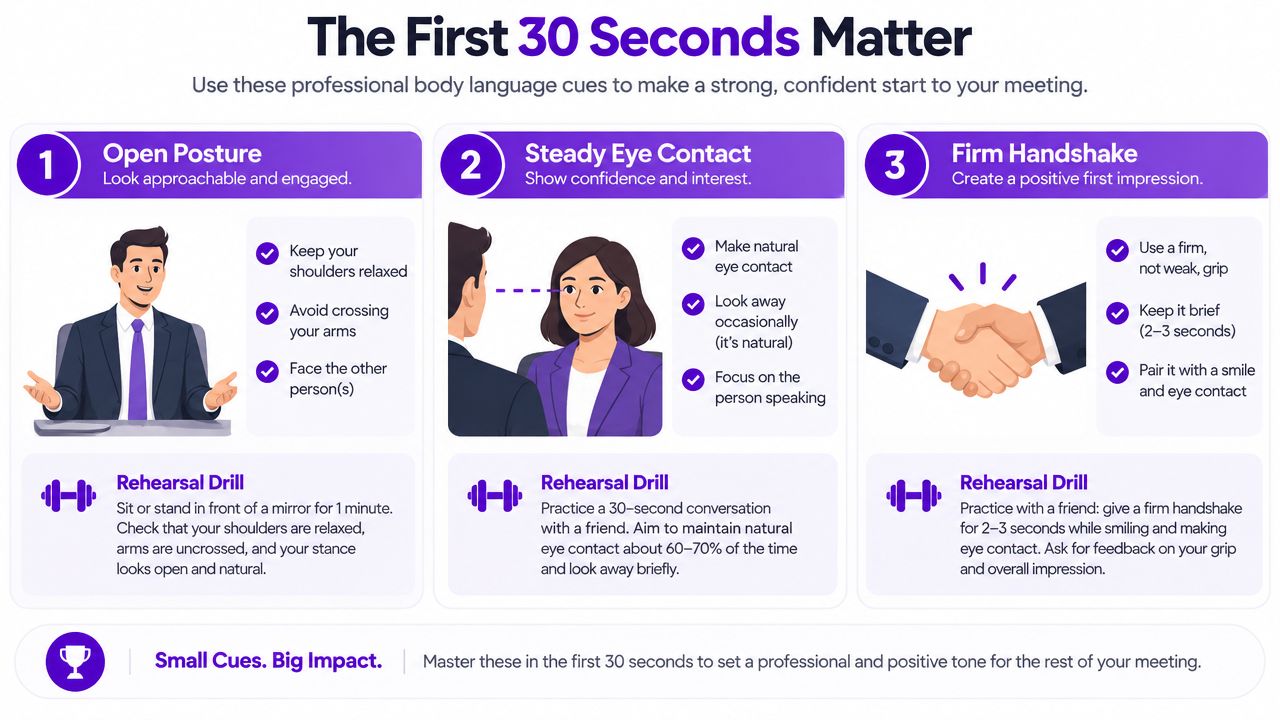
A handshake should be comfortable, brief, and responsive to the other person. Don't crush a hand, offer limp contact, or continue holding on while speaking. In a virtual interview, your hands can rest just below the frame or appear naturally when you gesture. Keep them out of your face and avoid gripping your desk.
Use a short reset after difficult questions. Inhale, pause, and begin with the situation rather than filling the silence with “um.” That pause won't look rehearsed if the rest of your answer sounds conversational.
This video offers a visual reference for practicing professional body language:
Run a 10-minute self-audit before an important call: record a greeting, answer one behavioral question, review your gaze, posture, hands, facial expression, and pace, then repeat the weakest cue. Save the note in the interview record so you work on a specific behavior rather than vaguely trying to “be more confident.”
Following Up Without Sounding Desperate
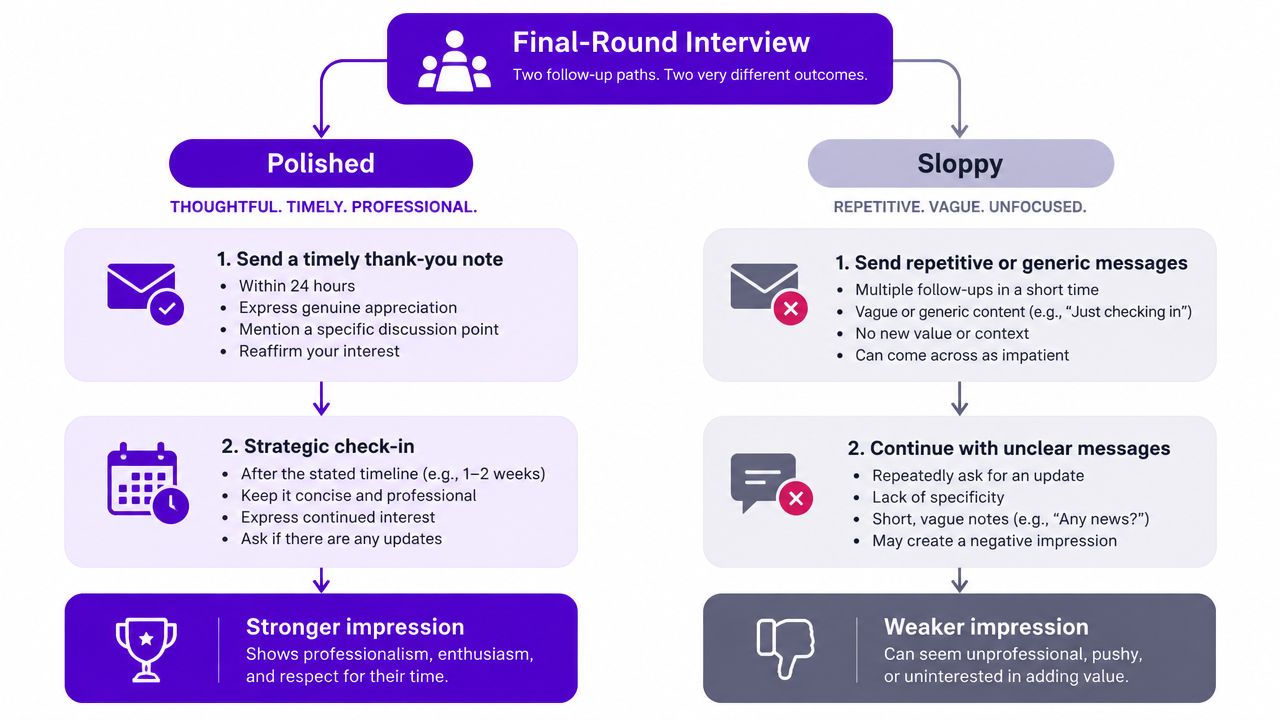
A polished candidate treats follow-up as part of the application process. A careless candidate treats it as an anxiety outlet.
After a final interview, the polished version sends a concise thank-you message that refers to a specific discussion point and reinforces relevant interest. The candidate records the message and next expected step in the application tracker, then waits before checking in. The message might say: “Thank you for discussing the team's reporting challenges today. Our conversation reinforced my interest in bringing structured analysis to the role, particularly the opportunity to improve how teams use customer data.”
The sloppy version sends “just circling back” immediately, adds every panelist on LinkedIn without context, then sends another message asking whether the decision is “still on track.” Each message asks the recruiter to manage the candidate's uncertainty. That creates work without adding evidence.
Use a cadence, not a panic loop
| Scenario | First message | Next move | Exit point |
|---|---|---|---|
| Post-interview | Send a specific thank-you after the meeting. | Check in after the timeframe the employer gave you, or after a reasonable pause if no timeframe was provided. | Send a final concise note, then redirect your effort to active applications. |
| Post-networking coffee | Thank the person and mention the advice you'll use. | Share a relevant update or ask one connected question. | Stop when the exchange no longer has a clear purpose. |
| Post-application silence | Contact the named recruiter or hiring contact with a focused update. | Follow up once with new relevance, not repetition. | Stop sending messages when you have no new information to add. |
Your tone can be assertive without becoming pushy. Assertive language states interest and asks for information. Pushy language demands reassurance, assumes access, or repeats the same request. Avoid sending a third follow-up because you feel uncomfortable waiting.
For wording that stays professional after an interview, use this second follow-up email structure. Record the date, recipient, message purpose, and response status. The tracker protects you from duplicate messages and shows where your follow-up habits need improvement.
A 7-Day Routine to Bring It All Together
Treat professional presentation as a pipeline, not a pile of disconnected tasks. Each day should produce a visible deliverable that you can attach to an application record, review later, or reuse for another role.
Days one through three build the core story
Day 1, audit your presence. Review your headshot, LinkedIn banner, resume header, email signature, and voicemail greeting. Take one screenshot of your current LinkedIn profile and write one sentence describing the impression it creates. Remove anything that looks unfinished or contradicts your target role.
Day 2, align the evidence. Rewrite three resume bullets so they describe actions and verified outcomes rather than duties. Then rewrite your LinkedIn About section around the same professional direction. Your deliverable is a saved resume version and one aligned summary paragraph.
Day 3, rehearse the pitch. Write the hook, proof, relevance, and ask for your target role. Say the pitch aloud three times and record the final attempt. Save the recording link or file name beside the relevant application row, then note the phrase that sounded least natural.
Days four through seven test the system
Day 4, contact warm connections. Send personalized networking messages to people who can offer relevant context, not generic requests for “any opportunities.” Add a spreadsheet row for every message, including recipient, purpose, date sent, and reply date.
Day 5, run two mock interviews. Complete one in-person rehearsal and one virtual rehearsal. Record the virtual version, observe your posture, gaze, hands, facial expression, and pace, and write down the recurring slip you need to correct.
Day 6, prepare follow-up assets. Draft one post-interview thank-you and one post-networking check-in. Store them in a text expander, but leave a clear placeholder for the specific conversation point. Your deliverable is two reusable drafts that still require personalization.
Day 7, review the pipeline. Check every active application for missing documents, interview dates, preparation notes, and follow-up tasks. Schedule the next applications and choose one presentation behavior to practice during the coming week.
If an interview moves earlier, prioritize the greeting, outfit or camera setup, resume version, and pitch. If it moves later, don't stop preparing. Use the extra time to improve one weak body-language cue, strengthen one evidence-based story, and research questions that test whether the role fits you.
The point isn't to perform a fake version of professionalism. It's to make your real value easier to recognize across every channel.
Eztrackr helps you keep job postings, application stages, documents, interview preparation, and follow-up tasks in one workflow, with tools for resume building, resume analysis, LinkedIn headline creation, cover letters, and application answers. Visit Eztrackr to organize your presentation work around the applications you're actively pursuing.