What Is Application Tracking System and How It Works
An Applicant Tracking System, or ATS, is a recruitment database plus workflow engine that parses resumes into structured fields, tracks candidates through hiring stages, and helps recruiters search and rank applicants. It's also extremely common in modern hiring, with widely cited estimates putting adoption at 98% of Fortune 500 companies and more than 75% of organizations globally using some form of ATS to manage recruitment (Bullhorn ATS usage report).
You've probably felt the system without seeing it.
You apply for a job. You upload your resume. A form auto-fills half your work history correctly, scrambles the other half, and asks you to fix it. Then you hit submit, get a confirmation email, and wonder where your application went.
For many job seekers, that moment feels like dropping a resume into a black hole. But there usually is a system on the other side. It's just not magic, and it's not only a robot deciding your fate. Most of the time, the first hurdle is simpler and less dramatic. Can the software read your resume cleanly?
That's the part many people miss when they ask, “what is application tracking system?” They assume it's mainly a ranking tool. In practice, it starts as a data-extraction tool. Before a recruiter can search, sort, filter, or compare candidates, the ATS has to turn your resume into usable records.
Introduction to Applicant Tracking Systems
A useful way to think about an ATS is this: it's part digital filing cabinet, part assembly line.
The filing cabinet part stores candidate information in one place. The assembly line part moves each applicant through steps like applied, screened, interviewed, and hired. Recruiters need both. If a company gets applications from its careers page, LinkedIn, Indeed, referrals, and campus events, someone has to keep all that organized.

What an ATS actually does
When you submit a resume, the ATS usually tries to extract details such as:
- Name and contact info so recruiters can identify and reach you
- Work history including job titles, employers, and dates
- Education such as degrees and schools
- Skills that recruiters may later search or filter for
- Application status so the team knows whether you're new, reviewed, interviewed, or declined
That's why an ATS is more than an inbox. An inbox stores files. An ATS stores structured candidate records and connects them to a hiring workflow.
Why employers use one
Without an ATS, a hiring team would have to juggle spreadsheets, shared folders, email chains, interview notes, and job board logins. That gets messy fast.
With an ATS, a recruiter can open one system and see a candidate's resume, answers to application questions, current stage, interviewer feedback, and hiring history in one place. For large teams, it also helps with consistency. Everyone is looking at the same record.
A lot of frustration around ATS comes from treating it like a mysterious gatekeeper. Most of the time, it's infrastructure that hiring teams use to keep application volume manageable.
For job seekers, that means two things are true at once. Yes, the ATS matters. But no, it isn't always “rejecting” you in the dramatic way people describe online. Sometimes it's reading your document poorly before a recruiter ever gets a fair look.
How Applicant Tracking Systems Evolved Over Time
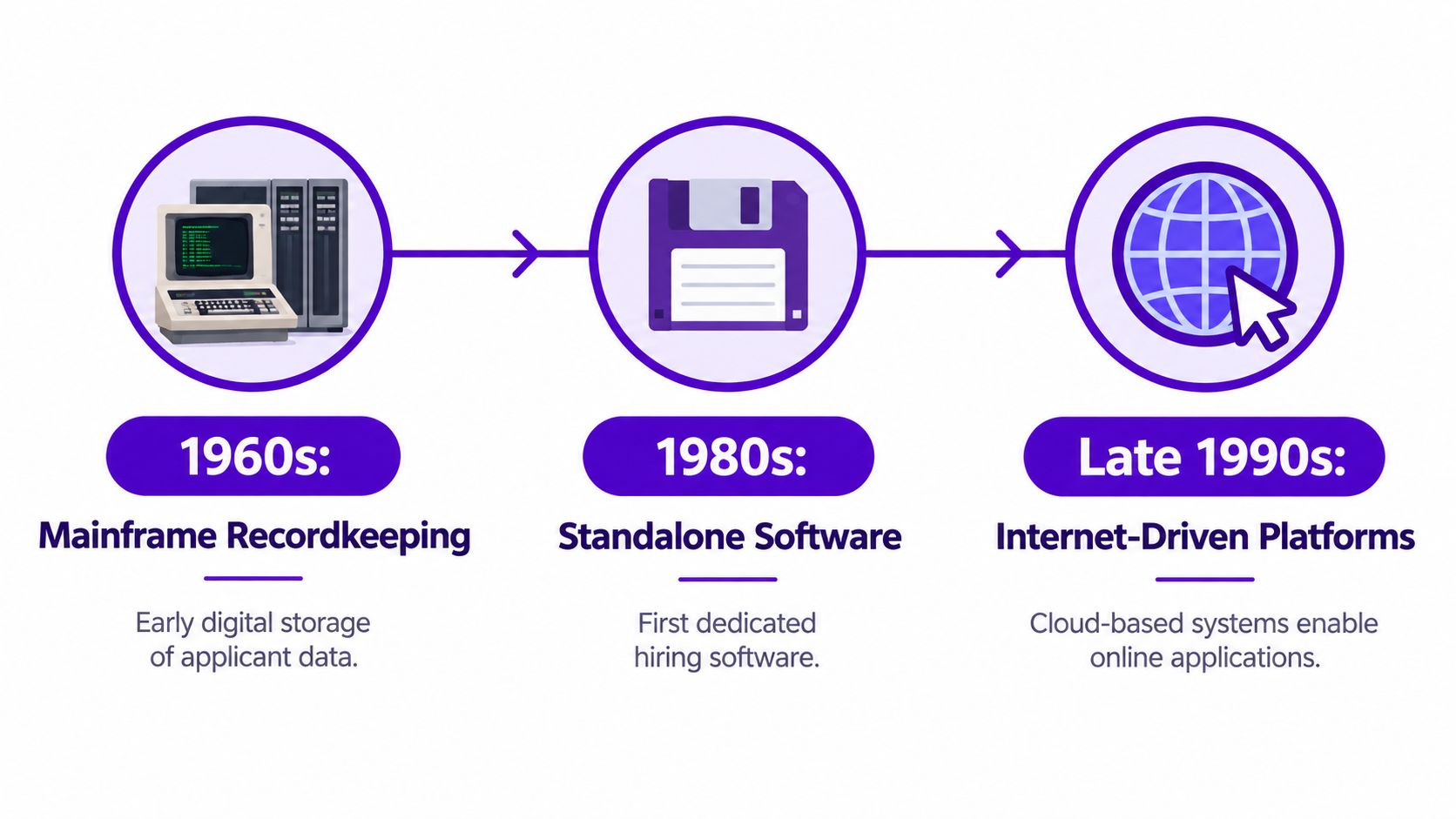
A hiring office in the paper-resume era had filing cabinets, manila folders, and handwritten notes. Once applications moved online, that same basic job, keeping track of who applied, for what role, and what happened next, turned into a data problem.
From recordkeeping to recruiting software
The earliest versions of ATS-like systems were closer to digital recordkeeping than modern recruiting platforms. Large organizations used early databases to store candidate information long before today's web-based hiring tools existed. Over time, dedicated recruiting software appeared, then grew quickly as online job boards made it much easier for employers to collect far more applications than paper-based hiring ever could. Monster Board's 1994 launch is a useful marker in that shift, and specialized ATS vendors followed soon after in the late 1990s. By the 2010s, cloud-based systems made hiring software easier for recruiters, managers, and coordinators to access from one shared platform (historical ATS evolution overview).
That timeline matters because it explains a common misunderstanding.
ATS software was built first to capture, organize, and move applicant data through a hiring process. Ranking and filtering came later as application volume grew. In plain English, the system had to read resumes before it could compare them.
That is why formatting problems matter so much. If an older system was built to turn resumes into database records, and newer systems still rely on versions of that same parsing logic, then a badly structured resume can break at the first handoff. A candidate can have the right experience and still end up with a messy or incomplete record if the software cannot extract the basics cleanly.
Cloud systems expanded that role. They connected job postings, applications, recruiter notes, interview stages, and reporting in one place. They also made ATS use more routine across companies, which is part of why job seekers now run into the same parsing issues again and again.
If you want context on the newer layer being added on top of ATS workflows, this piece on how companies hire with AI explains how automation is shaping screening after the application enters the system.
Context check: ATS history makes more sense when you view it as an intake and data-extraction tool first. The scoring part gets more attention, but clean parsing usually decides whether your information is usable in the first place.
That history also explains where personal tools fit. Employer ATS platforms help companies manage applicants. Tools like Eztrackr sit on the candidate side, helping job seekers monitor their own search while the employer's system handles intake on the other end.
Inside an ATS and How It Really Works
You upload a resume. It looks clean on your screen. A recruiter should see the same story you do.
But first, the ATS has to turn that document into data.
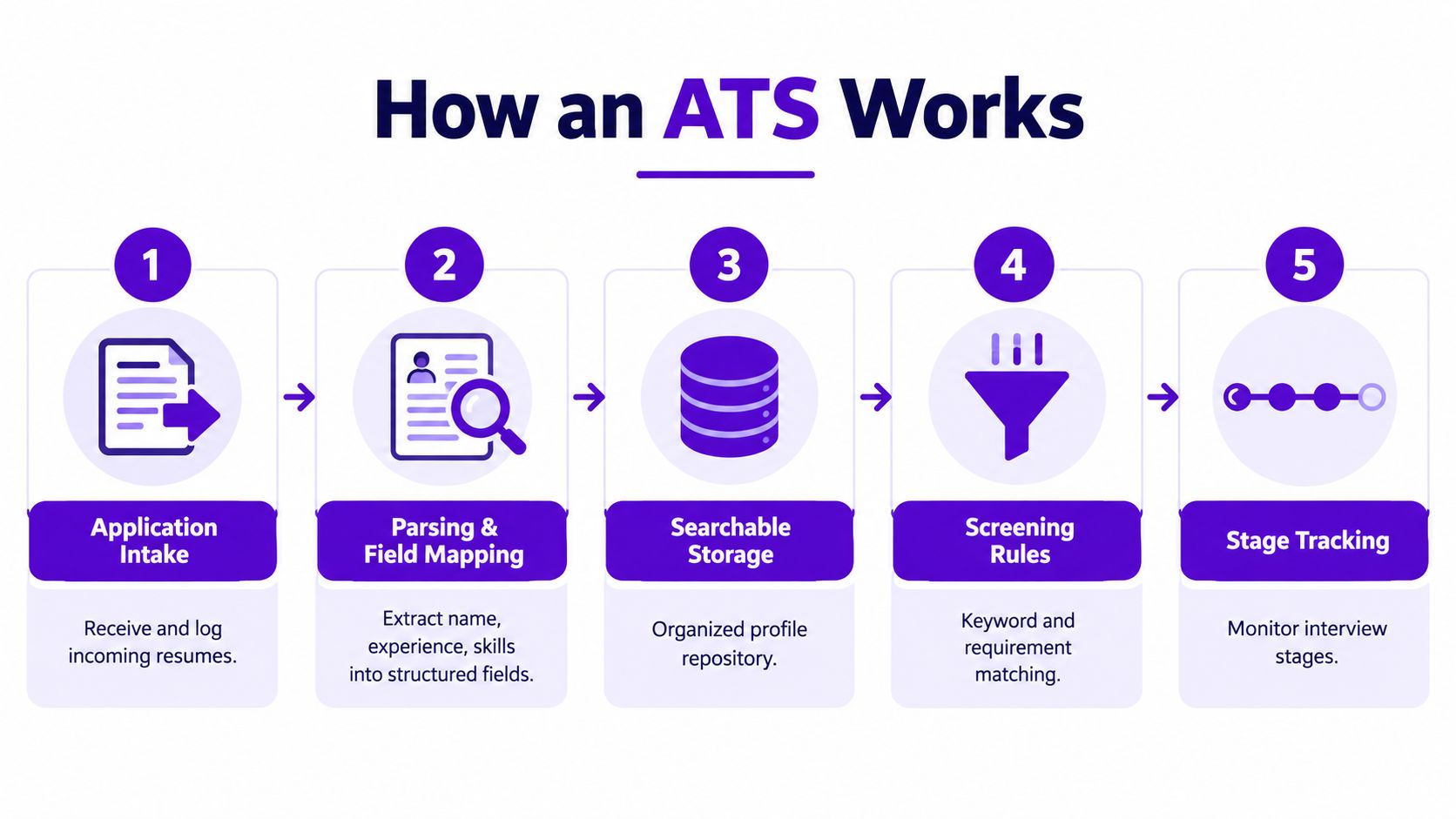
That is the clearest way to answer what is application tracking system at a practical level. An ATS takes a resume, application form, and related materials, then converts that information into a candidate record a hiring team can search, sort, and review.
Step one is intake and extraction
The first job of the ATS is collection. Applications can arrive from a company career page, a referral form, a recruiter upload, or a job board feed.
Then the harder part starts. The system has to read what you sent.
Parsing is the step where the software extracts details from your resume and places them into fields such as name, contact information, employer, job title, dates, education, and skills. A helpful comparison is a clerk entering information from a paper form into a database. If the handwriting is hard to read or the boxes are arranged strangely, the record comes out incomplete or wrong.
Resume formatting creates the same problem. Two columns, text boxes, icons instead of words, design-heavy PDFs, tables, and unusual section headings can all interrupt extraction. When that happens, the ATS may not build a clean profile, even if the resume looks polished to a human reader.
Ranking usually comes after the record exists
Many candidates get confused. They assume the ATS immediately scores the resume for keywords and decides their fate.
In many workflows, the system cannot do much matching until it has usable text and properly mapped fields. If your job title ends up in the wrong section, or your skills are trapped in a sidebar the parser skips, the ranking stage starts with broken inputs.
So the bottleneck often comes before any score.
One benchmark from Resume Atlas found that many real resumes ran into section-detection and record-creation problems during parsing. That finding matters more than it may seem at first. A candidate does not need to be underqualified to disappear in an ATS. The software may fail to translate the resume into a reliable database entry.
A practical way to view the workflow is as five handoffs:
Application intake
Your file enters from a job page, form, or external source.Parsing and field mapping
The ATS extracts text and assigns it to standard profile fields.Searchable storage
That extracted information becomes a candidate record in the database.Screening rules or ranking
The system may compare the record against job requirements, filters, or search terms.Stage tracking
Recruiters add notes, move candidates through steps, and keep a dated history.
Here's a short visual explainer if you prefer to see the process in action.
Where assessments and extra tools fit
Some systems add screening questions, tests, or structured evaluations on top of the core record. If you want to see that layer, this guide to applicant tracking with assessments shows how companies combine candidate records with skill evaluation inside the same workflow.
The path into the ATS matters too. Applications often pass through syndication tools, job boards, and application connectors before they ever reach the employer database. That flow helps explain duplicate applications, missing fields, and imported data that looks inconsistent. This overview of how job board integrations pass application data into ATS platforms is useful if you have ever wondered why one application feels easy and another feels glitchy.
Practical rule: If the ATS cannot extract your information cleanly, strong experience and perfect keywords may never appear correctly inside the system.
That is why formatting problems matter so much. Keyword strategy still matters, but only after the system has something accurate to rank.
It also helps explain where personal tools fit. Employer ATS platforms manage intake on the company side. Candidate tools such as Eztrackr help job seekers keep track of applications, follow-ups, and search activity outside that employer system.
What Recruiters and Hiring Teams Use ATS For
From the employer side, an ATS is less about mystery and more about operations.
Recruiters use it to collect applicants from different channels, keep candidate records in one place, search by criteria, move people through hiring stages, and document decisions. Hiring managers use it to review resumes, leave feedback, compare candidates, and keep interviews organized.
A candidate might experience the ATS as a form and an automated confirmation email. A recruiter experiences it as a working dashboard.
Day-to-day tasks inside the system
A recruiter may log in and do several different things in one sitting:
- Post and collect applications from job boards and company career pages
- Search the database for people with certain skills, titles, or locations
- Review stage history to see who has been screened, interviewed, or declined
- Collaborate with hiring teams by sharing notes and feedback on the same record
- Run reports to understand pipeline activity and keep processes documented
That's why large organizations lean on ATS platforms so heavily. The software helps them manage volume and maintain a record of what happened, when it happened, and who made each decision.
How the same system feels different depending on where you sit
| Perspective | What Happens in ATS | What It Means for You |
|---|---|---|
| Recruiter | Applications from several sources land in one database | They don't have to chase files across email and job boards |
| Recruiter | Candidate profiles become searchable by fields and filters | They can narrow a large pool quickly |
| Recruiter | Hiring stages, notes, and feedback are stored centrally | Teams can collaborate without losing context |
| Candidate | Resume details may auto-fill into a form | If parsing goes wrong, you may need to correct fields manually |
| Candidate | You receive status updates or silence based on workflow setup | Communication often reflects the company's process, not just interest level |
| Candidate | Your application becomes a structured record, not just a file | Clear formatting improves how accurately you're represented |
The ATS is the same system for both sides. Recruiters see workflow control. Candidates mostly see the front door.
That difference matters because it explains a lot of confusion. Job seekers often assume the tool exists mainly to eliminate them. Recruiters usually see it as the only practical way to manage a busy pipeline without losing people or notes.
How to Make Your Resume Work With ATS
If parsing is the first bottleneck, the goal is straightforward. Give the system a document it can read without guessing.
This doesn't mean writing a dull resume. It means using structure that machines and humans can both understand.
Format for extraction first
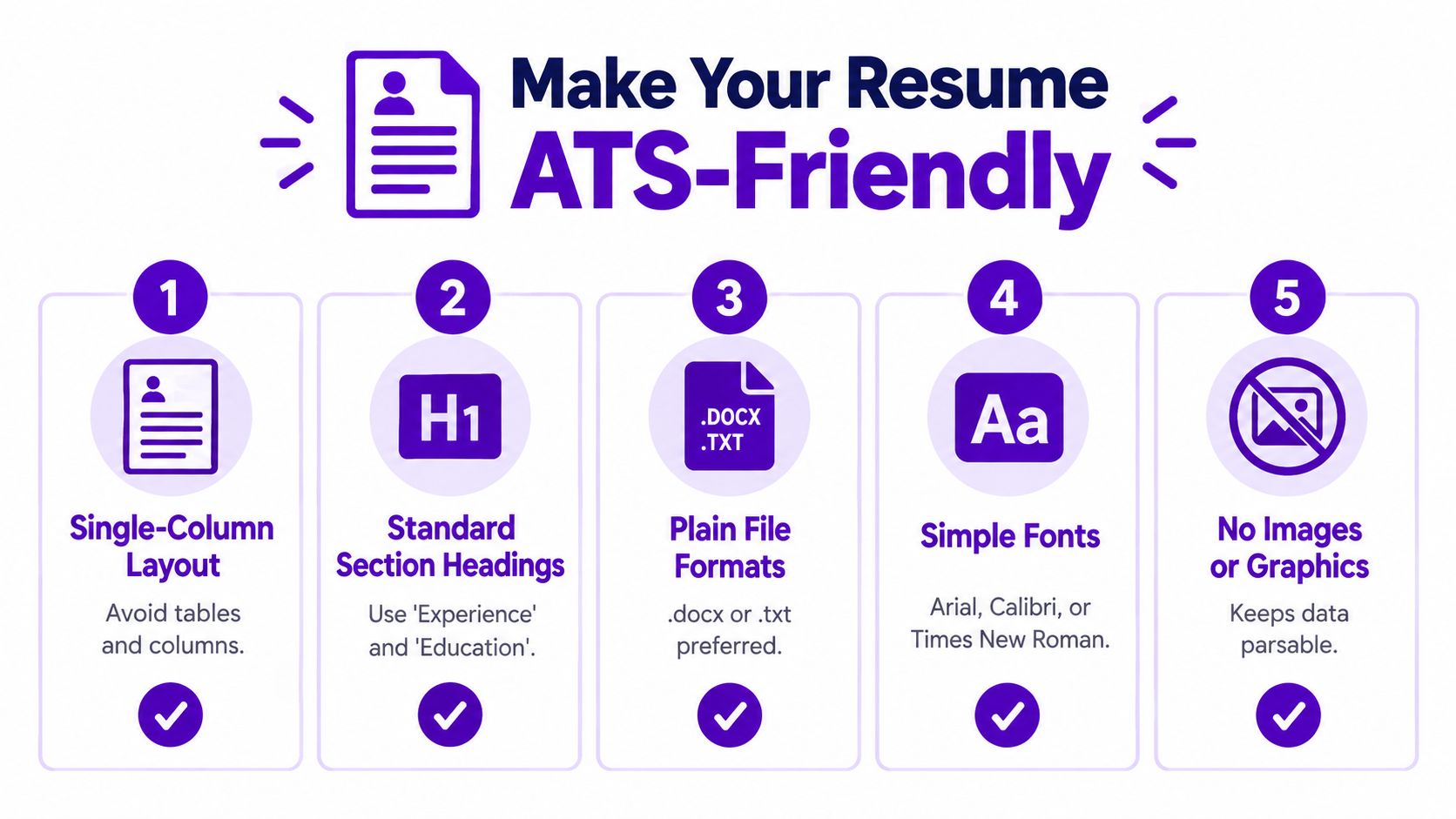
Research-oriented coverage on ATS problems points to the same common failure points: two-column layouts, unusual fonts, headers in text boxes, and design-tool PDFs can break parsing before ranking even begins (ATS misconceptions and parsing issues).
That gives you a practical checklist.
- Use a single-column layout so the software reads top to bottom in the right order
- Stick to standard headings like Experience, Education, and Skills
- Choose simple fonts that don't create character recognition issues
- Avoid text boxes, icons, and embedded graphics because they often don't map cleanly into fields
- Be careful with heavily designed PDFs especially those made in visual design tools rather than word processors
Write for matching after readability
Once your resume is machine-readable, then keyword alignment matters.
That doesn't mean stuffing the same phrase twenty times. It means reflecting the language of the job description naturally where it truthfully matches your background. If the role asks for “project coordination,” “stakeholder communication,” and “Excel,” those ideas should appear in your resume if they're part of your experience.
A simple example:
- Weak version: “Helped with many office tasks”
- Better version: “Coordinated project timelines, updated Excel trackers, and communicated status to internal stakeholders”
The second version helps both a recruiter and a parser. It uses clearer, more searchable terms.
A practical resume check before you apply
Before sending a resume, try this short review:
Scan the headings
Would a stranger instantly recognize your sections?Check the layout
Does the content read in one straightforward column?Compare against the job post
Are the required tools, skills, and titles reflected naturally where relevant?Test copy and paste
If you copy your resume into a plain text document, does the order still make sense?Tailor the file version
Keep your designed portfolio resume if needed, but submit a cleaner ATS version when the application flow suggests machine parsing
If you want a role-specific example of how to keep technical experience readable, this motorsport engineering resume blueprint is a good reference because it shows how specialized work can still be presented clearly.
You can also compare your draft against practical formatting guidance in this article on resume format to pass ATS.
Clear structure beats clever formatting when software is involved.
That's the mindset shift. Don't try to “beat” the ATS. Help it represent you accurately.
How Eztrackr Complements Your ATS Journey
Employer ATS platforms track candidates for the company. Job seekers still need a separate way to track their own search.
That gap is bigger than it sounds. Once you're applying to several roles, it's easy to lose track of which version of your resume you sent, when you applied, whether you followed up, and where each application stands.
The employer tracks applicants. You need to track your campaign.
A personal job search has its own moving parts:
- saved job posts
- resumes
- cover letters
- deadlines
- recruiter names
- interview notes
- follow-up reminders
That's where a personal tracking tool fits. It doesn't replace the company's ATS. It sits on your side of the process so you can stay organized across many companies and systems.
One example is Eztrackr. It lets users save job postings with a Chrome extension, organize applications on a kanban board and timeline, attach documents, and use tools like a resume builder, cover letter generator, and skill-match analysis. If you want to evaluate whether a resume is likely to align with a role before you submit it, the resume scorer feature is the part most directly connected to ATS prep.
Why this matters in practice
A personal tracker helps with three very practical problems.
First, it reduces version confusion. You can keep track of which resume you used for which role.
Second, it supports tailoring. If ATS performance starts with clean extraction and relevant language, then having your job post, notes, and documents connected in one workflow makes customization much easier.
Third, it lowers administrative stress. When the busywork is organized, you can spend more energy on stronger bullets, better interview prep, and more thoughtful follow-up.
That's the key distinction. An employer ATS manages their hiring pipeline. A personal tracker manages your application pipeline.
Common Myths About Applicant Tracking Systems
Some ATS advice online is useful. A lot of it isn't. The biggest myths usually come from treating the system like a single all-powerful judge.
Myth and reality
Myth: The ATS instantly rejects most resumes for mysterious reasons.
Reality: Many application problems start earlier, with poor parsing or weak alignment between the resume and the job profile.
Myth: Keyword stuffing is the best way to pass.
Reality: Repeating terms unnaturally won't help much if the resume structure is hard to extract or the experience doesn't match the role.
Myth: Fancy design helps you stand out everywhere.
Reality: In ATS-heavy workflows, visual complexity can make your resume less readable to the software that creates your candidate record.
There's also a broader misconception that the ATS is always the main cause of rejection. Sometimes it is part of the issue. But often the problem is a combination of unclear formatting, missing role-relevant language, and a competitive applicant pool.
The better takeaway
Focus on what you can control.
Use a clean structure. Match your language to the role. Keep records of where you applied and what you sent. Those habits solve more ATS problems than gimmicks do.
When people ask what is application tracking system, the most useful answer isn't “a robot that rejects resumes.” It's this: a hiring database and workflow tool that must first read your resume as data before anyone can fairly search, rank, or review it.
If you want a simpler way to stay organized while applying, Eztrackr gives you a personal system for saving jobs, tracking application stages, and tailoring resumes to specific roles. It fits this process well because employer ATS tools manage the company's workflow, while Eztrackr helps you manage yours.