Recruiting Pipeline Template: Stages, Fields and KPIs
The most repeated advice about a recruiting pipeline template is that you should grab a free board, add your open roles, and drag candidate cards from column to column as they move. It takes ten minutes, it looks tidy in a screenshot, and it stops producing anything useful the moment the team gets busy.
The columns aren't the problem. A column with no definition, no exit criterion and no timestamp means two recruiters classify the same candidate differently, and nobody can answer the three questions that decide whether hiring is working: which stage is slow, which source produces hires rather than applications, and why candidates leave. A template earns its keep when every stage carries a written definition and a conversion metric, and every candidate record carries the disposition and governance fields the free versions omit. That's the version worth running.
The Eight Pipeline Stages and Their Exit Criteria
A flat status dropdown is the most common mistake and the hardest to undo, because it corrupts history. Once candidates sit in "Interviewing" with no entry date and no exit date, you can't compute how long the stage takes or what share of candidates survive it. Write the stage definition first, then let whatever tool you use draw the column.
Here are the eight stages I'd defend in a hiring review, each with the criterion that moves a candidate in, the one that moves them out, and the person who owns the move.
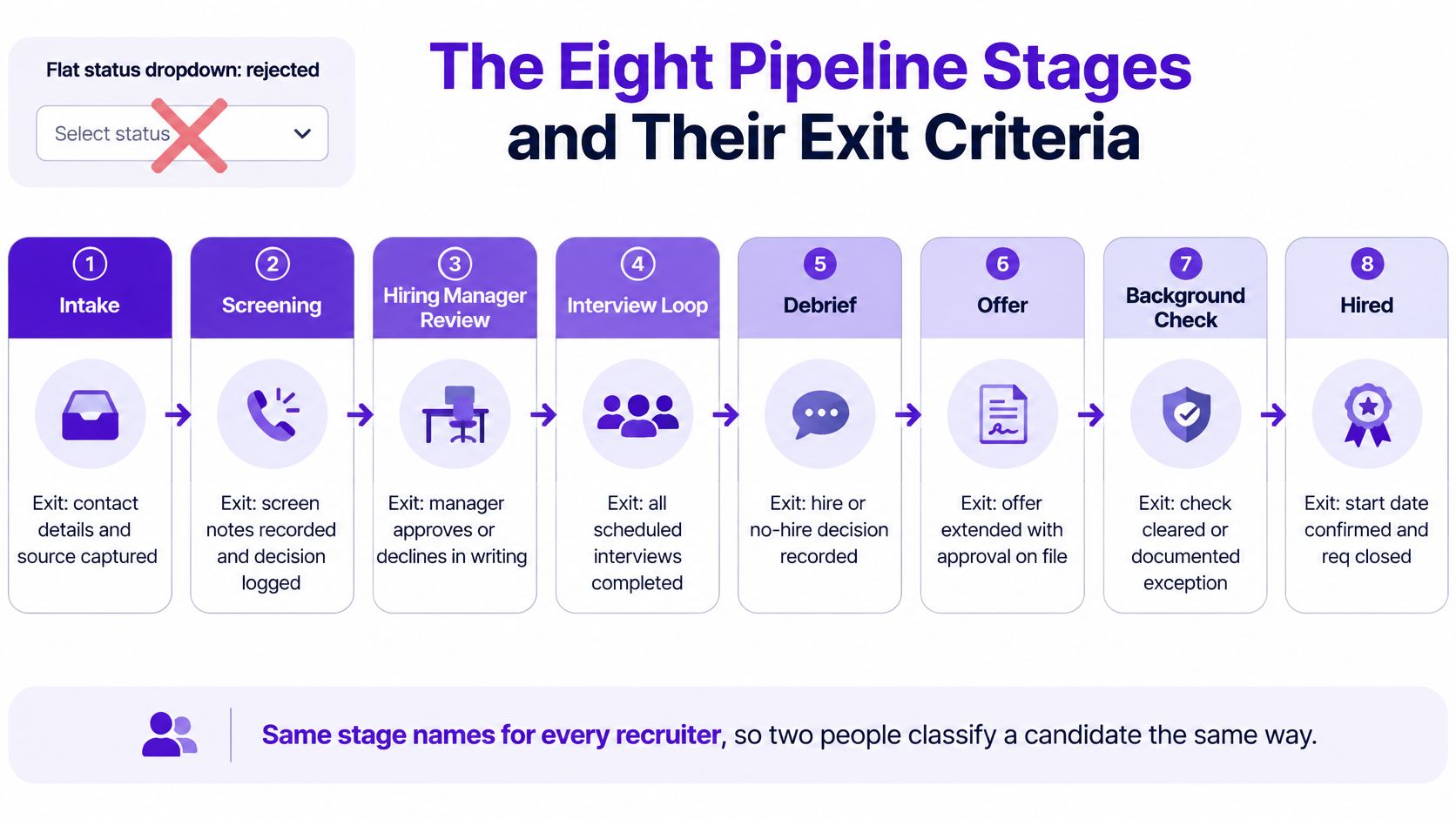
| Stage | Entry criterion | Exit criterion | Owner | Typical days |
|---|---|---|---|---|
| Requisition approved | Headcount signed off and budget confirmed | Job posting or sourcing brief published | Hiring manager | 1-3 |
| Sourcing and outreach | Brief live in ATS and job boards | Candidate applies or recruiter logs outreach reply | Recruiter | 3-10 |
| Application received | Application or sourced profile in system | Minimum qualifications screen completed | Recruiter or ATS rule | 1-3 |
| Screener | Passes minimum qualifications | Phone or video screen scored against criteria | Recruiter | 2-5 |
| Structured assessment | Passes screen | Work sample or skills test scored | Hiring manager | 3-7 |
| Interview loop | Assessment passed | Panel debrief and decision recorded | Hiring manager | 5-10 |
| Offer | Verbal intent to offer | Offer accepted or declined in writing | Recruiter | 2-7 |
| Hired or Dispositioned | Accepts or exits any stage | Start date set or disposition reason logged | Coordinator | 0-1 |
Requisition approval sits first for a measurement reason, not a procedural one. SHRM defines time-to-fill as the calendar days from opening a requisition to the candidate's offer acceptance, weekends and holidays included, and its 2025 benchmarking summary put the median at roughly one and a half months for both executive and nonexecutive roles (SHRM recruiting benchmarking). Start your clock at application and you understate the employer's real cycle by every day approval and sourcing consumed.
One stage, one row: stages run in sequence, but a disposition can fire from any of them, and each transition writes a new row in the candidate's event history instead of editing a status field.
That single rule is what makes the timeline reconstructable six months later, when someone asks why a hire took nine weeks.
Candidate Record Fields Grouped by Category
Most templates carry a name, an email, a role and a stage. That's enough to open a record and not enough to learn anything from it. The schema below groups fields by the question they answer, so it works as a spreadsheet header row today and maps to a database table when the volume justifies one.
| Field | Category | Type | Required |
|---|---|---|---|
| candidate_id | Identity and contact | Text | Yes |
| full_name | Identity and contact | Text | Yes |
| Identity and contact | Text | Yes | |
| requisition_id | Requisition link | Text | Yes |
| role_title | Requisition link | Text | Yes |
| job_level | Requisition link | Picklist | Yes |
| stage_code | Stage events | Picklist | Yes |
| stage_entered_at | Stage events | Date and time | Yes |
| stage_exited_at | Stage events | Date and time | Yes |
| score | Stage events | Number | No |
| assessor_id | Stage events | Text | No |
| decision_reason | Stage events | Picklist | Yes |
| source_channel | Source and cost | Picklist | Yes |
| cost_category | Source and cost | Picklist | No |
| cost_amount | Source and cost | Currency | No |
| skills_required | Quality signal | Multi-select | No |
| skill_evidence | Quality signal | Long text | No |
| assessment_method | Quality signal | Picklist | No |
| hiring_manager_satisfaction | Quality signal | Scale 1-5 | No |
| collection_purpose | Governance | Text | Yes |
| notice_version | Governance | Text | Yes |
| retention_category | Governance | Picklist | Yes |
| deletion_date | Governance | Date | Yes |
| future_vacancy_consent | Governance | Yes or no | Yes |
The Two Fields Most Templates Leave Out
stage_exited_at turns the pipeline from a status board into a measurement instrument, because duration and passthrough both come from the gap between entered and exited. decision_reason protects every downstream analysis, since free-text outcome notes ("not a fit", "moved on") can't be counted and can't be compared across recruiters.
A filled record should read like this: candidate C-1042, requisition R-208, stage Interview loop, entered 2025-03-04 09:10, exited 2025-03-06 16:40, decision Advanced to offer. Notice what the record doesn't contain: cost. Cost-per-hire belongs at requisition level, where each cost_amount is a line item keyed to requisition_id and the total divides by hires on that requisition.
The event-per-row structure isn't only good hygiene. Under the U.S. Uniform Guidelines on Employee Selection Procedures, a selection procedure covers application reviews, interviews, work samples and experience requirements, so each stage row should carry the competency assessed, the rating scale, the assessor, the decision and the evidence behind it (29 CFR Part 1607). If you're building the relational version rather than a sheet, the PracHub data modeling interview guide covers the normalization decisions that determine whether events belong in their own table.
Pipeline Metrics the Template Should Produce
Measure passthrough, not volume. An application count tells you how well a job ad performed; a stage passthrough rate tells you whether the hiring process works. The template should compute the second without anyone exporting a CSV.
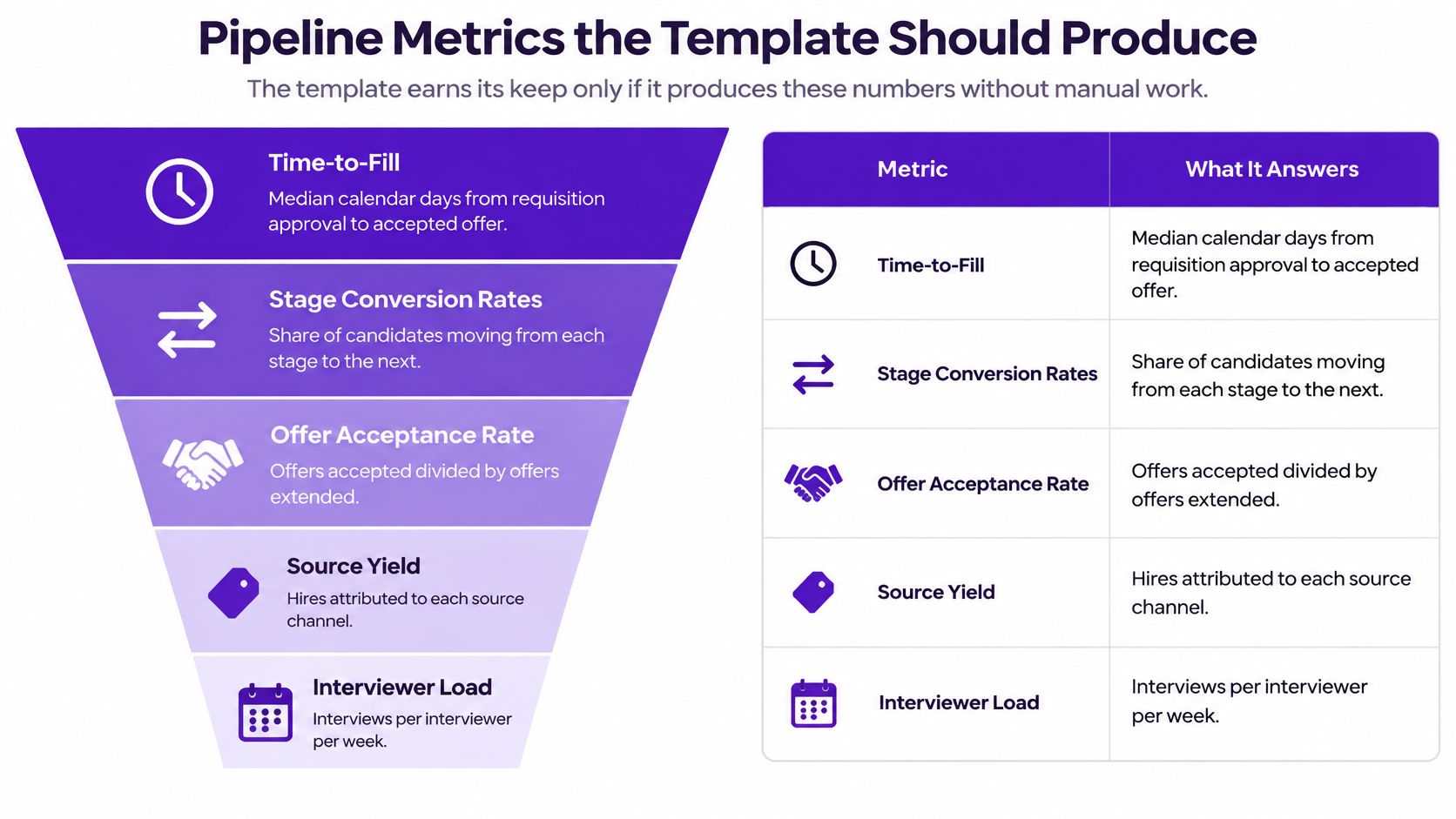
Put each of these in as a calculated column or a pivot, and give every metric a named owner, because a number nobody owns gets explained away at the next review rather than fixed.
| Metric | Formula | Reference value |
|---|---|---|
| Time-to-fill | Requisition approval date to offer acceptance, calendar days | Median across your filled requisitions, read by job family |
| Time-to-hire | First candidate contact to offer acceptance | Set from your own trailing data |
| Application-to-screen rate | Screened divided by applications | Declining since 2021, with the steepest drop at the top of the funnel |
| Click-to-apply rate | Applications divided by job page clicks | 6% average across industries (CareerPlug, 2024) |
| Stage passthrough rate | Selected divided by considered at each stage | Application-to-pre-onsite fell 4.8% to 7.4% by group, 2021 to 2024 (Gem 2025 Recruiting Benchmarks) |
| Offer acceptance rate | Offers accepted divided by offers extended | Set from your own trailing data |
| Sourced hire rediscovery | Sourced hires already in CRM or ATS divided by sourced hires | 44.0% in 2024, up from 29.1% in 2021 (Gem) |
| Cost-per-hire, nonexecutive | Total recruiting cost divided by nonexecutive hires | $5,475 average (SHRM-related 2025 cost-per-hire benchmarks) |
| Cost-per-hire, executive | Total recruiting cost divided by executive hires | $35,879 average, same benchmark, executive roles |
| Quality-of-hire | Hiring-manager satisfaction rating at 6 to 12 months | Set from your own trailing data |
The Gem decline figure is the one to keep in front of a hiring manager who wants more applicants. Top-of-funnel volume and hiring outcomes moved in opposite directions between 2021 and 2024, so adding sourcing spend to a funnel that leaks at the screen is the most expensive way to feel busy. Work a small example: 40 applications, 12 screened, 3 interviewed, 1 hired gives a screen rate of 30% and an interview rate of 25% out of that stage. If the screen rate is the weak link, the fix is qualification criteria, not more advertising.
Read the funnel weekly in one view. A working layout for it is set out in this applicant tracking system dashboard guide, which covers the same stage and source cuts.
Here's how the metric set translates into a working board when you're tracking the funnel from the candidate side.
Adapting the Template to Different Teams
No template survives contact with a real team unchanged, and it shouldn't. Start from the eight-stage core, then reshape it to the hiring you do, keeping the definitions and dropping the fields nobody reads.
| Team type | Stages | Cut these fields | Add these fields | Priority metric |
|---|---|---|---|---|
| High-volume hourly | 4 | score, assessment_method, hiring_manager_satisfaction | shift_availability, location_preference | Time-in-stage for screener |
| Professional and corporate | 8 | none | work_sample_score, panel_feedback | Stage passthrough rate |
| Executive search | 9 | cost_category detail | compensation_expectation, search_firm_flag, client_brief_version | Offer acceptance rate |
| Agency or RPO | 9 | cost_category detail (fees tracked by client) | client_approval, submission_date, client_feedback | Submission-to-interview rate |
High-volume hourly hiring collapses to four stages, apply, automated screen, on-site group interview, offer, and the structured assessment doesn't exist at that volume. What it needs instead is the screener duration, because a shift hire who waits four days for a callback has usually taken another job.
Executive search adds the retained-search stage and a compensation alignment checkpoint before the offer goes out, which is why offer acceptance becomes the metric that matters. Agency and RPO work adds client_approval and submission stages, because the hiring decision sits outside the recruiter's control.
When a team wants to simplify, cut assessments and reference checks before any governance field, and never cut stage_exited_at, decision_reason or retention_category regardless of team size. Set a maximum days-in-stage for each step, typically 5 working days for the screener and 10 for the interview loop, with escalation to the hiring manager on breach. Then migrate in order: run the new template on one requisition for a full cycle before switching the whole team over.
A Skills-First Variant for the Template
Swapping a "degree" column for a "skills" column does not remove subjectivity. It relocates it, and unless the skills are defined and measured consistently, the template now records opinions with a more modern label. Adoption isn't the problem. A 2025 survey of 1,076 job seekers and 1,084 hiring decision-makers in the United States and United Kingdom found 85% of employers used skills-based hiring, up from 81% the year before, and 76% used skills tests to validate ability (TestGorilla, The State of Skills-Based Hiring 2025). The measurement is the problem.
Apply the method in four steps:
- Mark each skill essential or preferred. Essential skills justify rejection. Preferred skills only break ties, and mixing the two is how a "nice to have" becomes a silent filter.
- Define the observable evidence that satisfies each essential skill, whether that's a portfolio piece, a work sample, a certification or a scored test. "Strong communication" isn't evidence. A 20-minute written brief is.
- Record the assessment method and score next to the evidence, so a second reviewer can reach the same conclusion from the same file.
- Require a written justification for any rejection on an essential skill. One sentence, tied to the evidence field, not a free-text impression.
The fields to add are skills_required, skill_evidence, assessment_method, score, confidence level and essential_or_preferred. The practical payoff lands with career changers and recent graduates, whose capabilities rarely show up in conventional credentials and who now get assessed on work they can demonstrate. The audit payoff is that every skill decision links to an evidence record. If you're choosing how to score those assessments, this guide to skills assessment tools covers the formats and where each one fits.
One hard rule: never let an opaque automated score be the sole rejection criterion. Keep the underlying job-related factors, put a human reviewer on the decision, and document and validate anything automated before it eliminates candidates.
Privacy and Record-Keeping Controls in the Template
Workflow fields get all the attention and governance fields prevent the expensive problems. Six controls belong in the template from day one, and all six work in a spreadsheet.
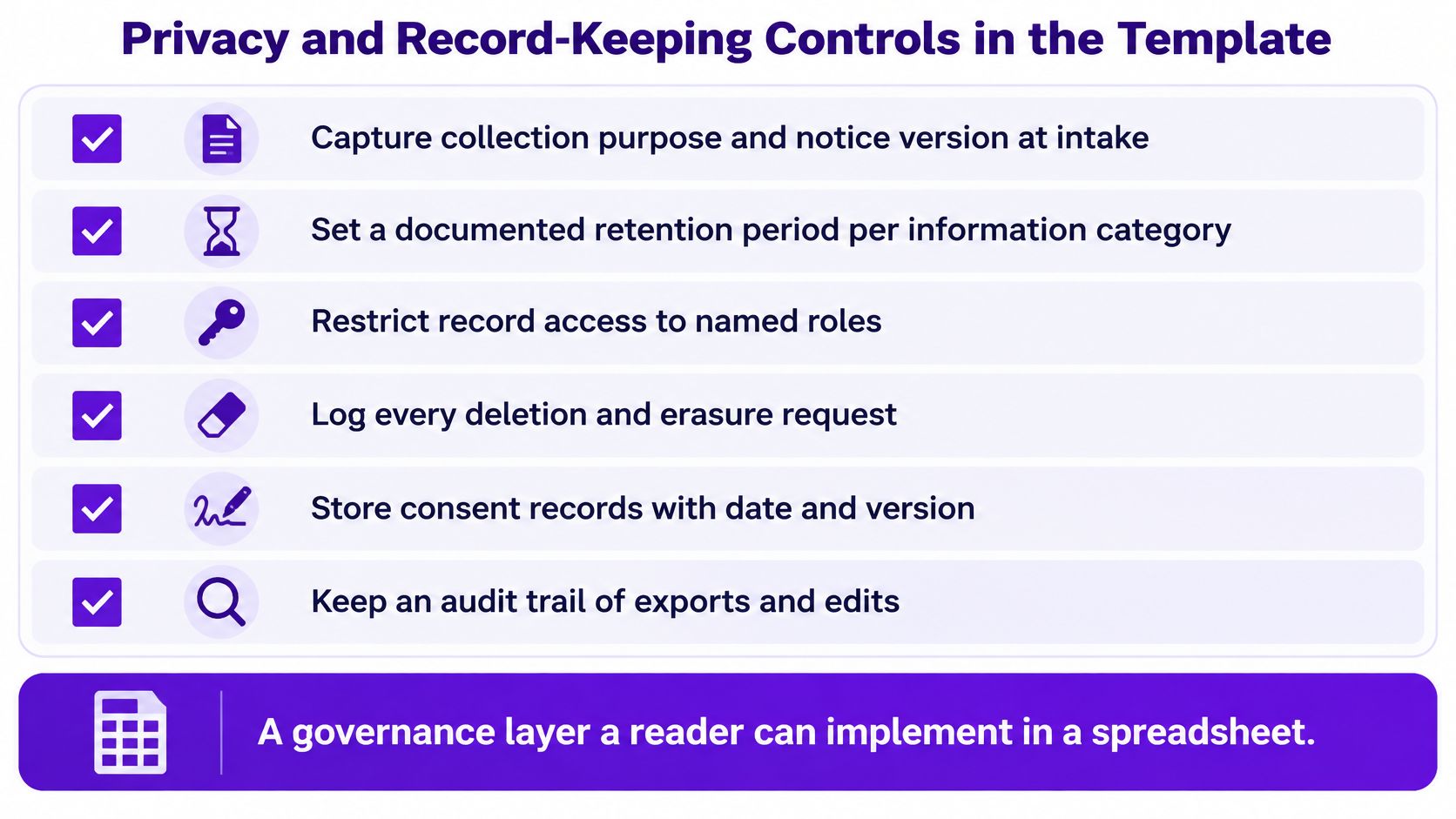
- Capture purpose and notice at intake. Two fields, collection_purpose and notice_version, answering why you're holding the record and which privacy notice the candidate saw.
- Set retention by category, not one blanket rule. A rejected applicant, a silver-medalist and a hired employee have different storage needs.
- Record future-vacancy consent explicitly. Yes or no, with the date, because "keep me in mind" isn't a lawful basis on its own.
- Assign a deletion or anonymization date at the point of collection rather than reconstructing one during an audit.
- Restrict identifiable fields to a named access group, and keep analytics on aggregated data.
- Log exports and edits. Who pulled the candidate list, and when.
The UK Information Commissioner's Office is direct on the substance: candidates must be told how long their information will be kept, including whether it will be used for future vacancies; records must not be retained longer than needed; records kept solely for statistical reporting should be fully anonymized; and information no longer required should be securely deleted (ICO recruitment and selection guidance).
Dispositions and Speculative Applications
Offer disposition as a fixed picklist, never free text: minimum qualifications not met, withdrawn, accepted another offer, duplicate, requisition closed, other documented reason. Six options cover nearly everything, and they make rejection analysis possible a year later.
Unsolicited CVs need a written decision too. State whether the organization uses them, holds them for future roles with consent and a review date, or deletes them on receipt. Keeping them "just in case" with no retention date is the default that creates the liability.
Finally, separate the two layers. Identifiable records live in a restricted candidate table for operations; the funnel view, applicants per stage, median days in stage, completion rate, rejection reason and source yield, runs on aggregated data that anyone on the team can read.
Building the Template in a Spreadsheet or Tracker
Three tabs beat one wide sheet. Requisitions, Candidates and StageEvents keep stage history immutable while the candidate row stays editable. Each stage event then carries an entry, an exit and a duration you can count, which is what a status column cannot do.
Build in this order:
- Create Requisitions, Candidates and StageEvents. One row per open role, one per person, one per stage move.
- Paste the field schema from the record table as the header row on Candidates, dropping the quality signal fields if you are not measuring quality-of-hire yet.
- Add the eight stages as a validated dropdown on StageEvents, so stage_code can only hold a defined value with a written exit criterion.
- Add a calculated column for days in stage, stage_exited_at minus stage_entered_at, formatted as a number rather than a date.
- Build a pivot for passthrough rate per stage and per source_channel, then pin it to the top of the sheet.
- Lock the Requisitions tab to the hiring manager and the governance fields to the recruiter lead, using sheet protection.
Sheets have no real role-based access, so those governance fields need a separate restricted tab or a tool with permissions. A spreadsheet also stops being workable somewhere past a few hundred live candidates per recruiter. If the team already runs a CRM, check whether its tiers support that role-based access and the stage events this template needs before you treat it as the system of record. Cost is a separate question: browse Freshsales plan options to see what each tier includes, not to decide the data model.
A tracker earns its place where a sheet is weak: moving candidates across stages visually, and rolling up a summary per application. Eztrackr's job tracker does both with a Kanban board grouped by hiring stage, a timeline from applied to hired, and a summary for each application. Bring existing jobs across with a spreadsheet import rather than retyping them.
Common Failures and How to Fix Them
The failures below account for most broken pipelines, and they cascade. Start with the first one, because it invalidates every metric downstream.
- Stage names drift between recruiters. Symptom: three spellings of "phone screen" in one export. Cause: no written entry and exit criteria. Fix: publish the stage definitions and audit a sample of ten records monthly against them.
- Candidates stall in one stage. Symptom: records untouched for two weeks. Cause: no maximum time in stage. Fix: escalate at 5 working days for the screener and 10 for the interview loop.
- Source reporting is unusable. Symptom: a source column with 40 distinct values. Cause: free text. Fix: convert it to a fixed picklist aligned with your job board and cost categories.
- Conversion analysis can't run. Symptom: you can see the current stage but not the path. Cause: an overwritten status field. Fix: immutable stage events with entered and exited timestamps.
- Records outlive their purpose. Symptom: a candidate folder from four hiring cycles ago. Cause: no deletion date. Fix: assign retention_category and deletion_date at intake.
Two measurement traps sit behind those failures. Confusing time-to-hire with time-to-fill understates the employer's real cycle, because one starts at first contact and the other at requisition approval. And treating application volume as pipeline health measures your advertising, not your hiring, which is why source yield in hires beats source yield in applications every time you have to choose one number.
Change control is the difference between a template that improves and one that decays. Any new stage or field needs a definition and an owner before it goes live.
Without that gate, the template turns back into a status list within a quarter. The deeper fix for most of these failures is fewer manual handoffs, which is what this walkthrough of hiring process automation covers.
Definitions and Source Notes
- Time-to-fill: calendar days from requisition opening to offer acceptance, weekends and holidays included (sections 1 and 3).
- Time-to-hire: days from first candidate contact to offer acceptance (section 3).
- Stage passthrough rate: candidates selected divided by candidates considered at a stage (section 3).
- Disposition: the fixed reason a candidate leaves the pipeline (section 6).
- Requisition: an approved opening that anchors every candidate record (section 1).
- Source yield: hires per sourcing channel rather than applications per channel (section 3).
- Quality-of-hire: hiring-manager satisfaction measured at 6 to 12 months (section 3).
- Retention category: the documented storage period assigned to a record at intake (section 6).
Sources consulted: SHRM's recruiting benchmarking for time-to-fill and cost-per-hire, including the 2025 summary and the 2026 trend description; Gem's 2025 Recruiting Benchmarks Report; CareerPlug's 2024 analysis of click-to-apply conversion; a 2025 survey of 1,076 job seekers and 1,084 hiring decision-makers in the United States and United Kingdom on skills-based hiring; the EEOC Uniform Guidelines on Employee Selection Procedures; and the UK Information Commissioner's Office guidance on recruitment data.
Treat every external benchmark as a reference point rather than a target. Replace it with your own trailing four quarters as soon as you have them, because your roles, market and candidate pool set the honest comparison.
Start With One Requisition This Week
Don't roll this out to a team on a Monday morning and hope. Run one live requisition through the full template first:
- Copy the stage table and field schema into a working sheet and attach them to a single open role from the day the requisition is approved.
- Record stage dates and a disposition reason for every candidate, including the ones you reject in four minutes.
- Review the first complete cycle against the metrics, then decide what to change before expanding.
At that review, ask three questions. Which stage had the longest median duration? Which source produced the most hires rather than the most applications? Which disposition reason appeared most often? The answers tell you whether you have a pipeline problem (slow stages), a sourcing problem (thin interview slates) or a screening problem (a screen rate that kills good candidates early).
Then make the adoption call: the full eight-stage template, the four-stage high-volume variant, or the skills-first version. If the review shows a sound pipeline with weak tracking, a dedicated tracker costs less than an ATS, and Eztrackr's job tracker is included free and maps onto the same three tabs. Teams filling legal roles carry an extra approval layer, and specialist legal recruiting services show how the requisition and the candidate record split when a client sits between you and the hire.
Eztrackr gives you a Kanban board grouped by hiring stage, a timeline that runs from applied to hired, and a summary for every application, so the three tabs described here become one view you can keep current. If you're tracking your own applications rather than a team requisition, you can import existing jobs from a spreadsheet and start with the stages you already use. Visit Eztrackr to set up your first board and see where your funnel is really losing candidates.