Applicant Tracking System Statistics: 2026 Trends
You can submit a carefully crafted resume and still receive no response. Often, the first reader isn't a person. In large-enterprise hiring, 97.8% of Fortune 500 companies had a detectable applicant tracking system, or ATS, on their career pages in 2025, according to 2026 ATS adoption research.
That doesn't mean an ATS automatically rejects every imperfect resume. It means your application may first pass through software that extracts information, organizes candidates, supports recruiter searches, and routes applications through hiring stages. If the system misreads your job title, skills, or education, a recruiter may never see the full picture.
Introduction to Applicant Tracking System Statistics That Matter Now
Applicant tracking system statistics matter because they reveal how hiring works before the interview stage. A job seeker might think, “The company hasn't replied because I'm not qualified.” Sometimes that's true. In other cases, the resume may have been difficult for the software to interpret, or it may not have used the terminology connected to the role.
The distinction matters. You can't control how many people apply, which recruiter opens your file, or how quickly a hiring manager responds. You can control whether your resume presents your experience in a format that hiring software can read and in language that matches the position.
Recruiters use ATS platforms for practical reasons. A company hiring across multiple teams needs a central place to collect applications, search candidate records, move people between stages, and maintain communication history. The ATS acts as the hiring team's shared filing system, not merely a digital gatekeeper.
The strongest interpretation of the data is simple: ATS software has become standard infrastructure for large companies. Recent audits have placed Fortune 500 adoption at roughly 98% to 99%, with reported penetration remaining between 97.4% and 98.8% since 2018 in the cited research. That long-running stability suggests the technology isn't a temporary experiment.
But enterprise adoption doesn't tell the whole story. The ATS market is fragmented, and a small business, staffing firm, and global corporation may process resumes differently. A strategy designed only around Fortune 500 hiring can therefore become too broad.
This guide translates the data into useful decisions. You'll learn what an ATS does, why format affects parsing, how company size changes the experience, and how tracking your own applications can reveal patterns. The point isn't to make job searching feel technical. It's to replace ATS myths with a clear process you can use.
How Applicant Tracking Systems Actually Work
Think of an ATS as a busy mailroom. Every resume is an envelope arriving at the same building, but the software needs to identify the sender, read the contents, label the package, and send it to the right hiring team.
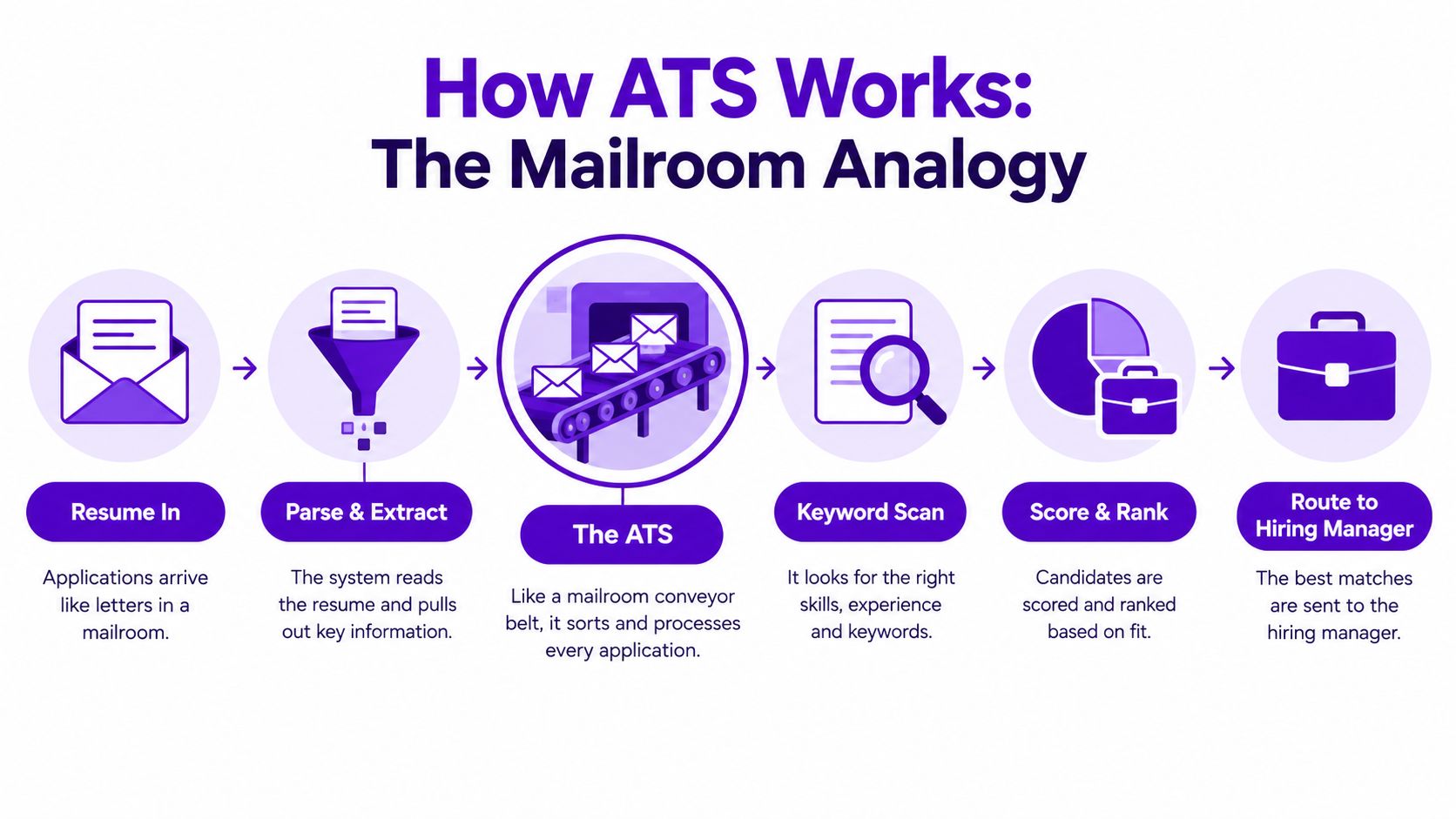
First, the system reads the document
The ATS begins by parsing your resume. Parsing means converting a document into recognizable fields, such as name, contact details, work history, education, skills, and certifications.
A clean heading like “Professional Experience” helps the software understand what follows. A job title placed beside an employer name and dates gives the system a familiar structure. Decorative elements, unusual text boxes, or information placed in headers and footers can make those relationships harder to identify.
Next, it looks for relevant information
After extraction, the system can compare your resume with the job description. It may look for skills, job titles, education, certifications, and related terms selected by the employer or recruiter.
This isn't the same as understanding your career the way a human does. A recruiter might recognize that “client relationship management” connects to “account management.” Software may handle that relationship differently depending on its configuration and the wording in the record.
Then, the ATS supports workflow
The system can store applications, record screening decisions, schedule steps, and route candidates to recruiters or hiring managers. Some teams use search and ranking features, while others mainly use the ATS as a central database.
Core idea: An ATS is a sorting and workflow system. It doesn't replace human judgment, but it can influence which applications receive human attention first.
That's why “beating the ATS” is a misleading goal. You're not trying to trick the software. You're making your qualifications easy to extract, locate, and verify. For a deeper technical walkthrough, see how applicant tracking systems work.
A readable resume gives both the software and the recruiter a better starting point. Clear structure, conventional headings, and role-specific language reduce ambiguity at the earliest stage.
ATS Adoption and Market Growth by the Numbers
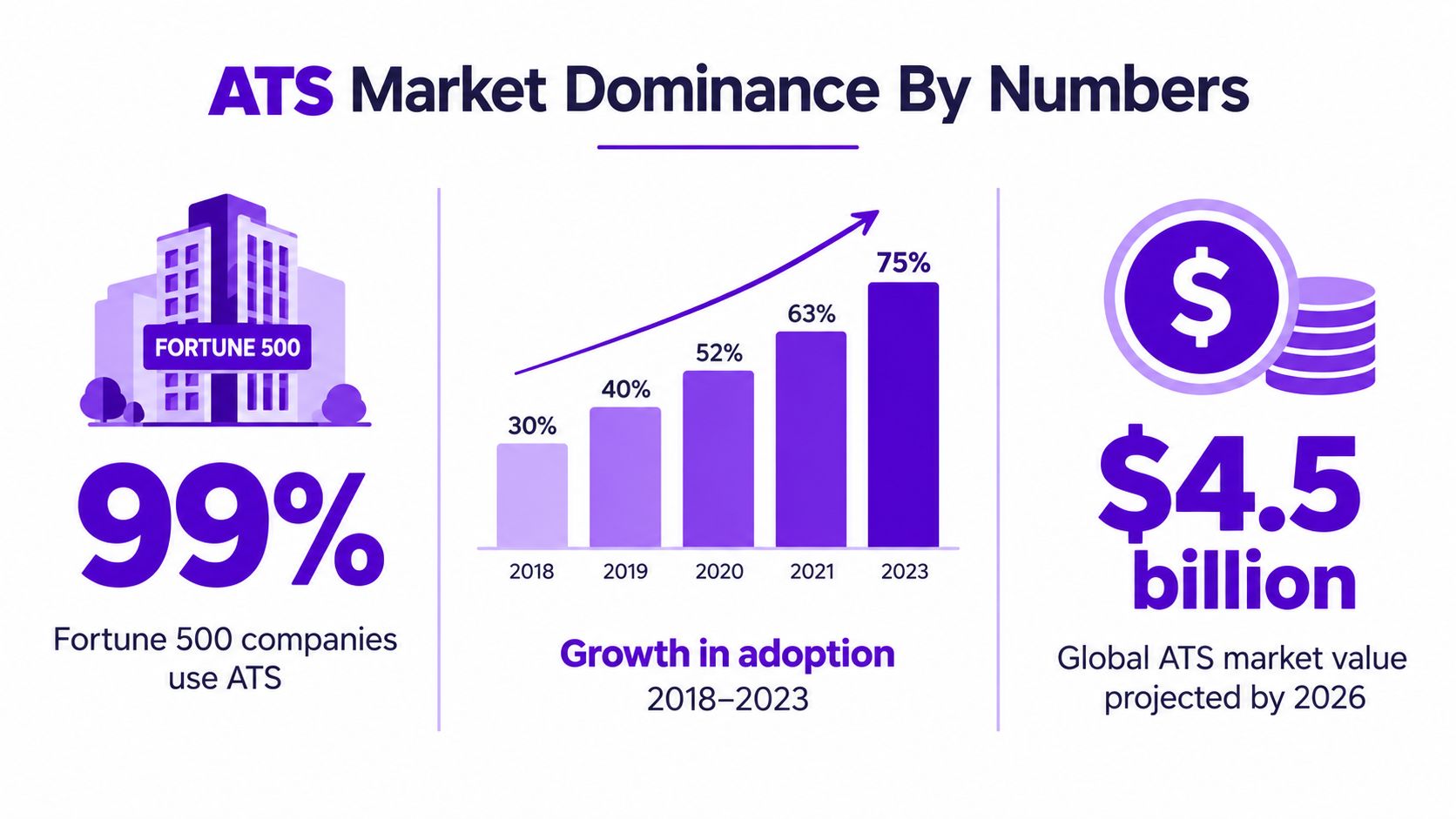
The global ATS market was valued at USD 2.41 billion in 2022 and is projected to reach USD 4.68 billion by 2030, with a projected compound annual growth rate of 8.7% from 2023 to 2030, according to Gitnux's ATS statistics summary. Those figures show continued investment in software that organizes recruiting activity, rather than promising a particular result for applicants.
Adoption has become stable infrastructure
ATS use has remained highly consistent among large enterprises over recent audit periods. A 2025 audit found an ATS on career pages for 97.8% of Fortune 500 companies, as reported in the 2026 ATS state report. The useful insight is stability, not one isolated percentage. Hiring teams continue to use software for candidate routing, screening support, recordkeeping, and pipeline management.
That pattern matters because ATS adoption does not mean one universal system. Company size, recruiting volume, configuration, and connected tools can change how applications are processed. A resume that parses well in one system may still need different keyword choices for another employer's setup.
The history of the category helps explain its staying power. Early applicant tracking systems emerged in the 1970s. More recognizable modern features developed in the mid-to-late 1990s, as online applications increased and hiring teams needed digital tracking and storage.
What market growth means for applicants
Market expansion signals operational dependence. Employers are paying for systems that help manage applications at scale, so applicants should treat a resume as structured application data as well as a document for human readers.
That means clear headings, readable formatting, and role-specific language matter before visual polish. If parsing separates a skill from its context or hides an important job title, a recruiter may have less usable information to review. Matching the employer's terminology can help, but the exact strategy should reflect the company and system rather than a generic ATS myth.
The video below offers another visual explanation of how applicant tracking fits into recruiting operations.
Employers may also connect career pages, recruiting workflows, and external listings through job board integration. For applicants, that connection can mean an application passes through several linked steps before human review. Segment-specific parsing and keyword choices therefore matter more than assuming every ATS evaluates resumes in the same way.
Industry Breakdowns and Why Company Size Changes Everything
A Fortune 500 adoption rate tells you a great deal about large enterprises, but it doesn't describe every hiring environment. The ATS experience changes with company size, recruiting volume, internal processes, and the tools connected to the hiring workflow.
The market is also fragmented. One 2026 analysis of 600+ recruiting teams identified 23 distinct systems, with no single system exceeding 16.5% share, while a separate audit detected ATS use at 97.4% of Fortune 500 firms, according to the ATS market share analysis.
That combination creates an important contrast. ATS use may be nearly universal among large enterprises, while the actual software and configuration can vary widely.
A practical segment comparison
| Employer Segment | ATS Prevalence | Market Fragmentation | Implication for Applicants |
|---|---|---|---|
| Large enterprise | Extremely high in Fortune 500 hiring | Many platforms and internal configurations | Use conventional formatting and mirror the job description's terminology |
| Small and midsize business | Varies by company and workflow | May combine ATS software with email, spreadsheets, or manual review | Keep the resume clear for both software and people |
| Staffing firm | Depends on the firm, client, and assignment | Multiple pipelines may use different systems | Make skills, availability, location, and role history easy to find |
The table isn't a promise about any individual employer. It's a decision aid. If you're applying to a global company, assume structured digital processing is likely. If you're applying to a smaller employer, don't assume the absence of a familiar ATS brand means there's no automation.
Why generic ATS advice can fail
A resume can be technically readable and still miss the target because the applicant optimized for the wrong segment or role. A large company may search a centralized database using standardized fields. A staffing recruiter may scan quickly for specific assignment requirements. A founder at a small business may read the document directly.
The same resume should therefore preserve a stable foundation while adjusting its emphasis. Keep headings and layout consistent, but adapt the summary, skills, and achievement language to the employer and vacancy.
Practical rule: Don't ask only whether an employer uses an ATS. Ask how that employer is likely to search, sort, and review candidates.
This is why platform-specific speculation often distracts applicants. You usually can't know every rule running behind a career page. You can make your information legible across systems by using straightforward structure and precise language.
What ATS Statistics Mean for Your Resume and Application Strategy
Resume format can create information loss before keyword matching starts. The cited analysis reports a 4% parsing failure rate for plain DOCX files, compared with 18% for PDFs, and reports 93% parsing accuracy for single-column layouts, compared with 86% for two-column layouts, as summarized by OneHour Digital's ATS adoption statistics.
The takeaway isn't that every PDF fails or every DOCX succeeds. File handling varies by system. The safer approach is to reduce unnecessary complexity, especially when the application instructions don't specify a preferred format.
Start with a readable foundation
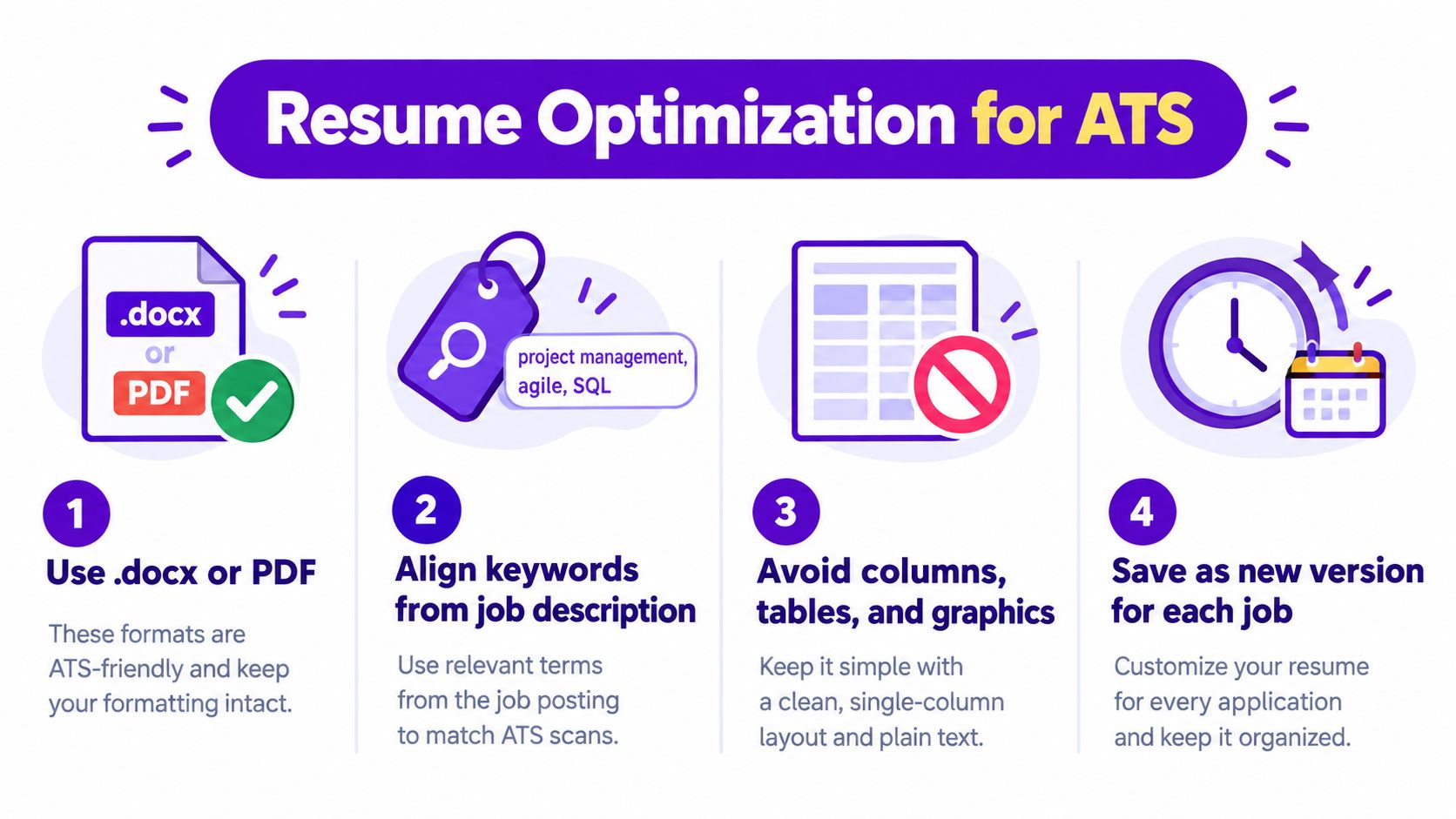
Use a single-column layout with familiar section headings such as Summary, Experience, Education, and Skills. Keep contact information in the main body rather than hiding it in a header or footer, where some parsers may handle it less reliably.
Avoid text embedded in images, elaborate icons, and design elements that separate a job title from the employer or dates. Tables and columns can look organized to a person while creating confusing reading order for software.
Clarity beats design complexity when software must extract your experience.
Match language without stuffing keywords
Read the job description for exact terms that accurately describe your background. If the posting uses “project management,” and you have performed project management, use that phrase rather than relying only on a less direct expression such as “initiative coordination.”
A useful before-and-after example:
- Less precise: “Led cross-functional initiatives and improved delivery.”
- More searchable: “Led cross-functional project management for product launches, coordinating timelines, risks, and stakeholder updates.”
The second version adds context instead of repeating a keyword without meaning. It tells the recruiter what you did and gives the system a recognizable term.
For more guidance on selecting role-specific terminology, use this resource on ATS resume keywords.
Make one controlled version per role
Tailoring doesn't require rewriting your entire career history. Change the opening summary, reorder relevant skills, and revise a few bullets so the most important qualifications appear naturally near the top.
The same principle applies across industries. Someone researching hire cold callers may emphasize prospecting, objection handling, CRM usage, and appointment setting when those requirements appear in the vacancy. A marketing applicant may instead foreground campaign planning, analytics, and content operations.
Before uploading, complete this quick review:
- File choice: Follow the employer's instructions. If none exist, use a simple DOCX or text-lean PDF.
- Layout: Confirm that the document reads from top to bottom in one logical sequence.
- Terminology: Compare your skills and titles with the posting.
- Evidence: Support important skills with actions, tools, outputs, or outcomes.
- Final scan: Open the saved file and check that text can be selected and copied normally.
Turning Statistics Into Success With Smart Tracking and Benchmarks
Application statistics become useful when they help you compare your own pipeline. Company size and ATS fragmentation can change how applications are parsed, ranked, and reviewed, so a single industry-wide figure cannot explain every result. Your tracker provides a practical record of which employer segments produce movement and which require a closer look.

Turn each application into a record
For every role, record the employer segment, job title, source, resume version, submission date, and current stage. Note the ATS or application experience when it is visible, but do not assume that recognizing a platform reveals its ranking rules or screening result.
A simple pipeline might include:
- Saved: The role is worth evaluating, but you have not applied.
- Prepared: Your resume and supporting materials are ready.
- Applied: The application has been submitted.
- Screening: A recruiter or hiring team has initiated contact.
- Interview: You are in a scheduled evaluation stage.
- Closed: The role ended, you withdrew, or the employer declined.
Look for patterns, not isolated outcomes
One rejection rarely explains what happened. A group of similar outcomes gives you a stronger signal. For example, if twelve enterprise applications produce no screens while five small-company applications produce two, review your employer targeting, seniority alignment, and keyword coverage before blaming the ATS.
The comparison can also reveal ATS fragmentation. A large employer may use one system for parsing and another process for recruiter review, while a smaller company may rely on a different platform or a lighter workflow. Segment-specific wording can therefore matter more than a generic belief about how every ATS works.
Compare resume versions with care. Change one or two elements, such as the title, skills order, or summary, then record the result. This is not a controlled scientific test, but it creates a clearer feedback loop than memory alone.
A dashboard such as Eztrackr's task tracker dashboard can organize saved roles, application stages, linked documents, and progress views in one workspace. The practical benefit is visibility. You spend less time reconstructing each application's status and more time reviewing the parts you can control, including employer segment, resume version, and keyword choices.
Key Takeaways and Next Steps for Navigating ATS Hiring
The most useful applicant tracking system statistics point to three conclusions.
First, ATS software is default infrastructure in large-enterprise hiring. You don't need to fear it, but you should assume that your resume may be parsed before a recruiter reviews it.
Second, company segment matters. Fortune 500 saturation doesn't mean every employer uses the same platform, fields, ranking logic, or review process. A clear resume should work across systems, while your wording should reflect the specific role and employer.
Third, format and tracking turn general advice into repeatable practice. Use a readable single-column document, follow the employer's file instructions, reflect relevant job-description terminology, and track the version you used. If your search includes early-stage companies, resources about building a talent engine for startups can also provide useful context about how smaller teams approach hiring.
Start with this order:
- Audit the document: Remove layout features that could interrupt parsing.
- Tailor the language: Use accurate skills, titles, and tools from the target posting.
- Track the outcome: Record stages and compare patterns across employer segments.
- Iterate carefully: Change one or two elements at a time so you know what you're testing.
ATS data should make your search more understandable, not more intimidating. You're not trying to satisfy an invisible machine with tricks. You're presenting real qualifications in a structure that software can identify and people can trust.
Eztrackr helps you save job postings, organize applications on a visual pipeline, connect documents to each role, and review job-search progress through tracking and statistics dashboards. Visit Eztrackr to turn ATS-aware applications into a clearer, more manageable search process.