Resume Example Office Assistant That Gets Interviews
You're probably looking at a blank document, a job posting full of vague requirements, and a dozen office assistant resume examples that all look polished but say very little about how to win the interview. Most show one finished template. Few explain how to turn scheduling, customer service, data entry, and coordination into evidence that a hiring manager can trust.
That distinction matters. The U.S. Bureau of Labor Statistics outlook for secretaries and administrative assistants lists about 3.5 million jobs in 2025, with approximately 314,400 openings projected each year from 2025 to 2035, even though overall employment is projected to decline by 2% during that period. Office assistant roles remain widely available, but generic task lists won't separate your application from the competition.
The resume example below focuses on the friction that most templates skip: how to quantify soft administrative work, mirror ATS language without sounding copied, and adjust the same core resume for entry-level, experienced, and career-changer applications.
What a Hiring Manager Actually Looks At First
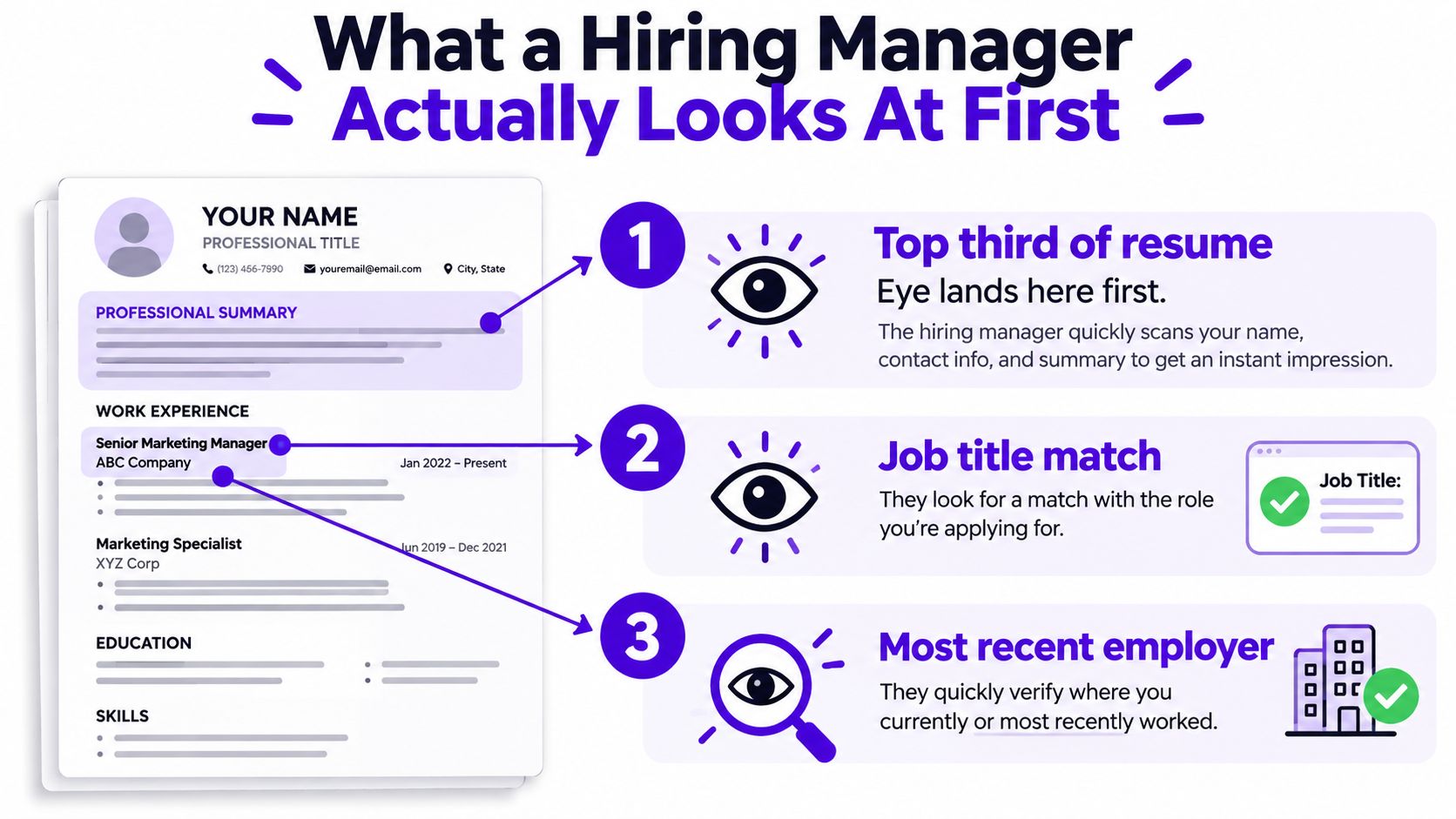
A recruiter opens a stack of applications and gives each resume a rapid first scan. The eye lands in the top third, checks whether the target job title matches the vacancy, then moves quickly to the most recent employer. If those areas make sense, the recruiter may continue. If they don't, attractive formatting won't rescue the document.
That's why the first two inches carry disproportionate weight. The header confirms that the applicant is reachable and located where the employer expects. The summary establishes the candidate's level and administrative focus. The latest job title becomes the credibility anchor, especially when the applicant has held several customer-facing or operational roles.
What earns a second look
Three details usually keep the scan moving:
- A matching title line: “Office Assistant” or a closely related title immediately connects the resume to the vacancy.
- A quantified first bullet: A result involving scheduling, records, supplies, or workflow gives the reader something concrete to assess.
- Clean contact details: Name, city and state, phone, email, and LinkedIn should be visible without a second address line or visual clutter.
Three other choices often end the review:
- A vague objective: “Seeking an opportunity to grow” describes what the applicant wants, not what the employer gets.
- Decorative skill bars: Graphics suggesting “Excel, 80%” don't prove ability and may interfere with parsing.
- Missing location: City and state help recruiters assess practical fit and distinguish the applicant from similarly named candidates.
A concise summary can also prevent a common mistake, choosing an objective when a summary would sell stronger experience. The difference is explained clearly in this guide to resume summary versus objective. A structured language learning path can also help candidates describe communication abilities more precisely, especially when bilingual support is part of the target role, as shown in this structured language learning path.
Practical rule: The top of the page should answer three questions before the reader reaches the first employment entry: “What role is this person pursuing?”, “What level are they?”, and “Can I contact them?”
The Full Office Assistant Resume Example Explained
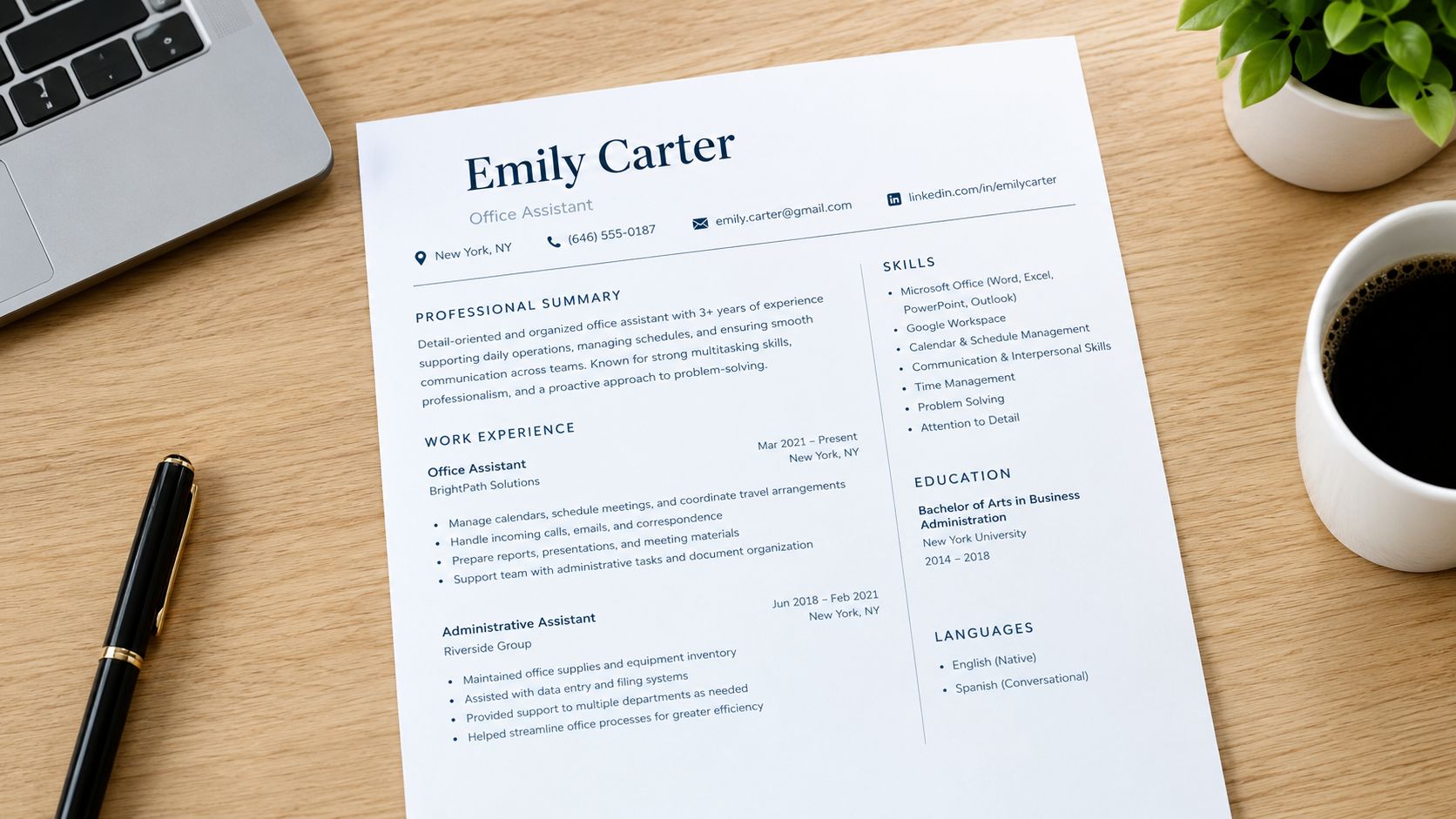
A recruiter should understand your target role, level, and strongest evidence before reaching the bottom of the page. A complicated design slows that decision. Use a clear sequence that makes administrative work easy to verify.
Header
Jordan Lee
Office Assistant
Columbus, OH | 555-555-0184 | jordan.lee@email.com | linkedin.com/in/jordanlee
Put your name, target role, city and state, phone number, professional email, and LinkedIn profile in one clean header. Leave out a photograph, full street address, and decorative icons. The space should support evidence, and the contact details should remain readable to recruiters and resume software.
Summary
Office Assistant with four years of experience supporting busy office environments through calendar management, document control, customer communication, and Microsoft Office. Coordinates meetings, maintains accurate records, and improves administrative workflows across departments. Known for dependable follow-through and clear communication in service-focused settings.
This three-line summary identifies the role, establishes experience, and finishes with language relevant to office administration. It avoids first-person pronouns and empty claims such as “hard worker.” Replace the experience level, duties, and final strengths with details you can support from your own work.
Skills
Skills: Calendar management, Microsoft Outlook, Excel, Google Workspace, data entry, document control, customer service, meeting coordination, travel booking, vendor communication, records maintenance, written communication
Combine software, operational duties, and communication strengths in the skills list. Choose terms from the vacancy, then remove anything you have not used. For a sense of what does an admin assistant do, review the range of administrative duties described there, then mirror only the work you personally performed.
Experience
Office Assistant | Northstar Professional Services, Columbus, OH
Recent employment dates
- Coordinated calendars and meeting logistics for multiple department leaders, resolved conflicts, and confirmed materials before scheduled sessions.
- Maintained digital records and Excel spreadsheets, improving retrieval consistency by standardizing file names and folder structure.
- Processed incoming requests, routed customer communications, and tracked follow-up items through completion.
- Coordinated office supplies and vendor communication, keeping purchase records current for finance review.
Receptionist | Riverside Health Group, Columbus, OH
Earlier employment dates
- Managed front-desk communication, visitor requests, and appointment information while protecting confidential records.
- Prepared documents, updated contact information, and supported staff with Microsoft Office and Google Workspace.
- Organized meeting rooms and onboarding materials so new employees received required forms and access information.
Each bullet should start with a strong verb, identify the work, and show its scope, process, or consequence. Add verified figures where you have them. Without reliable numbers, specify the system used, the groups supported, the records handled, or the workflow improved. That approach quantifies soft administrative work without inventing results.
Education
Associate Degree in Office Administration
Central Ohio Technical College, Newark, OH
Graduation year
List the qualification, school, and graduation year. Entry-level applicants can add relevant coursework, projects, or academic activities. Experienced applicants should keep education compact unless the posting asks for a particular credential.
This reverse-chronological, single-column structure works because the reader sees the newest evidence first, while standard headings make the document easy to scan and parse. See administrative assistant resume examples from BeamJobs for another reference point, then adapt the format to your experience level and target posting.
Tailoring the Example to a Specific Job Posting
Don't rewrite your resume by intuition. Start with the vacancy and extract the language that defines the employer's actual need.
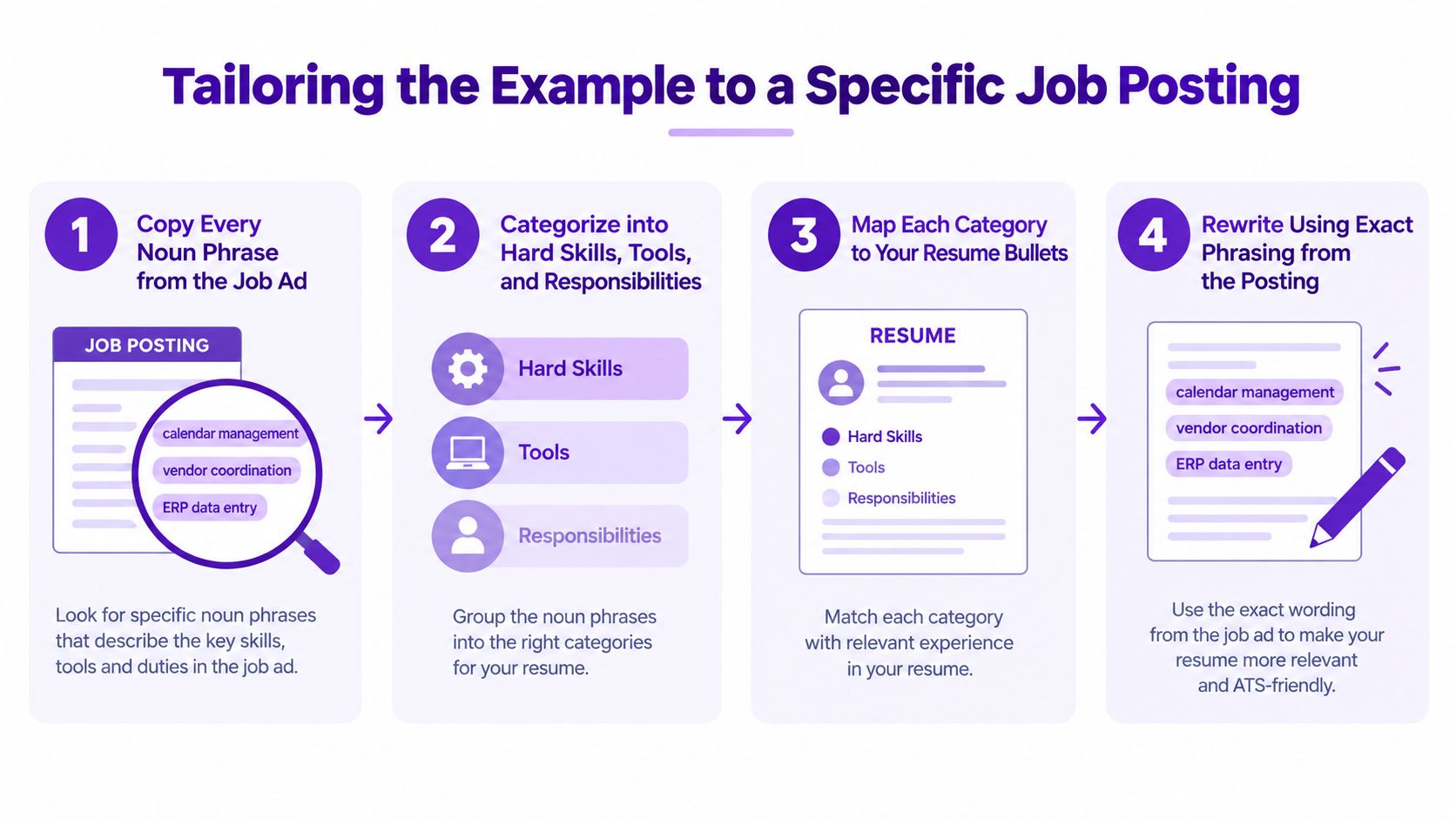
Use four passes
First, copy the noun phrases. Pull out terms such as calendar management, vendor coordination, ERP data entry, invoice processing, or meeting preparation. Don't interpret them yet. Capture the wording as the employer wrote it.
Next, identify repetition. A phrase that appears in the title, summary of duties, and requirements deserves more attention than a phrase mentioned once in a preferred-qualification paragraph. Repeated language often signals what the recruiter or ATS will look for first.
Then, rank by prominence. Give the job title and opening responsibilities the most weight. A phrase buried in a long list shouldn't replace a capability you can demonstrate clearly, but prominent requirements belong near the top of your resume.
Finally, assign each term to a location. Put core responsibilities in the summary, software and hard skills in the skills section, and proof of use in experience bullets.
The target job description guide can help you organize this comparison before you edit your document.
Rewrite without stuffing
Suppose the posting asks for “calendar management for senior leadership.” A weak revision would repeat that phrase several times in the skills list, summary, and every role. A natural bullet would be:
- Coordinated calendar management for senior leadership by resolving conflicts, confirming attendees, and preparing meeting materials.
The phrase appears in context, and the rest of the sentence shows what the work involved. If you supported a different group, don't claim senior leadership experience. Use an accurate version such as “department managers,” “clinical staff,” or “sales representatives.”
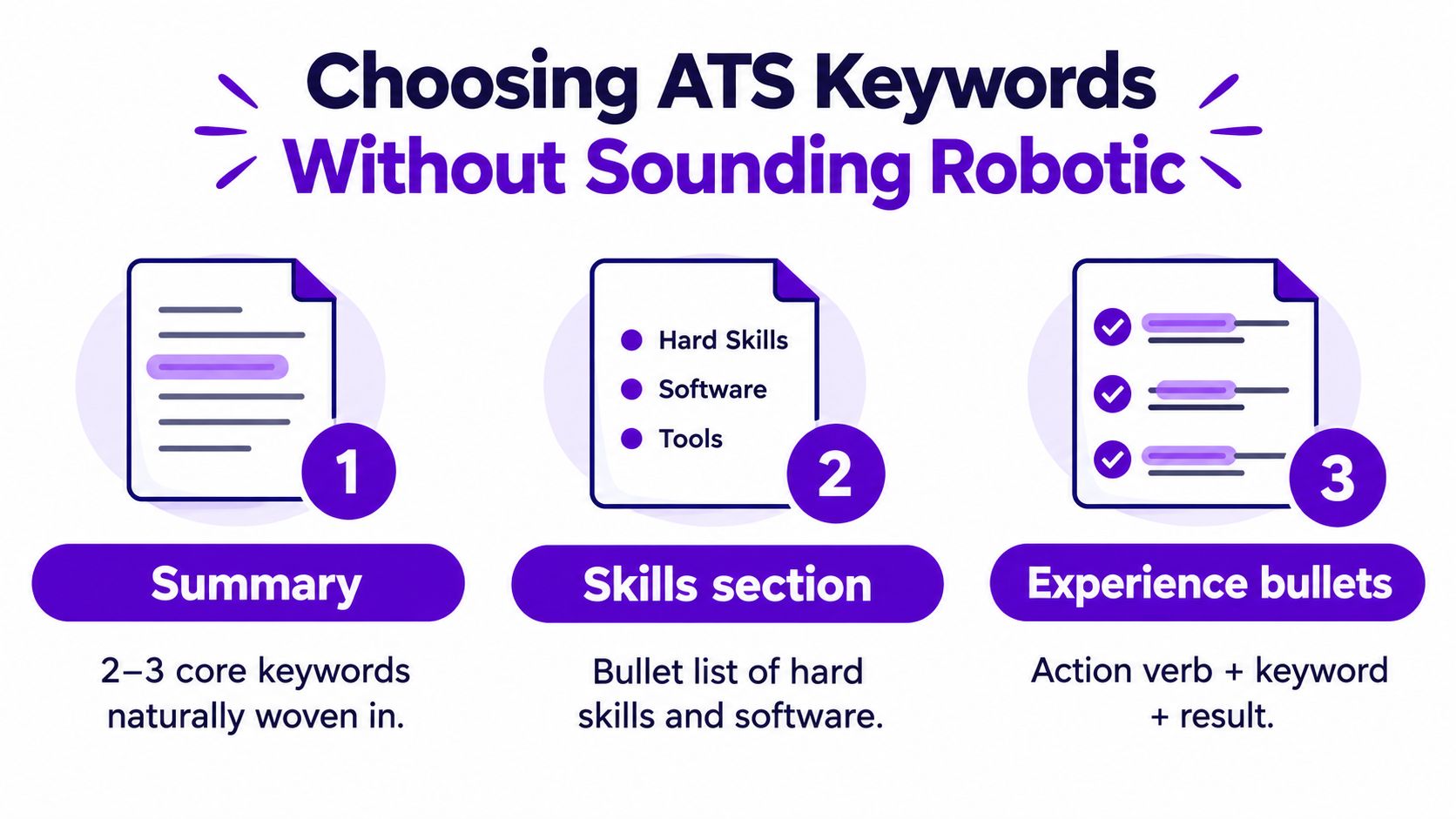
Place the strongest three or four requirements in the summary, skills section, and first bullets of your latest role, following the ATS guidance summarized by Robert Half's administrative assistant resume advice. The objective isn't to make the resume sound identical to the posting. It's to make the match obvious while preserving your own evidence.
Writing Bullet Points That Show Real Impact
“Handled office supplies” tells the reader almost nothing. It could mean checking a cabinet occasionally, managing recurring orders, or coordinating purchasing across several teams. “Answered phones” has the same problem. It describes a duty without showing volume, complexity, judgment, or result.
Use a three-part formula:
Action verb + specific task + measurable or observable result
If you know the verified scope, include it. That scope might be the number of calendars supported, records maintained, onboarding packets prepared, or departments served. If you don't have a reliable number, name the system, frequency, stakeholder group, or process change instead of guessing.
| Weak Bullet | Strong Bullet |
|---|---|
| Handled office supplies. | Coordinated supply orders, checked inventory, and maintained vendor records so staff requests were routed through a consistent purchasing process. |
| Answered phones. | Managed incoming calls, identified the purpose of each request, and routed messages to the appropriate department for follow-up. |
| Scheduled meetings. | Coordinated meeting times across competing calendars, confirmed attendees, and distributed agendas before sessions. |
| Helped with onboarding. | Prepared onboarding documents, organized workstation requests, and tracked outstanding forms for new employees. |
Make soft work visible
Administrative impact often appears as fewer delays, cleaner records, faster retrieval, and fewer follow-up messages. Those outcomes are real, but they need a defensible connection to your work. “Standardized file naming and reduced duplicate records” is stronger than “improved filing,” even without a percentage.
For travel booking, explain the constraint and outcome: “Arranged multi-city travel, reconciled itinerary changes, and maintained current confirmations for traveling staff.” For vendor management, show the control you applied: “Maintained vendor contacts, purchase records, and delivery updates for recurring office orders.”
A useful self-check is simple:
- Lead with a verb: Coordinated, processed, maintained, prepared, reconciled, routed, or implemented.
- Avoid first person: Bullets don't need “I” or “my.”
- Remove duplicates: Each role should add new evidence, not repeat the same duty with different wording.
- Use proof you can defend: Any number, range, percentage, or time saving must come from your records or a reasonable, explainable estimate.
For additional help identifying experience from customer service, retail, teaching, or volunteer work, use this guide to identify transferable skills. The strongest bullet isn't the one with the most impressive verb. It's the one that lets an interviewer ask a specific follow-up question.
Choosing ATS Keywords Without Sounding Robotic
A resume can contain the right keywords and still fail a recruiter's first scan. The problem is usually stuffing: repeated phrases, irrelevant software, and claims the candidate cannot explain. Start by marking hard skills, software, certifications, and repeated responsibilities in the posting. Build a short list tied to the role, then use the terms only where they describe real work. This guide to ATS resume keywords offers a useful reference for choosing and handling those terms.
Make keywords sound human
Use the exact job-posting language when it improves accuracy, especially for software names and recurring duties. Keep the rest in your normal professional voice. “Managed calendars and updated Excel tracking sheets” reads naturally. “Calendar management, Excel, scheduling, coordination, administrative support” repeated across every section reads like a search query.
Follow the placement plan from the tailoring section rather than rebuilding it here: place the strongest capabilities where they support the resume's story, list specific tools accurately, and connect keywords to evidence. A keyword without context is a claim. A bullet such as “Updated Excel tracking sheets, reconciled missing entries, and prepared the file for monthly review” shows how the tool was used and gives an interviewer something concrete to ask about.
Standard headings and plain text also reduce avoidable parsing problems. Use headings such as Summary, Skills, and Experience. Keep contact details in the main document body, and avoid tables, text boxes, graphics, and unusual symbols that can separate words or hide them from an ATS. A clean layout supports both software review and the human scan that follows.
Avoid shortcuts that backfire
Do not list every Microsoft Office product when the posting asks for Excel and Outlook. Do not repeat “detail-oriented” in the summary, skills list, and every role. Never add a hidden block of white text containing keywords. It can damage trust and still cannot prove you can perform the work.
Run three checks before submitting:
- Does each keyword appear where it makes sense?
- Does the wording match the posting when precision matters?
- Can you explain the tool or process in an interview?
If the answer to the last question is no, remove the term or describe your experience more accurately.
Adapting the Example for Every Experience Level
A chronological resume isn't automatically the right answer for every office assistant candidate. It works well when recent experience is relevant, but it can bury useful evidence for someone with internships, mixed jobs, or a career change.
Entry-level applicants
Lead with education, technical skills, relevant coursework, volunteer administration, internships, and customer-facing work. A receptionist role can demonstrate call handling, visitor support, appointment coordination, and document accuracy. A retail role can show transaction records, customer communication, inventory coordination, and shift organization.
Don't label a project “professional experience” if it wasn't employment. Use a section such as Relevant Projects or Administrative Experience, then describe the actual activity. A college event, volunteer intake process, or student organization project can become useful evidence when the bullet explains the task and result without inflating its importance.
Mid-career assistants
Lead with the most relevant recent role and make its first bullets carry the application. Compress older positions into shorter entries unless they show a capability the target posting requires. A selected accomplishments section can work when it adds distinct evidence, such as process documentation, cross-department coordination, or support for complex office systems.
Compensation varies widely across administrative work. The BLS wage data cited by Frontline Source Group reports a May 2025 median annual wage of $48,310, with the lowest 10% earning less than $35,360 and the highest 10% earning more than $77,720. Those figures aren't a promise of what any individual will earn, but they reinforce the value of documenting software proficiency, calendar management, communication, and operational complexity instead of presenting only generic duties.
Career changers
Rewrite the summary around transferable work, not the fact that you're trying to escape a previous field. A teacher might foreground scheduling, parent communication, records management, and process documentation. A retail supervisor might emphasize staff coordination, inventory records, customer resolution, and cash-handling controls. A military applicant might focus on logistics, reporting, compliance, and communication across teams.
Keep official job titles accurate. You can add a clarifying descriptor in parentheses, such as “Teacher, Administrative and Records Coordination,” but don't replace the actual title with “Office Assistant” if that wasn't your position.
| Experience Level | Lead Section | Summary Focus | Bullet Strategy |
|---|---|---|---|
| Entry-level | Education, skills, relevant projects | Tools, training, customer service, readiness | Show context and transferable tasks |
| Mid-career | Recent administrative experience | Scope, systems, coordination, outcomes | Lead with verified results and complexity |
| Career changer | Transferable experience and skills | Scheduling, communication, records, process control | Translate previous work without changing official titles |
Cut photos, fancy templates, progress bars, and oversized design elements at every level. They consume space that should go to evidence, and they can make the resume harder for an ATS to read. The office assistant resume examples from Jobseeker reflect the common reverse-chronological structure, but your strongest material should decide the emphasis, not habit.
Final Pass Before You Hit Submit
A good office assistant resume can still fail because of small execution errors. Treat the final review as a quality-control check, not a last glance for spelling.
Inspect the document itself
Export a clean PDF with a professional filename such as FirstName_LastName_Office_Assistant.pdf. Don't submit a file named “Resume Final,” “Resume Final New,” or “Document 3.” The filename is a small signal, but it also makes the application easier for a recruiter to identify and retrieve.
Copy the PDF text into a plain-text editor. Check whether the reading order remains logical. If the name appears after the skills list, dates have moved away from job titles, or bullet points are scrambled, remove columns, tables, sidebars, and graphics.
Compare it with the vacancy
Open the job posting again and check each required skill or certification. The important terms should appear naturally in the summary, skills section, or an experience bullet. Don't add a capability you can't discuss confidently.
Read the summary and first bullet of every role aloud. Cut clichés such as “hard worker,” “team player,” and “passionate” unless the sentence gives them a specific, observable meaning. Replace them with evidence about calendars, records, communication, systems, or workflow.
Use this final checklist:
- Contact details: Confirm your phone, email, city, state, and LinkedIn URL.
- Employment history: Check titles, employers, dates, and reverse-chronological order.
- Formatting: Verify that headings, bullets, spacing, and fonts remain consistent.
- Accuracy: Remove unsupported statistics and make every achievement defensible.
- Mobile view: Send the PDF to yourself and inspect it on a phone before submitting.
The repeatable workflow is straightforward: extract the posting language, map it to real experience, write bullets around outcomes, then test the finished file for clarity and parsing. That process is more valuable than copying any single polished resume example office assistant template.
Eztrackr helps you save job postings, organize applications, and use its resume builder to upload an existing resume, parse your experience and skills, tailor the document to a pasted job description, and download a PDF. Visit Eztrackr to keep your resume versions and application workflow in one place.