Follow Up Email for Job Application: Craft a Standout Message
Sending a follow-up email after applying for a job isn't just good manners; it’s a killer strategy that can pull your resume out of the digital slush pile. Think about it: a well-timed, professional message shows you're genuinely interested and persistent, which drastically boosts the odds of your application actually getting seen by a human.
Why Your Follow-Up Email Is a Job Search Game Changer
In today’s crowded job market, your application is just one of hundreds, maybe even thousands. To stand out, you need to do more than just submit a great resume. You have to be proactive. This is where a sharp follow-up email can change everything, turning your job search from a passive waiting game into an active pursuit.
Escaping the Application Void
Let's be real. When you apply online, your resume gets sucked into an Applicant Tracking System (ATS), a piece of software designed to weed out candidates. If your resume doesn't have the perfect keywords or formatting, it might never even reach a recruiter.
A direct follow-up email can be your secret weapon to bypass this digital gatekeeper and land your name right in a recruiter’s inbox.
This simple move proves you're more than just another applicant. You’re a motivated professional who’s truly invested in the opportunity. It screams initiative and shows you’re organized—qualities every single employer is looking for.
Your follow-up email isn’t about being pushy; it’s about strategic persistence. It’s a professional nudge that keeps your application top of mind and proves your commitment to the role.
The Power of Proactive Communication
The numbers don't lie. A single job post can attract an average of 250 resumes, but only about 2% of applicants ever land an interview. That's a tough field to play in.
But here’s the good news: sending a follow-up can totally change those odds. Research shows that 80% of HR managers actually view candidate follow-ups in a positive light, seeing them as a clear sign of enthusiasm. If you want to really nail every step of the process, digging into a practical guide to landing jobs often highlights this tactic as a must-do.
Ultimately, that quick email accomplishes a few key things:
- Confirms Receipt: It makes sure your application didn’t get lost in cyberspace or a spam folder.
- Reinforces Interest: It’s another chance to show how excited you are about the position and the company.
- Highlights Professionalism: It showcases your solid communication skills and ability to follow through.
- Increases Visibility: It bumps your name to the top of a busy recruiter's inbox, setting you apart from everyone else.
Writing Subject Lines That Actually Get Your Emails Opened
Let's be real: your email subject line is the gatekeeper. Hiring managers are drowning in emails, and a vague or generic subject line is a one-way ticket to the trash folder. Your follow-up will die unread.
The mission is simple: be clear, be concise, and be instantly recognizable.
Think of it like a label on a file. It needs to tell the recipient exactly who you are, what job you're talking about, and why you're in their inbox. Anything wishy-washy like "Following Up" or "Job Application Inquiry" is just noise. They've seen it a thousand times, and they'll ignore it a thousand times.
Formulas for Effective Subject Lines
Don't overthink it. Instead of trying to be clever, lean on a proven formula. A simple, direct structure is your best friend here. It cuts through the ambiguity and makes it dead simple for a busy recruiter to see what your email is about.
Here are a few solid formulas you can adapt for pretty much any situation:
- Formula 1: Follow Up: [Job Title] Application – [Your Name]
- Formula 2: [Job Title] Application Follow Up – [Your Name]
- Formula 3: Regarding my application for the [Job Title] position
See? They lay out all the critical info right away: the role, your name, and your purpose. It's a professional approach that shows you respect their time. If you want to really nail your communication game, check out our deeper guide on professional email writing tips.
Real-World Subject Line Examples
Let's put these formulas to work.
-
After you just sent your application:
Follow Up: Senior Marketing Manager Application - Jane Doe -
If the job posting included an ID number:
Application Follow Up: Software Engineer (Job ID #74321) - John Smith -
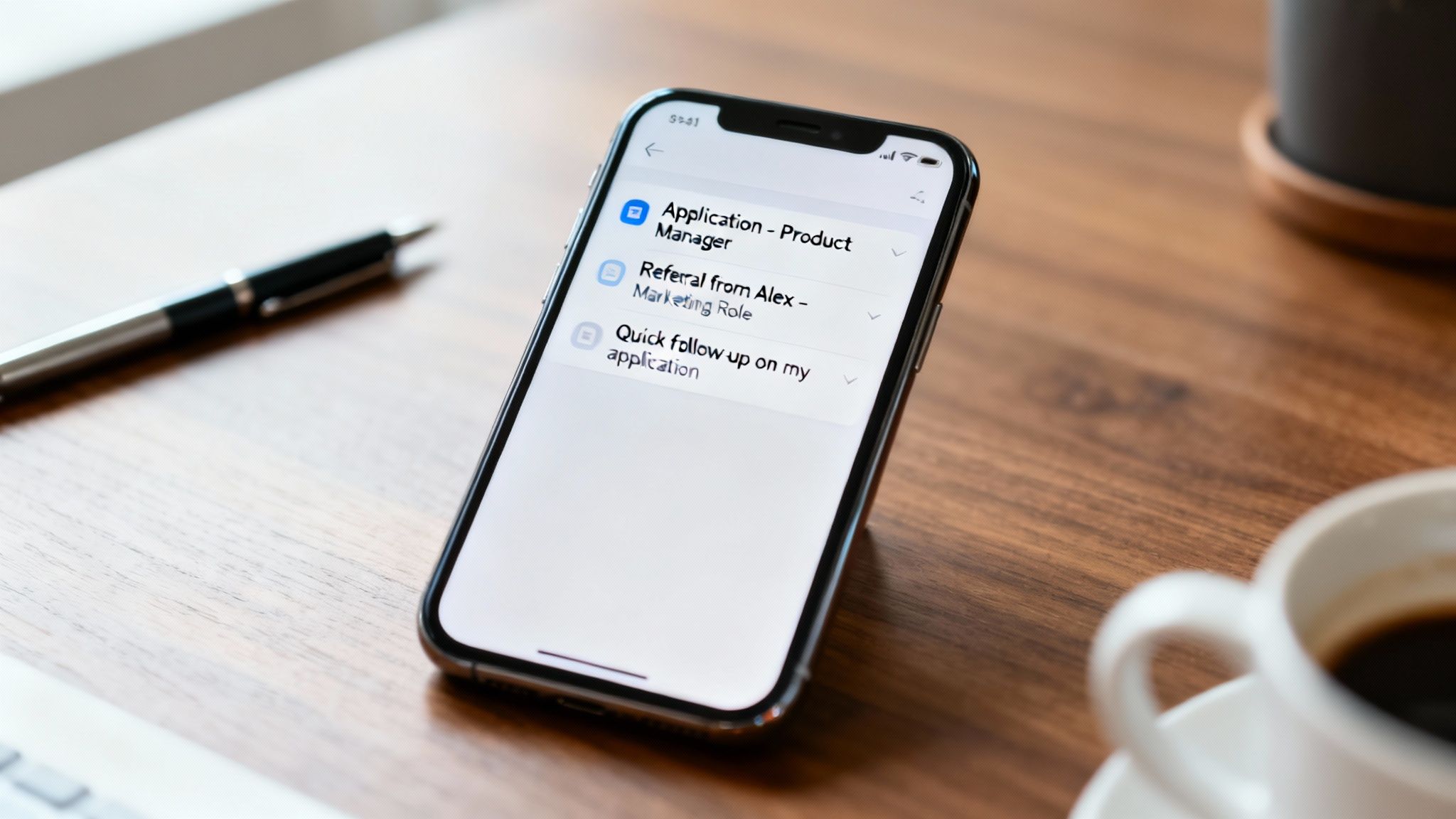
When you were referred by someone:
Follow Up: Referred by Alex Chen for Product Manager Role - Sarah Lee
The secret is specificity. When you drop in details like a job ID or a referral's name, you instantly give your email context and credibility. It bumps your message right to the top of their mental to-do list.
These kinds of clear, direct subject lines slice through inbox clutter. They guarantee your follow up email for a job application gets noticed and opened, giving the rest of your message a fighting chance to make an impact.
The Anatomy of a High-Impact Follow-Up Email
Once your killer subject line gets your email opened, the structure of your message is what seals the deal. A great follow-up isn't just a jumble of words; it’s a strategic conversation broken down into three simple parts: the opening, the body, and the closing.
Each part has a specific job to do. Get this right, and you’ll guide the hiring manager from "Who is this again?" to "We need to talk to this person." It’s a simple formula that turns a quick check-in into a genuinely powerful career move.
The Opening: Your Polite Reminder
The first couple of lines are all about providing context. Recruiters are juggling hundreds of applications, so your first mission is to politely jog their memory. Be direct. State the exact job title you applied for and the date you sent in your application.
This is no time to be vague. Getting straight to the point shows you respect their time and helps them pull up your file in seconds.
- Weak Opening: "I'm just checking in on my application."
- Strong Opening: "I hope your week is off to a great start. I'm writing to follow up on my application for the Senior Product Manager role, which I submitted last Tuesday, October 26th."
See the difference? That simple, direct approach immediately clarifies who you are and why you’re in their inbox, setting a professional tone right from the start.
The Body: Reinforcing Your Value
Okay, they remember you. Now what? The body of your email is your chance to briefly—and powerfully—remind them why they should care. This isn't the place to rehash your entire resume. Instead, you want to land one or two key points that stick.
First, reaffirm your genuine enthusiasm for the role. Mention something specific that still has you excited, whether it’s the company’s mission or a cool project you spotted in the job description.
Next, draw a clear line between one of your top qualifications and a specific need the company has. If you need some help finding the right words, our guide on what to say when sending a resume has some great phrases you can borrow.
Pro Tip: Try to add a new piece of value. Did the company just launch a product or get some great press? Mention it! It shows you're paying attention and are genuinely invested in what they're doing.
Here’s what a value-packed body paragraph can look like:
"My enthusiasm for this opportunity has only grown, especially after reading about your recent expansion into the European market. My five years of experience managing international product launches directly aligns with the challenges this expansion presents, and I'm confident my skills could support a successful rollout."
The Closing: Your Confident Call to Action
Finally, you need to wrap things up with a clear, confident, and polite call to action (CTA). Your goal is to make it incredibly easy for them to take the next step, not to pressure them into a response.
Ditch any passive or wishy-washy language. A strong closing shows you’re proactive and ready for what’s next.
Effective Closing Components
- Offer of Help: Politely let them know you’re happy to provide any other information they might need.
- Clear Next Step: Simply state that you’re looking forward to hearing about the next steps.
- Professional Sign-off: End with a classic "Best regards," or "Sincerely," followed by your full name and contact info.
This simple three-part structure transforms your follow-up from a forgettable "just checking in" email into a memorable touchpoint that reinforces your professionalism and keeps you top of mind.
Follow-Up Email Templates for Any Situation
Knowing why you should follow up is the easy part. Knowing exactly what to say? That’s where things get tricky.
To help you out, I’ve put together a few go-to templates for the most common spots you’ll find yourself in during the job hunt. Think of these as a starting point—your job is to fill in the blanks with details that are specific to the role, the company, and your conversation.
Template 1: The First Check-In After Applying
This is your classic, all-purpose follow-up. You'll want to send this about a week after you first hit "submit." The goal here isn't to be pushy; it's a simple, professional nudge to bring your name back to the top of their inbox and confirm you're still very interested.
Subject: Following Up on [Job Title] Application – [Your Name]
Body:
Hi [Hiring Manager Name],
I hope this email finds you well. I’m writing to follow up on my application for the [Job Title] position, which I submitted on [Date of Application].
I'm still incredibly enthusiastic about the chance to join [Company Name]. My experience in [Mention 1-2 Key Skills, e.g., agile project management and user-centric design] feels like a great match for the responsibilities you outlined in the job description.
Is there any other information I can provide to help with the decision? I’m looking forward to hearing about the next steps.
Thank you for your time and consideration.
Best,
[Your Name]
[Your Phone Number]
[Link to your LinkedIn Profile]
Template 2: Following Up After a Referral
When someone sticks their neck out for you, that email carries a lot more weight. You need to leverage that connection right away. Mentioning your referral in the very first sentence gives you instant credibility and makes sure your email gets a second look.
Subject: Follow Up: Referred by [Referral's Name] for [Job Title] Role
Body:
Hi [Hiring Manager Name],
Hope you’re having a great week. Our mutual colleague, [Referral's Name], suggested I reach out directly about my application for the [Job Title] position.
When we spoke, [Referral's Name] and I talked about my background in [Your Area of Expertise], and they thought my skills would be a strong match for your team's goals, especially around [Specific Project or Company Initiative].
I’ve attached my resume again for your convenience. I’m really keen to discuss how my experience can help [Company Name].
Thanks for your time,
[Your Name]
[Your Phone Number]
[Link to your LinkedIn Profile]
Key Takeaway: A referral is gold. Lead with it. It immediately pulls your email out of the general applicant pile and cashes in on the trust your contact has already built with the hiring manager.
Template 3: The "Radio Silence" Nudge
So, it's been a couple of weeks since you applied or interviewed, and all you've heard is… crickets. This one's a delicate balance. You want to show you're still interested without coming across as impatient or annoying. This template is designed to reopen the conversation gracefully.
Subject: Checking in on the [Job Title] Application
Body:
Hi [Hiring Manager Name],
I hope you're having a good week. I'm writing to politely check on the status of my application for the [Job Title] role I applied for back on [Date of Application].
I know how busy things can get, but I wanted to reiterate my strong interest in the position and the team at [Company Name].
If you have a moment, could you share a quick update on the hiring timeline? I'm happy to provide any further information if it's helpful.
Thanks again for your consideration.
Best regards,
[Your Name]
[Your Phone Number]
[Link to your LinkedIn Profile]
Trying to get the wording just right can eat up a lot of time. If you're looking for more detailed advice, you can find a ton of great follow-up email templates and best practices to build from. These examples give you a solid foundation so you can communicate with confidence every single time.
How to Track Your Job Applications and Follow-Ups
So, you’ve nailed the perfect follow-up email. That’s a huge win, but its real power fizzles out if you can't keep track of who you sent it to and when. Let's be honest, juggling dozens of applications, deadlines, and follow-up dates in a spreadsheet is a recipe for chaos. It’s overwhelming, and it's how great opportunities slip through the cracks.
A dedicated tracking tool completely changes the game. Think of it like a visual command center for your job search. A Kanban board, for example, lets you see the status of every single application in one quick glance. You physically (or digitally) move a card from 'Applied' to 'Interviewing' to 'Offer'. This kind of clarity is what keeps you focused and moving forward. We actually wrote a whole guide on this, which you can check out here: track job applications.
Never Miss a Follow-Up Window
The real magic happens when you start automating reminders. Instead of constantly checking your calendar or that messy spreadsheet, you can set an alert for each application. This makes sure you send your follow-up email at the perfect moment—usually five to seven business days after applying—without ever having to second-guess yourself.
This is your best defense against getting ghosted. The numbers are pretty grim: a recent report found that a shocking 61% of job seekers are ghosted after interviews, and 52% of candidates in the U.S. never hear back after an interview. You can see more data on these job application statistics from HiringThing. By setting up automatic reminders, you turn those discouraging stats into your competitive edge.
Here’s what that kind of organized dashboard can look like. It’s all about seeing your progress and staying on top of every moving part.
When you can see everything laid out like this, you start to spot patterns. You see what's working, what's not, and where you need to shift your strategy.
Centralize Your Best Material
Modern job trackers do more than just send reminders. They become your personal toolkit, with features like template storage and AI drafting to make your life easier. Imagine having your most effective follow-up messages saved and ready to go, just waiting for a few personal touches.
An organized job search is an effective job search. By tracking every application and scheduling every follow-up, you move from passively waiting to actively managing your career journey.
AI tools can even help you draft those personalized emails, saving you a ton of time and mental energy. By storing your templates and using AI to help with the heavy lifting, you ensure every follow-up email for a job application is sharp and professional. This whole system frees you up to focus on what really matters: getting ready to crush your next interview.
Answering Your Top Questions About Follow-Up Emails
Knowing when and how to follow up after applying for a job can feel like walking a tightrope. Are you being persistent or just plain pushy? It’s a question even the most seasoned pros ask themselves. Let’s clear the air and tackle the most common questions job seekers have about the follow-up.
First things first, you need a system. Relying on memory alone is a recipe for missed opportunities. Even a simple process can help you know exactly when to act, keeping great roles from slipping through the cracks.
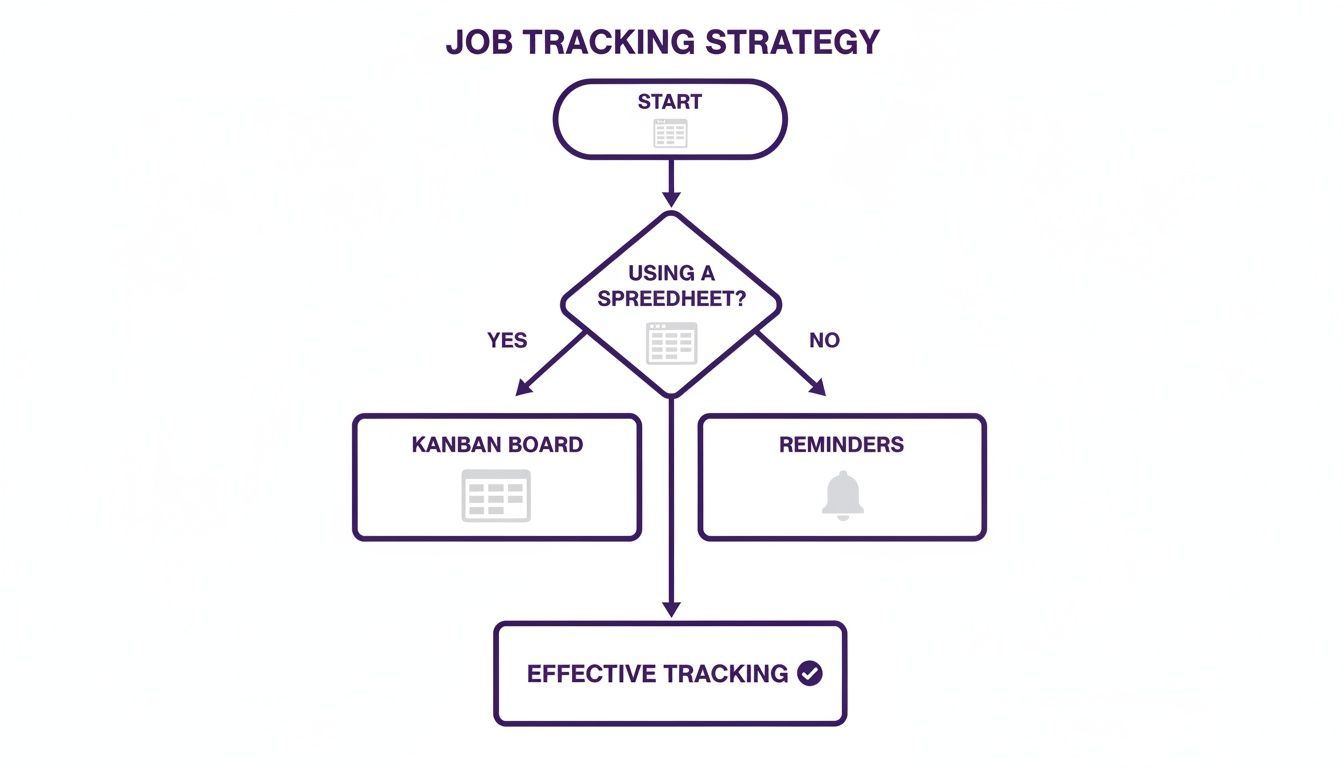
Without a solid tracking method, you're just guessing. A good system with reminders is what turns follow-ups from a chore into a strategic advantage.
How Long Should I Wait to Send My First Follow-Up?
The sweet spot is somewhere between 5 and 7 business days after you hit "submit."
This timing is strategic. It gives the hiring team enough breathing room to sort through the first flood of applications, but it’s soon enough that your name won’t get lost in the shuffle. Firing off an email in less than five days can make you seem impatient. On the other hand, waiting much longer might unintentionally signal that you're not all that interested.
Quick tip: If the job posting mentions a specific closing date, wait a few business days after that date passes before you reach out.
What if I Never Hear Back?
It’s frustrating, but it happens all the time—and it’s almost never about you. Recruiters are often swamped, juggling dozens of openings and hundreds of candidates.
If your first follow-up goes into the void, it's okay to send one last, gentle nudge about 7 to 10 days later. This second email should be even shorter and more direct. Just restate your interest and let them know you’re keen to hear about any updates when they have a moment.
After that? It’s time to let it go and focus your energy on other opportunities. Pushing any harder can backfire and hurt your reputation with that company for future roles.
Silence from a recruiter isn’t an automatic "no." More often, it means they're overwhelmed. Your polite, well-timed email can be the exact nudge they need to bring your application back to the top of the pile.
Should I Follow Up with Email or LinkedIn?
Stick with email for the official follow-up. It's the professional standard.
Email is direct, it’s formal, and it creates a clean paper trail that’s easy for everyone to track. Think of it as your main channel for this kind of communication.
LinkedIn, however, is a fantastic supporting tool. After you've sent your email, feel free to send a connection request to the recruiter or hiring manager. Add a short, personalized note mentioning you’ve applied for the role. It’s a great way to put a face to the name and build a more personal connection. For a deeper dive, check out our guide on how to follow up with a recruiter.
What if the Job Posting Says 'No Follow-Ups'?
This one’s a non-negotiable. You have to respect their instructions.
If a company explicitly puts "no calls or emails" in the posting, then don’t do it. Ignoring a direct request is a huge red flag—it immediately tells them you don't pay attention to detail.
In these cases, your only move is to pour all your effort into crafting an absolutely killer initial application. Once you’ve sent it off, trust their process and pivot your attention to other job leads where following up is fair game.
Ready to stop juggling spreadsheets and start landing interviews? Eztrackr helps you visualize your job search, set automated reminders for every follow-up, and access AI tools to draft the perfect message. Take control of your job hunt at https://eztrackr.app and see the difference an organized approach makes.