Beat the Bots: check resume against job description to land more interviews
Before you even think about impressing a hiring manager, your resume has a digital gatekeeper to get past. Let's be real: you're writing for a robot first. Sending out a generic, one-size-fits-all resume is one of the quickest ways to land in the virtual trash can, often getting filtered out before a human ever lays eyes on it.
Why Your Resume Needs to Beat the Bots First

When you hit "submit" on an application, it rarely goes straight to a recruiter's inbox. Most companies—up to 90% of them, in fact—rely on Applicant Tracking Systems (ATS) to manage the flood of applications they get. Think of these platforms as the first line of defense, scanning your resume for specific keywords, skills, and qualifications pulled right from the job description.
This is why matching your resume to the job ad has become the critical first hurdle. The data is a bit staggering: these automated filters reject roughly 75% of resumes before they ever reach a human. The most common reasons are surprisingly simple things like formatting errors, missing keywords, or just a general mismatch with the role's requirements.
Your main goal, then, is to make sure your resume is not only machine-readable but also highly relevant to the specific job you're after.
How Applicant Tracking Systems Think
An ATS doesn't understand nuance. It can't read between the lines to see your potential. It works on a simple, data-driven process:
- It slices and dices: The software breaks down your resume into categories like "Work Experience," "Education," and "Skills."
- It plays matchmaker: The system then cross-references the words in your resume with the keywords and phrases from the job posting.
- It ranks the candidates: Based on how well you match, it scores and ranks you against other applicants, handing a shortlist of the "best" fits to the recruiter.
Your resume isn't just a document; it's a data set. If your data doesn't align with what the system is searching for, you might as well be invisible.
Getting a handle on this initial screening is everything. For a closer look at how these systems work, check out our complete guide on the resume ATS scanner. And if you really want to craft resumes for remote jobs that get noticed, you need to build them with both bots and humans in mind.
How to Decode Any Job Description for Key Insights
Think of every job description as a cheat sheet. It’s the company literally telling you what they want. Your mission, should you choose to accept it, is to read between the lines, figure out their real priorities, and then make sure your resume reflects that.
This isn’t about just glancing at it. It’s about being a detective.
Start by breaking the posting down into its core parts: Responsibilities, Qualifications, and maybe a "Nice to Have" or "Bonus Points" section. Don't just see these as lists; see them as a hierarchy of needs. The qualifications are your ground zero—that's what the automated systems and the bleary-eyed recruiters will be scanning for first.
Pinpointing Must-Haves vs. Nice-to-Haves
Figuring out what's a dealbreaker versus what's just a bonus is half the battle. The language they use is your biggest clue.
- Must-Haves are usually pretty direct. Look for words like "required," "minimum of 5 years experience," or "proficiency in." These are the non-negotiables. You have to show you've got these.
- Nice-to-Haves are softer. You'll see phrases like "preferred," "familiarity with," or "a bonus if." These are great to have, but they won't automatically disqualify you if they're missing.
I always tell people to just grab a piece of paper or open a blank doc and make two columns. It sounds simple, but physically separating these points turns a wall of text into a clear, actionable checklist. It’s your roadmap.
Remember, a single corporate job post can pull in an average of 250 applications. Recruiters simply don't have time to read every word. They rely on specific criteria to filter people out, fast. Mirroring their exact language and prioritizing their stated needs is how you get past that first gatekeeper.
Building Your Keyword Lexicon
Once you've sorted the requirements, zoom in on the specific words they use. Applicant Tracking Systems (the resume-scanning robots) are not smart. They don't understand context or synonyms. If the job description says "data analysis," your resume better say "data analysis"—not "analyzing datasets" or "data interpretation."
Make a list of both the hard skills (like "Salesforce" or "Python") and the soft skills ("stakeholder management," "cross-functional collaboration"). This list becomes your vocabulary for this specific application. For a deeper dive into which terms pack the most punch, check out our guide on essential resume keywords to use.
Following this process means that when you check your resume against the job description, you're not just hoping for the best. You're strategically aligning your experience with exactly what they've asked for.
Tailoring Your Resume Section by Section
Alright, you’ve broken down the job description and have a solid list of what the hiring manager is looking for. Now comes the fun part: performing surgery on your resume.
This isn't just about a quick update. You're strategically reshaping your resume so it reads like a direct answer to their problems. The goal is to make it so obvious you're a perfect fit that the recruiter can't help but move you to the "yes" pile. It's about reframing your professional story for an audience of one.
Let's start at the top with your professional summary. This is the most valuable real estate you have. Ditch the generic, overused line like "Results-driven professional with 5+ years of experience." Instead, craft a sharp headline that mirrors the job title and its core purpose. If they're hiring a "Digital Marketing Manager," your summary should scream that right back at them.
Rewriting for Impact
Next up is your work experience. This is where you connect the dots between what you've done and what they need done. Vague, passive bullet points are a complete waste of space. You need to translate your old duties into compelling, quantifiable achievements that solve their specific pain points.
Think about it this way:
- Before: Responsible for managing social media accounts.
- After: Grew social media engagement by 45% in six months by implementing a new content strategy focused on user-generated campaigns.
See the difference? The second version is a powerhouse. It kicks off with a strong action verb ("Grew"), backs it up with a hard number (45%), and drops a relevant keyword ("content strategy"). This shift from "what I did" to "what I achieved" is everything. If you're struggling to get the formatting right, a good resume builder can offer ATS-friendly templates to make this whole process a lot smoother.
This simple, three-step analysis is your roadmap for figuring out exactly what to focus on before you even start writing.
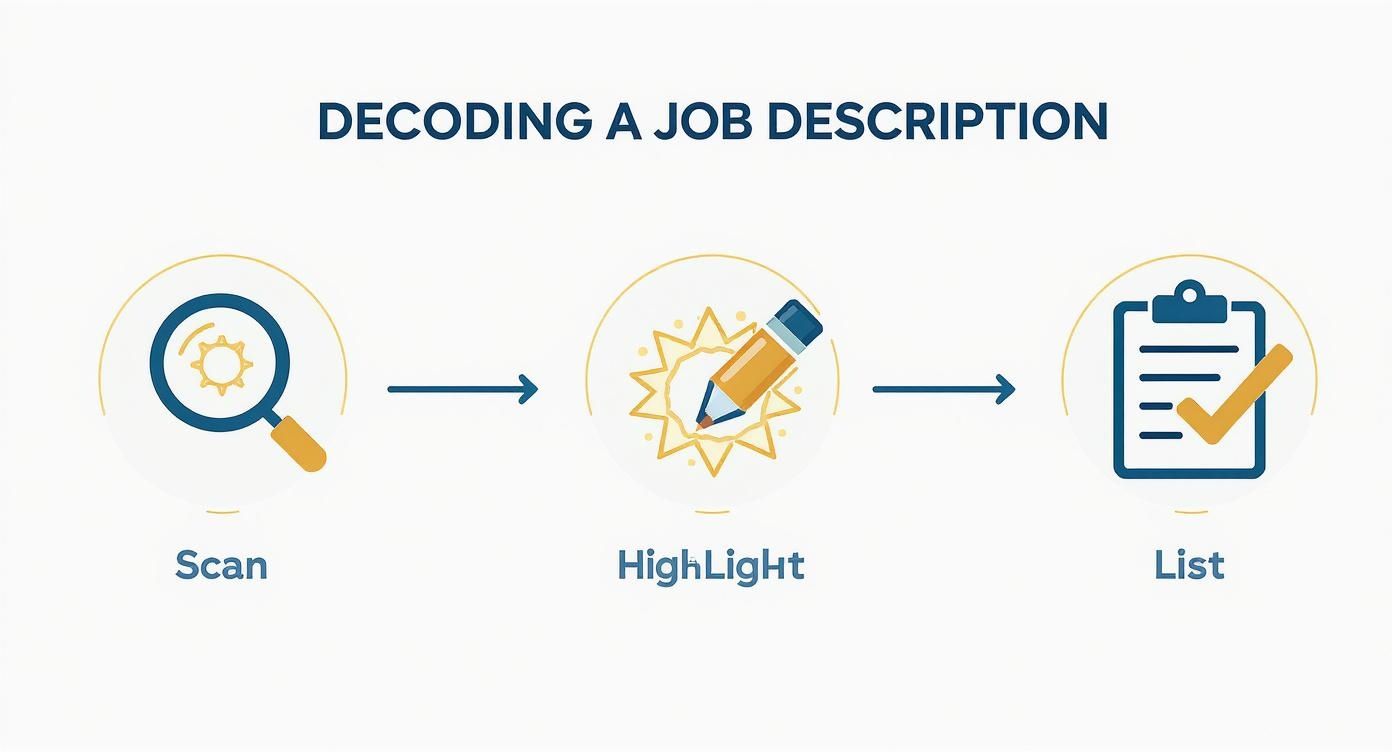
Taking a methodical approach like this ensures you don't miss a single clue, giving you a clear plan for your resume edits.
The final piece of the puzzle is weaving those keywords you found throughout your resume. Don't just stuff them into a skills section and call it a day. The real magic happens when you embed them naturally into your bullet points, giving context to your accomplishments. When you check your resume against the job description, this integration proves you don't just have the skills—you've actually used them to get results.
Alright, you've spent the time manually tweaking your resume, making sure your experience lines up with the job. Now what? Before you hit that "submit" button, there's one more step that can give you a serious leg up on the competition.
Using Resume Checkers to Get a Competitive Edge
This is where technology comes in. Think of a resume checker as your secret weapon—a final quality check to see how your resume really stacks up against the job description through the eyes of a machine.
These tools aren't about taking shortcuts. They’re about giving you a data-driven preview of how an Applicant Tracking System (ATS) will read your resume, flagging keywords and skills you might have accidentally missed.
And trust me, that's more important now than ever. The initial screening process is almost entirely automated these days. Resume parsing AI now hits around 94% accuracy, and skill-matching algorithms are sitting at about 89%. For recruiters, this tech cuts down their review time by a whopping 75%. (SecondTalent.com has some great stats on this if you want to dig deeper).
Interpreting Your Skill-Match Analysis
So what does this look like in practice? When you check your resume against a job description, you get immediate, concrete feedback. Tools like Eztrackr’s skill-match analyzer give you a clear breakdown of which keywords the job ad is looking for versus what's actually on your resume.
Here’s a real-world example of an analysis for a Project Manager role.
Right away, you can see that critical skills like "Agile Methodologies" and "Risk Management" were completely absent from the resume. That's a huge red flag for an ATS. Seeing it laid out like this makes it incredibly easy to go back and make a few quick, precise edits. No more guessing.
This data-driven approach takes the guesswork out of the equation. Instead of wondering if your resume is "good enough," you get a real score and a clear roadmap for what to fix.
Using a dedicated resume scorer lets you systematically find and fill those gaps between what you've written and what the employer actually wants to see. It’s that final polish that ensures you’re not just sending in an application, but the strongest possible one you can.
So, What Are the Common Mistakes That Get You Rejected?
You’ve put in the work, analyzing the job post and matching your experience. This is the home stretch. Don't let a simple, totally preventable mistake sink your chances now. This final review is all about catching those tiny errors that can have a huge impact when you check your resume against the job description one last time.
These missteps often seem so minor, but they can easily get your application tossed by an Applicant Tracking System (ATS) before a human ever sees it. It’s a tough world out there. Some roles get over 285 applicants in a single week.
And get this—a recent survey found that a whopping 88% of employers believe they lose out on qualified candidates simply because their resumes weren't "ATS-friendly" enough to get past the first scan. You can read more about these key hiring trends shaping 2025 to see what you’re up against.
Formatting That Trips Up the Bots
The number one offender? Overly creative formatting. I get it, you want to stand out. But what looks great to you and me just looks like garbled nonsense to an ATS.
Here are the biggest resume-killers I see all the time:
- Tables and Columns: An ATS reads text like a book—left to right, top to bottom. Columns scramble your carefully crafted experience into an unreadable mess. Just don't do it.
- Headers and Footers: This one is a classic mistake. Never, ever put your contact info or other crucial details in the header or footer. Many systems are programmed to completely ignore these sections.
- Fancy Fonts and Graphics: Stick to the basics. Standard, web-safe fonts like Arial, Calibri, or Georgia are your best friends. Those cool skill-rating bars, custom icons, and unusual bullet points? The software can't read them.
Your resume has one job at first: deliver your information clearly to a machine. Simplicity and clarity will always beat complex design in this initial screening phase.
Walking the Fine Line Between Optimized and Overstuffed
Another common trap is what's known as "keyword stuffing." This is where you cram every possible keyword from the job description into your resume, hoping to trick the system.
While you absolutely need to include relevant terms, forcing them in where they don’t belong makes your resume sound robotic and unnatural to the hiring manager who eventually reads it.
Instead, weave those keywords into your accomplishment statements where they actually make sense. The goal is to show how you've used these skills to get real results, not just that you know the buzzwords. A final, careful proofread ensures your optimized resume is also a professional, error-free document that a human will actually want to read.
Answering Your Top Resume Questions
Even with a great strategy, you're bound to have questions when you start comparing your resume to a job description. Let's walk through some of the most common ones I hear, so you can move forward with total confidence.
One of the biggest concerns is always, "How much do I really need to change?" Do you have to write a brand-new resume for every single application? Absolutely not. That's a one-way ticket to burnout.
Focus your energy on the high-impact zones: your professional summary, the skills section, and the bullet points for your last one or two roles. A good rule of thumb is to aim for tweaking 20-30% of your resume to mirror the language and priorities in the job post. The core of your experience doesn't change—you're just reframing it for a new audience.
How to Handle Keywords Naturally
Another question that comes up a lot is whether it's okay to just lift keywords straight from the job description and drop them into your resume. The short answer is a hard no. This is a massive red flag for both Applicant Tracking Systems (ATS) and the human recruiter on the other side. They can spot "keyword stuffing" from a mile away.
So, what do you do instead? Weave them into your accomplishment-based bullet points.
Let's say the job requires "agile project management." Instead of just listing it under your skills, you could write a bullet point like this:
Led a cross-functional team of 8 using agile project management methodologies to deliver the new software feature two weeks ahead of schedule.
This is so much more powerful. It proves you don't just know the term; you've actually applied that skill to get real, tangible results. That distinction is everything, especially now that AI-powered resume screeners use sophisticated methods like keyword mapping and structured rubrics to score your fit. If you don't naturally mirror the job's language, you're putting yourself at a huge disadvantage. You can learn more about the key trends shaping 2025 hiring to get ahead of the curve.
What Is a Good Resume Match Score?
If you're using a resume checker tool, you're probably wondering what score to aim for. The sweet spot is 80% or higher.
It might be tempting to shoot for 100%, but that can often backfire and make your resume sound robotic or forced. Landing in the 80-90% range is a great sign that you’ve done a solid job aligning your qualifications without sounding like you just copied and pasted the job description.
Of course, once your resume gets you through the door, you have to nail the interview. It's a good idea to brush up on comprehensive interview preparation strategies to help you seal the deal.
Ready to stop guessing and start tailoring your resume with confidence? The Eztrackr Skill-Match Analyzer gives you an instant score and a clear, actionable checklist to make sure your application gets noticed. Optimize your resume and land more interviews today.